If you're searching for "how to connect Linear to OpenClaw", the real question is usually not just whether the connection is possible. It's how to make Linear usable inside an OpenClaw workflow with the right model, the right context, and the right level of control.
That's the practical framing.
OpenClaw gives you the orchestration layer: connectors, skills, tools, prompts, approvals, and the ability to run workflows where your team already works. Linear provides the domain context. The integration becomes valuable when those two pieces are connected cleanly.
Linear + OpenClaw: What's Actually Happening Here
When someone searches for "how to connect Linear to OpenClaw," they're really asking one of two things. Either they're running OpenClaw on their own server and need a practical integration path, or they already use Cody (OpenClaw managed hosting) and want to understand what's available under the hood.
Linear is GraphQL-only — there's no REST API to fall back on. That makes the integration fundamentally different from tools like GitHub or Jira that have familiar REST patterns. But Linear also shipped an official, hosted MCP server in May 2025, which changes the calculus completely. Let's walk through what actually works in mid-2026.
Path A: Linear's Official Hosted MCP Server (Recommended)
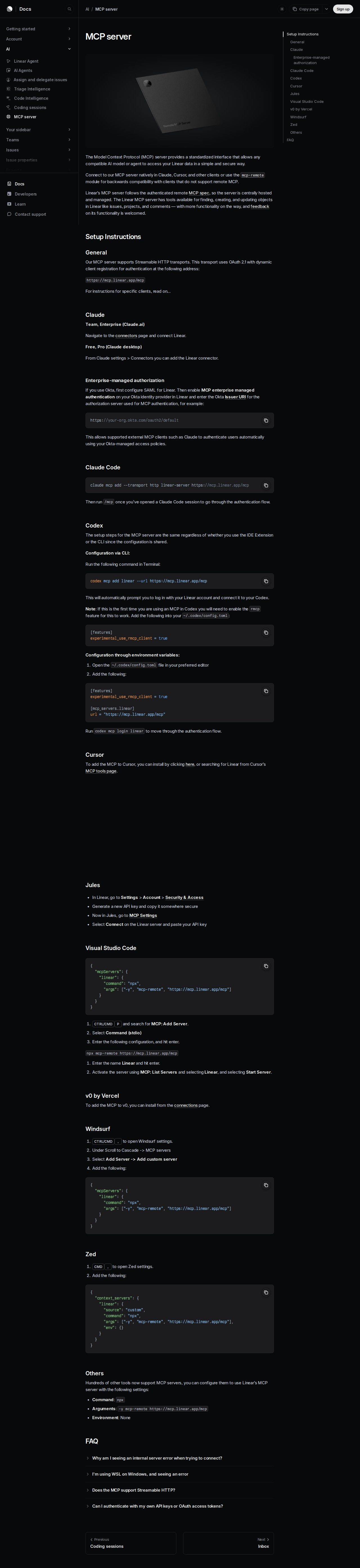
Linear launched their official MCP server in May 2025. It's remote, hosted, and uses OAuth 2.1 with dynamic client registration — no API keys to store, no server process to run, no SSH tunnels to maintain. The endpoint is:
https://mcp.linear.app/mcp
This is a Streamable HTTP endpoint (the SSE endpoint at /sse is being deprecated). It exposes roughly 25-30 tools covering issues, projects, cycles, teams, users, documents, comments, labels, and attachments. Every tool respects the permissions of the authenticating Linear account.
How this connects to OpenClaw: OpenClaw can consume MCP servers as tools. In your OpenClaw Gateway config, you'd add the Linear MCP server as a remote tool source:
{
  mcp: {
    servers: {
      linear: {
        url: "https://mcp.linear.app/mcp",
        transport: "streamable-http",
        auth: "oauth"
      }
    }
  }
}
Run openclaw mcp login linear to complete OAuth, then verify the connection with openclaw mcp doctor linear --probe. Once connected, an agent with access to the Linear tools can query issues, create tickets, check cycle status, and search projects without leaving team chat.
⚠️ Important: This is the path used by Claude, Cursor, Codex, VS Code, Windsurf, and Zed. It's tested, maintained by Linear's engineering team, and receives tool updates as Linear adds MCP capabilities. The community servers listed below are all deprecated — use the official one.
Path B: Community MCP Servers (Self-Hosted, Multi-Workspace)
Before Linear's official MCP server launched, the community built several alternatives. These wrap Linear's GraphQL API and run on your own infrastructure:
| Server | Status | Key Differentiator |
|---|---|---|
| jerhadf/linear-mcp-server | Deprecated — maintainer recommends official server | Was the most popular community option |
| tacticlaunch/mcp-linear | Community-maintained | Multi-workspace support |
| magarcia/mcp-server-linearapp | Community-maintained | Fuller GraphQL coverage |
| dvcrn/mcp-server-linear | Community-maintained | Lightweight, personal API key auth |
When to use a community server instead of the official one:
- You need multi-workspace support (the official server binds to one Linear workspace per OAuth session)
- You need full GraphQL query access beyond what the MCP tools expose
- You must run everything on your own infrastructure (regulated environments)
For OpenClaw, you'd configure a community server similarly — point OpenClaw at the MCP server's endpoint (local or hosted) and pass the Linear API key:
{
  mcp: {
    servers: {
    "linear-community": {
      command: "node",
      args: ["path/to/community-server/build/index.js"],
      env: {
        LINEAR_API_KEY: { source: "env", provider: "default", id: "LINEAR_API_KEY" }
      }
    }
    }
  }
}
⚠️ Warning: These community servers authenticate with a personal API key, which has the full permissions of the user who created it. If your OpenClaw agent is accessible to your whole team, anyone who can prompt the agent can act as that Linear user. Use a service account with restricted permissions, or prefer the official server's OAuth flow.
Path C: Direct GraphQL API + OpenClaw Skill File (Maximum Control)
If you want complete control over what Linear data your agent can access — and how it's queried — build a thin proxy that wraps Linear's GraphQL API and expose it to OpenClaw through a skill file.
Step 1: Get a Linear Personal API Key
Go to Linear → Settings → API and create a Personal API Key. This key authenticates all requests to Linear's GraphQL API at https://api.linear.app/graphql. No OAuth flow is required for personal or service account usage.
⚠️ Create a separate service account (a Linear user dedicated to the agent) rather than using your own. This limits blast radius if the key is compromised, and makes it clear in Linear's audit log which actions came from the AI agent.
Step 2: Understand Linear's GraphQL Schema
Linear's API is GraphQL-only. There is no REST fallback. Use the Linear API Explorer to explore the schema before writing queries. Key objects and their capabilities:
| Object | What you can do | Common use |
|---|---|---|
| Issue | Create, read, update, search, filter | The core unit of work — tickets, bugs, features |
| Cycle | Read, list issues within a cycle | Sprint tracking, burndown, capacity planning |
| Project | Create, read, update, add milestones | Roadmap items, epics, cross-team initiatives |
| Team | Read, list members, list issues | Team-scoped queries, workload distribution |
| User | Read, list assigned issues | Assignee queries, "what's on my plate" |
| Comment | Create, read, resolve | Discussion history, decision tracking |
| Document | Create, read, update | Spec docs, RFCs, meeting notes |
Example GraphQL query to fetch a team's active cycle issues:
query TeamActiveCycle {
  team(id: "TEAM_ID_HERE") {
    activeCycle {
      name
      startsAt
      endsAt
      issues(filter: { state: { name: { in: ["Todo", "In Progress"] } } }) {
        nodes {
          identifier
          title
          assignee { name }
          state { name }
          priority
        }
      }
    }
  }
}
Step 3: Build a Proxy Service
Your proxy accepts simple HTTP requests from OpenClaw and translates them into GraphQL queries. For example:
GET /linear/cycle-status?team=ENG→ queries the team's active cyclePOST /linear/issuewith{ title, teamId, priority }→ creates an issueGET /linear/my-issues?assignee=me→ lists assigned issues
The proxy handles authentication, query construction, and response formatting. OpenClaw never sees the API key directly.
Step 4: Write the Skill File
Create ~/.openclaw/skills/linear.md documenting available queries, team identifiers, and how to interpret Linear's data model:
# Linear Skill

## Available Queries
- **Cycle status:** GET /linear/cycle-status?team=ENG
- **My issues:** GET /linear/my-issues
- **Create issue:** POST /linear/issue
- **Search:** GET /linear/search?q=authentication+bug

## Team IDs
- ENG: `team-abc123`
- Product: `team-def456`
- Design: `team-ghi789`

## Important
- Cycle dates are in UTC
- Priority values: 0 (none), 1 (urgent), 2 (high), 3 (medium), 4 (low)
- Issue identifiers use the team prefix (e.g., ENG-1234)
Real Use Cases for a Linear + OpenClaw Agent
Below are workflows teams actually run once the connection is working — specific to Linear's data model, not generic "ask questions about tickets."
1. Sprint Standup Prep
Every morning at 9 AM, OpenClaw queries the team's active cycle and posts to #engineering:
🗓 Standup prep for Cycle 28 (ends Friday) ⚠️ At risk: ENG-4591 — OAuth refresh logic (blocked on API review, 3 days in review) In progress: 8 issues across 5 engineers Completed yesterday: 3 issues (ENG-4580, ENG-4582, ENG-4584) No updates in 5+ days: ENG-4521, ENG-4490 Assigned to Sarah: 4 open. Assigned to Alex: 2 open.
The agent uses Linear's GraphQL to query active cycle issues, filter by state and last-updated date, and format the summary. No one has to open Linear before standup.
2. Bug Triage — Label-Driven Routing
A bug label triggers an automated workflow. When someone creates a Linear issue with the bug label, the agent picks it up (via webhook or periodic polling), enriches it with context from related tools, and routes it:
- Client-side bug → pings the frontend team, links to the most recent Sentry occurrences
- API bug → checks the API changelog for recent endpoint changes, tags the backend owner
- Regression → finds the last 3 issues in the same project area, checks if any recent PRs touched those files
The agent uses Linear's issue search by label, cross-references with GitHub (for PR history), and posts the enriched context to the relevant Slack channel.
3. Cycle Health Check
A weekly automated check runs against the active cycle:
Cycle "Platform Stability" (Jul 14–28)
▸ 22 issues total
▸ 14 in progress, 3 in review, 2 done, 3 not started
▸ Avg time in review: 2.1 days
▸ ⚠️ 5 issues past estimated completion date
▸ 📊 Burndown: slightly behind (72% of expected progress for day 3)
Recommendation: Move 2 low-priority items to next cycle to free capacity
This uses Linear's cycle analytics (available through the GraphQL API) combined with issue state distribution. The "recommendation" part is the model reasoning over the data, not a Linear built-in feature.
4. Roadmap Visibility for Stakeholders
When your PM asks "what's the status of the Q3 platform initiative?" instead of clicking through 8 Linear projects, they ask the agent in Slack. The agent queries all projects with the platform label or team prefix, finds the active ones, extracts milestone progress, and returns:
Q3 Platform Initiative — 3 projects
- API Gateway v2 — 60% complete, on track for Aug 15
- Auth Migration — 40% complete, 1 week behind (blocked on security review)
- Observability Pipeline — 80% complete, ahead of schedule
Overall: 60% complete across 37 issues. 4 blockers. ETA for full completion: Aug 22.
5. Cross-Tool Incident Response
During an incident, the agent creates a Linear issue automatically from the #incidents Slack channel, then:
- Links the issue to the relevant GitHub PRs (found via branch name pattern matching)
- Adds a comment with the incident timeline extracted from Slack messages
- Assigns it to the on-call engineer for the affected team
- Updates the issue priority to
urgent(priority 1 in Linear)
This is the full round-trip — Slack → Linear → GitHub → Linear → Slack. The agent orchestrates across tools while Linear stays the system of record.
Linear-Specific Pitfalls (What Most Guides Miss)
These are the real-world gotchas from teams running Linear integrations in production:
1. GraphQL-Only — There Is No REST Safety Net
Every other major issue tracker (Jira, GitHub Issues, GitLab, Asana) has a REST API. Linear is GraphQL-only. If your developer isn't comfortable with GraphQL query construction, cursor-based pagination, and the nodes/edges pattern, there's a real learning curve. Fix: Use the Linear API Explorer to prototype queries before building the proxy. It generates query code from point-and-click field selection.
2. Cycle ≠ Sprint (Exactly)
Linear's cycles are flexible date ranges — they don't enforce fixed two-week sprints. A cycle can be 1 week, 3 weeks, or a custom range. This means "what's in the current sprint" isn't always a meaningful query. Fix: Query by active cycle (team.activeCycle) rather than hardcoding date ranges. And be aware that cycles can overlap — a team can have multiple active cycles if they're running parallel tracks.
3. Personal API Keys Have Full User Permissions
A Linear Personal API Key has all the permissions of the user who created it. If you use your own key in a proxy that your whole team can prompt through OpenClaw, anyone can create, update, and delete issues as you. Fix: Create a dedicated service account with restricted permissions — ideally read-only access to the workspaces it needs, with write access scoped to specific projects or issue creation only.
4. Webhooks Require a Public HTTPS Endpoint
Linear supports data change webhooks for Issues, Comments, Projects, Cycles, Labels, Users, and more — but your server needs a publicly accessible HTTPS endpoint to receive them. If your OpenClaw Gateway is on a private EC2 instance, webhooks won't reach it. Fix: Use a tunnel (ngrok, Cloudflare Tunnel) during development, or run a webhook relay service that your agent polls. Alternatively, use periodic polling of the GraphQL API for change detection — less elegant but works without a public endpoint.
5. Team-Scoped Queries Need Explicit Team IDs
Linear's data model scopes almost everything to a team. If you query "all my issues" without specifying a team, you'll get issues across all teams you belong to — which might be what you want, or might be 200 issues across 8 teams. Fix: Store team IDs in your skill file (see Path C above) and use them consistently. The GraphQL teams query returns all teams the authenticated user can see — use this to build a team picker for your agent.
6. The "View" Permission Trap
Linear has a View permission level — users who can see issues but can't create or modify them. If your service account has View-only access, the agent will be able to read issues but fail silently when trying to create them. GraphQL mutations will return errors about missing permissions, but a naive proxy that doesn't check error responses will appear to work (reads succeed) while writes fail. Fix: Test read AND write operations during setup. If your agent only needs read access, design the workflow around that explicitly — don't offer "create issue" as a capability if it won't work.
Decision Matrix: Which Path Should You Take?
| Scenario | Best Path | Why |
|---|---|---|
| Solo dev, one Linear workspace | Official MCP — Path A | Zero infrastructure, OAuth, always up to date |
| Small team (5-15), want Linear in Slack today | Cody | Zero setup, full OpenClaw power, Linear connected in minutes |
| Multi-workspace (agency, consulting) | Community MCP — Path B | Official server binds to one workspace per session |
| Regulated industry, must self-host | Community MCP or GraphQL proxy — Paths B/C | Data stays on your infrastructure |
| Need custom GraphQL queries beyond MCP tools | GraphQL Proxy — Path C | Full schema access, any query you want |
| Enterprise with Okta/SSO | Official MCP — Path A | Supports Okta-managed authentication for enterprise teams |
Related Pages
- Cody AI Assistant for Linear — Cody's dedicated Linear integration features
- How to Use Linear with ChatGPT — connecting Linear to ChatGPT via MCP
- How to Connect Jira to OpenClaw — alternative issue tracker integration
- Linear AI Automation — AI automation workflows for Linear teams
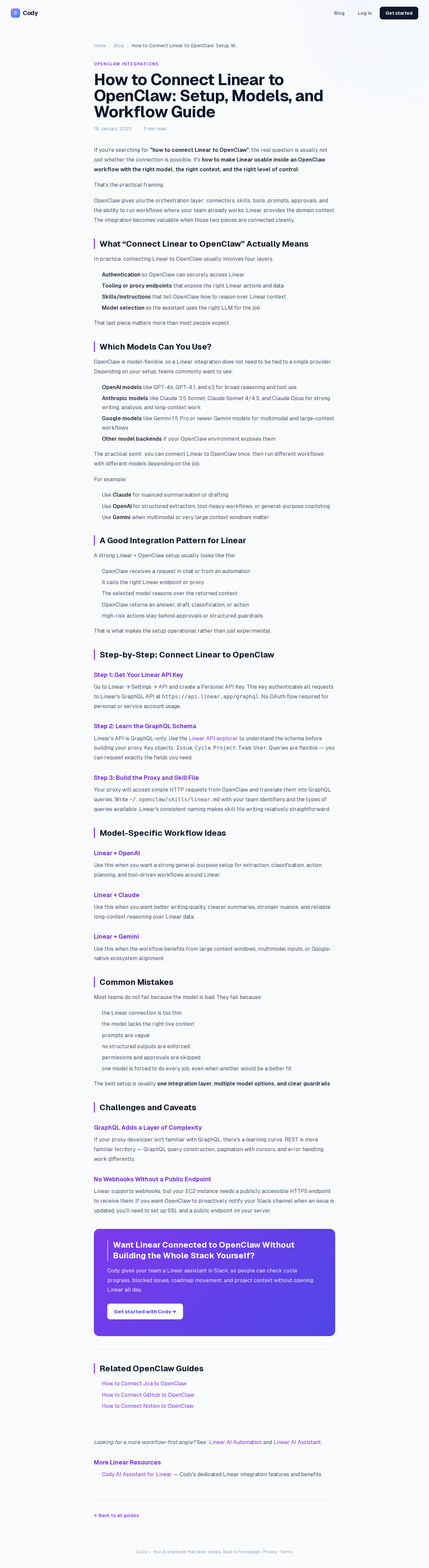
What “Connect Linear to OpenClaw” Actually Means
In practice, connecting Linear to OpenClaw usually involves four layers:
- Authentication so OpenClaw can securely access Linear
- Tooling or proxy endpoints that expose the right Linear actions and data
- Skills/instructions that tell OpenClaw how to reason over Linear context
- Model selection so the assistant uses the right LLM for the job
That last piece matters more than most people expect.
Which Models Can You Use?
OpenClaw is model-flexible, so a Linear integration does not need to be tied to a single provider. Depending on your setup, teams commonly want to use:
- OpenAI models for broad reasoning, structured extraction, and tool use
- Anthropic models for writing, analysis, and long-context work
- Google models for multimodal and large-context workflows
- Other model backends if your OpenClaw environment exposes them
Model names and availability change frequently, so check your OpenClaw model catalogue rather than copying a version from a guide. The practical point is that you can connect Linear once, then choose a supported model for each workflow.
For example:
- Use Claude for nuanced summarisation or drafting
- Use OpenAI for structured extraction, tool-heavy workflows, or general-purpose copiloting
- Use Gemini when multimodal or very large context windows matter
A Good Integration Pattern for Linear
A strong Linear + OpenClaw setup usually looks like this:
- OpenClaw receives a request in chat or from an automation
- It calls the right Linear endpoint or proxy
- The selected model reasons over the returned context
- OpenClaw returns an answer, draft, classification, or action
- High-risk actions stay behind approvals or structured guardrails
That is what makes the setup operational rather than just experimental.
Step-by-Step: Connect Linear to OpenClaw
Step 1: Get Your Linear API Key
Go to Linear → Settings → API and create a Personal API Key. This key authenticates all requests to Linear's GraphQL API at https://api.linear.app/graphql. No OAuth flow required for personal or service account usage.
Step 2: Learn the GraphQL Schema
Linear's API is GraphQL-only. Use the Linear API explorer to understand the schema before building your proxy. Key objects: Issue, Cycle, Project, Team, User. Queries are flexible — you can request exactly the fields you need.
Step 3: Build the Proxy and Skill File
Your proxy will accept simple HTTP requests from OpenClaw and translate them into GraphQL queries. Write ~/.openclaw/skills/linear.md with your team identifiers and the types of queries available. Linear's consistent naming makes skill file writing relatively straightforward.
Model-Specific Workflow Ideas
Linear + OpenAI
Use this when you want a strong general-purpose setup for extraction, classification, action planning, and tool-driven workflows around Linear.
Linear + Claude
Use this when you want better writing quality, clearer summaries, stronger nuance, and reliable long-context reasoning over Linear data.
Linear + Gemini
Use this when the workflow benefits from large context windows, multimodal inputs, or Google-native ecosystem alignment.
Common Mistakes
Most teams do not fail because the model is bad. They fail because:
- the Linear connection is too thin
- the model lacks the right live context
- prompts are vague
- no structured outputs are enforced
- permissions and approvals are skipped
- one model is forced to do every job, even when another would be a better fit
The best setup is usually one integration layer, multiple model options, and clear guardrails.
Challenges and Caveats
GraphQL Adds a Layer of Complexity
If your proxy developer isn't familiar with GraphQL, there's a learning curve. REST is more familiar territory — GraphQL query construction, pagination with cursors, and error handling work differently.
No Webhooks Without a Public Endpoint
Linear supports webhooks, but your EC2 instance needs a publicly accessible HTTPS endpoint to receive them. If you want OpenClaw to proactively notify your Slack channel when an issue is updated, you'll need to set up SSL and a public endpoint on your server.
Want Linear Connected to OpenClaw Without Building the Whole Stack Yourself?
Cody gives your team a Linear assistant in Slack, so people can check cycle progress, blocked issues, roadmap movement, and project context without opening Linear all day.
Related OpenClaw Guides
Looking for a more workflow-first angle? See: Linear AI Automation and Linear AI Assistant.
More Linear Resources
- Cody AI Assistant for Linear — Cody's dedicated Linear integration features and benefits