If you're searching for "how to connect GitHub to OpenClaw", the real question is usually not just whether the connection is possible. It's how to make GitHub usable inside an OpenClaw workflow with the right model, the right context, and the right level of control.
That's the practical framing.
OpenClaw gives you the orchestration layer: connectors, skills, tools, prompts, approvals, and the ability to run workflows where your team already works. GitHub provides the domain context. The integration becomes valuable when those two pieces are connected cleanly.
GitHub + OpenClaw: The Real Relationship
When people search for "how to connect GitHub to OpenClaw," they're usually asking one of two questions. Either they want to wire up GitHub's REST/GraphQL API behind their self-hosted OpenClaw agent so they can query repos, issues, and PRs from Slack. Or they're already using Cody (OpenClaw managed hosting) and want to understand how the GitHub integration works under the hood.
Both paths work. But the landscape changed dramatically when GitHub shipped its own official MCP server — and that's the elephant in the room that most "connect GitHub to OpenClaw" guides ignore.
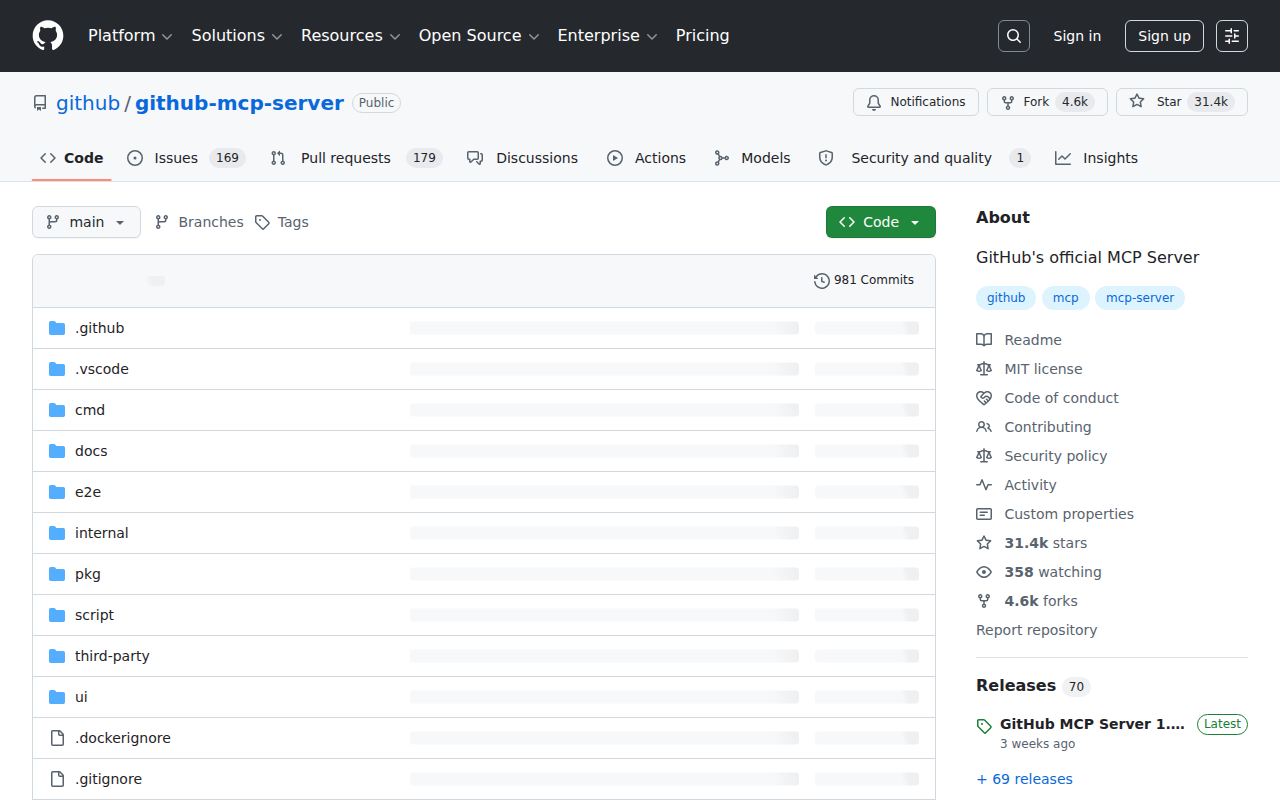
The Game-Changer: GitHub's Official MCP Server
In 2025, GitHub launched github.com/github/github-mcp-server — an official, first-party MCP server maintained by GitHub themselves. This is not a community wrapper or a third-party bridge. It's the real thing, and it fundamentally changes how you connect GitHub to any MCP-compatible host (including OpenClaw).
The server comes in two flavors:
| Mode | How it works | Best for |
|---|---|---|
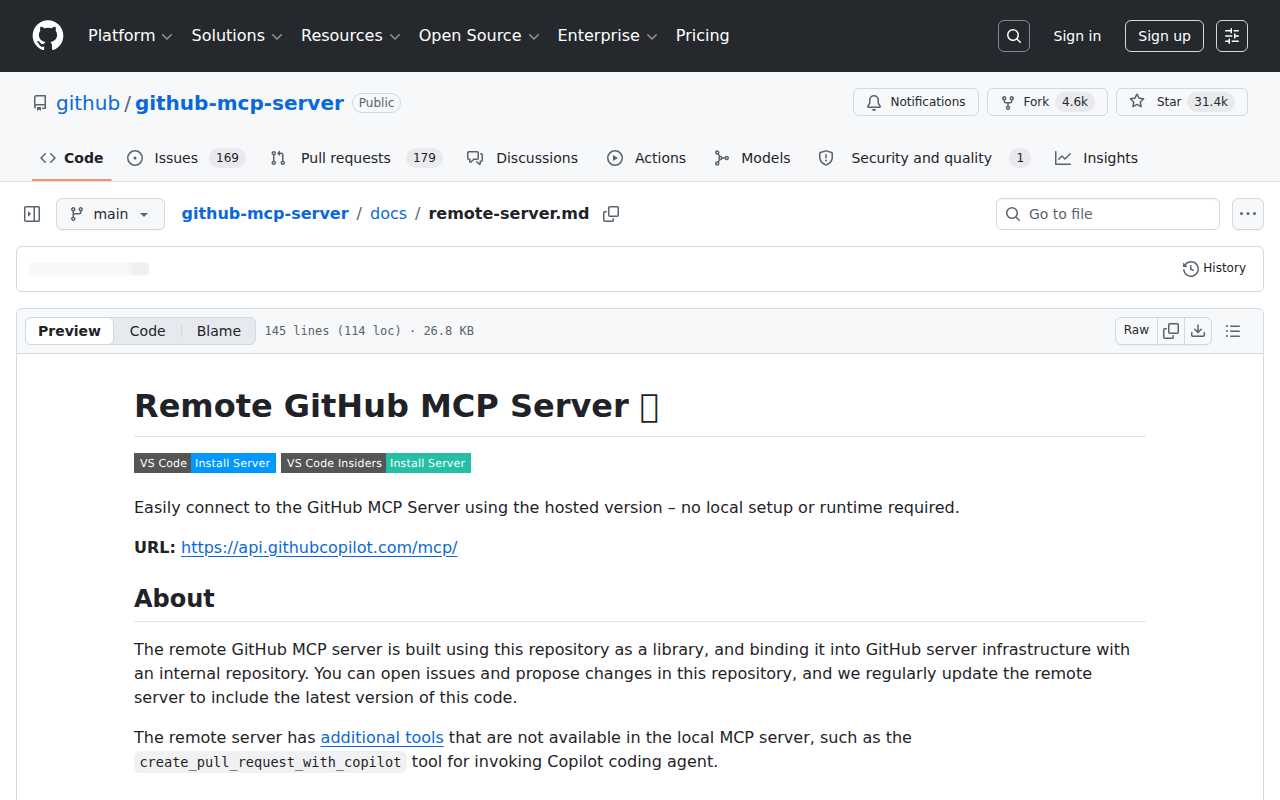
| Remote server | Hosted by GitHub at https://api.githubcopilot.com/mcp/ — zero local setup |
VS Code, Claude, Cursor, Windsurf, Codex, Zed, OpenCode, Rovo Dev CLI |
| Local server | Docker container at ghcr.io/github/github-mcp-server — runs on your infrastructure |
Self-hosted OpenClaw, air-gapped environments, custom toolset filtering |
The remote server is the easiest path. You paste a JSON config block into your MCP host and authenticate via OAuth (browser-based login, no token to create) or a PAT. The local server gives you full control — you can pick exactly which toolsets to expose, restrict to read-only, and run it behind your firewall.
Available Toolsets
The GitHub MCP server is organized into modular toolsets — you don't have to expose everything. Pick what your agent actually needs:
| Toolset | What it covers |
|---|---|
| default | Core repo browsing, file reads, issue/PR basics, search — the safe starting point |
| repos | Repository metadata, branch listing, file tree navigation, Git operations |
| issues | Create, read, update issues; search issues; manage labels and milestones |
| pull_requests | PR creation, review, merge; diff viewing; comment threads |
| actions | Workflow runs, job logs, re-run failed jobs, CI/CD monitoring |
| code_quality | Code Scanning alerts, CodeQL analyses, quality metrics |
| code_security | Secret scanning, security advisories, vulnerability alerts |
| dependabot | Dependency alerts, update PRs, version insight |
| copilot | assign_copilot_to_issue, create_pull_request_with_copilot, get_copilot_job_status |
| discussions | Read and manage GitHub Discussions |
| gists | Create, read, and manage Gists |
| git | Low-level Git database operations (blobs, trees, refs, commits) |
| projects | GitHub Projects (v2): list, get, write with field support |
| notifications | Thread subscriptions, notification management |
| search | Code search, repo search, issue search — backed by GitHub's native code search |
Each toolset has a read-only variant — append /readonly to the URL path. This is critical for safety: if your OpenClaw agent only needs to read repos and issues, don't give it write access.
Path A: Self-Hosted — Connect OpenClaw to GitHub MCP Server
If you're running OpenClaw on your own infrastructure (EC2, home server, corporate VM), the GitHub MCP local server is the cleanest integration pattern. Here's the end-to-end setup:
Step 1: Choose Your Authentication Method
You have three options, and the choice shapes everything downstream:
| Auth method | How it works | Security profile |
|---|---|---|
| OAuth (browser flow) | Docker container opens browser login on first use — token lives in memory only | Best: no persistent credentials on disk |
| Fine-grained PAT | github_pat_... scoped to specific repos + permissions |
Good: least-privilege, repo-scoped |
| Classic PAT | ghp_... with OAuth scopes |
Acceptable: the server auto-detects scopes and hides unauthorized tools |
Recommendation: Use a fine-grained PAT scoped to the specific repositories your agent needs. Never use a classic PAT with broad repo scope — if your OpenClaw instance is compromised, that token becomes a skeleton key.
Step 2: Run the Local MCP Server
Pull and run the Docker image:
docker run -i --rm \
  -p 127.0.0.1:8085:8085 \
  -e GITHUB_PERSONAL_ACCESS_TOKEN=github_pat_your_token_here \
  ghcr.io/github/github-mcp-server
For a focused setup (only issues + PRs), restrict the toolsets:
docker run -i --rm \
  -p 127.0.0.1:8085:8085 \
  -e GITHUB_PERSONAL_ACCESS_TOKEN=github_pat_your_token_here \
  -e GITHUB_TOOLSETS="issues,pull_requests" \
  ghcr.io/github/github-mcp-server
Step 3: Configure OpenClaw to Use the MCP Server
In your OpenClaw Gateway config, add the GitHub MCP server as a tool provider. OpenClaw supports MCP servers natively — the exact config depends on your Gateway version, but the pattern is:
{
  mcp: {
    servers: {
    github: {
      command: "docker",
      args: ["run", "-i", "--rm", "-e", "GITHUB_PERSONAL_ACCESS_TOKEN", "ghcr.io/github/github-mcp-server"],
      env: {
        GITHUB_PERSONAL_ACCESS_TOKEN: "${GITHUB_PAT}"
      }
    }
    }
  }
}
Step 4: Write a Skill File That Teaches the Agent How to Use GitHub Tools
The MCP server exposes 20-30+ tools. Without a skill file, your agent won't know which tools exist or how to use them effectively. Create ~/.openclaw/skills/github.md:
## GitHub Tools Available

You have access to the GitHub MCP server. Key tools:

- `search_repositories` — Find repos by name, language, topic, or full-text
- `get_file_contents` — Read a file or list directory contents. Pass a repo path like "src/app/page.tsx"
- `issue_read` — Read an issue by owner/repo/number
- `search_issues` — Search issues with GitHub's code-search syntax
- `pull_request_read` — Read PR details, diff, and review comments

### When reading code:
- Use `get_file_contents` with a specific file path, not a directory
- If you get a directory listing, drill into the most relevant file
- Always cite the file path in your response

### When triaging issues:
- Use `search_issues` with `is:open` for active issues
- Sort by `created` or `updated` depending on what's most relevant
Step 5: Test the Integration
Ask your OpenClaw agent a real question that exercises GitHub context:
- "What are the 5 most recent open issues in our main repo?"
- "Show me the diff from the latest merged PR"
- "Search our codebase for all uses of the deprecated
fetchUserfunction"
If the agent responds with real data (not "I don't have access to GitHub"), the integration is working.
Path B: Manual API Proxy (Without MCP)
If you don't want Docker or can't run the MCP server, you can still wire up GitHub through OpenClaw's existing proxy/tool pattern. This was the standard approach before the MCP server existed:
- Create a proxy service that wraps GitHub's REST API (or GraphQL API) with your PAT
- Write OpenClaw tool definitions for the endpoints you want to expose
- Add a skill file explaining how to use those tools
This is more work than the MCP server, but it gives you complete control over which endpoints are exposed and how responses are formatted. It's also the path if you're running OpenClaw in an environment where Docker isn't available.
Tip: If you go this route, use GitHub's GraphQL API v4 rather than REST v3. GraphQL lets you fetch exactly the fields you need in a single request — PR title, author, review status, and CI status in one query instead of four REST calls. This matters for token efficiency when the LLM is reasoning over the response.
Path C: Managed — Cody (OpenClaw Hosted)
If self-hosting the MCP server and writing skill files sounds like an afternoon of infrastructure work, that's because it is. Between Docker, PAT management, toolset selection, skill file authoring, and ongoing maintenance, a production GitHub + OpenClaw setup takes 3-5 hours for someone who knows what they're doing.
Cody gives you the same OpenClaw agent, with GitHub already connected. You authorize your GitHub org once, and Cody handles:
- MCP server provisioning and toolset configuration
- PAT/App token rotation and renewal
- Skill files pre-written for common GitHub workflows
- Multi-model support (Claude, GPT-4o, Gemini — switch per task)
- Approval gates for write operations (PR creation, issue updates, merge)
The agent experience is the same: ask about repos, issues, PRs, Actions, and code from Slack. The difference is zero infrastructure.
Start with Cody → or see the Cody AI Assistant for GitHub.
Real Use Cases for a GitHub + OpenClaw Agent
Here's what engineering teams actually build once the connection is working:
1. PR Review Triage in Slack
You're in a channel and someone asks "what PRs need review?" Instead of opening GitHub, checking each repo, and threading through review requests, you @mention the agent: "Show me all open PRs across our repos that have been waiting for review more than 24 hours, sorted by age." The agent queries the MCP server, returns a ranked list with links, and highlights the ones that are blocking releases.
2. On-Call Incident Root-Cause Analysis
An alert fires and your #oncall channel lights up. The agent searches recent commits merged to the affected service, cross-references them with open issues mentioning the error log pattern, and posts a summary: "3 commits merged to payment-service in the last 6 hours. PR #842 introduced a schema change that matches the error signature. Author is @alex — they're online and have been notified."
3. Sprint Retro Prep From Actual Data
Before your retro, DM the agent: "Summarize the last sprint: what shipped, what got rolled back, how many hotfixes, and which repos had the most churn." The agent reads merged PRs, closed issues, and Actions run history across your org's repos, then delivers a structured retro brief — no manual data gathering.
4. Dependency Hygiene Automation
Set up a weekly heartbeat: "Check all our repos for Dependabot alerts older than 30 days. List the repo, the dependency, the severity, and whether a fix PR already exists." The agent hits the code_security and dependabot toolsets, compiles the report, and posts it to #engineering. This used to be an hour of manual checking across repos — now it's a Slack message.
5. Codebase Archaeology
Someone asks in #architecture: "Why does UserService.validateToken() have that weird retry logic? When was it added?" The agent uses search_code to find the function, get_file_contents to read it, then traces the git blame via the git toolset to find the original commit and the linked issue — all without leaving Slack.
GitHub-Specific Pitfalls (Most Guides Miss These)
These are the things that break real GitHub + OpenClaw integrations, gathered from teams running them in production:
1. The MCP Server's "Default" Toolset Is Still Large
The default toolset exposes 20-30 tools by default. That's a lot of context-window real estate — every tool's JSON schema gets sent to the model on every turn. If your agent only needs issues and PRs, use GITHUB_TOOLSETS="issues,pull_requests" to keep the tool list lean. Smaller tool lists = lower latency and lower token costs.
2. Fine-Grained PATs Create Silent Permission Gaps
A fine-grained PAT scoped to repo:read on org/backend won't let you read org/frontend. When the agent tries to get_file_contents on a repo it can't access, GitHub returns a 404 — not a 403. The file "doesn't exist" from the token's perspective. This creates confusing agent responses ("I searched for that file but it wasn't found") when the real issue is permission scope.
3. get_file_contents Has a 1MB Size Limit
GitHub's API truncates file contents at 1MB. If your agent tries to read a large generated file (package-lock.json, compiled bundle, large CSV), it'll get a truncated response with no warning. The agent won't know the file is incomplete. Fix: in your skill file, instruct the agent to note file sizes before reasoning over contents, and flag files >500KB as potentially truncated.
4. Rate Limits Apply Per-Installation, Not Per-User
The GitHub API's 5,000 req/hour limit applies to the authenticated principal (PAT or GitHub App). If your team has 10 people all asking the agent GitHub questions simultaneously, you can blow through the rate limit in under an hour. GitHub Apps get higher limits (5,000-15,000/hr depending on plan), so prefer a GitHub App over a personal PAT for team-wide OpenClaw deployments.
5. Search Uses GitHub's Code Search, Not grep
The search_code tool uses GitHub's indexed code search — it's fast but not real-time. Newly pushed code can take up to 2 minutes to appear in search results. If your agent runs a code search immediately after someone pushes a commit, it might miss the latest changes. Fix: for real-time needs, use get_file_contents directly instead of search_code.
6. OAuth Tokens in Docker Are Ephemeral
If you use OAuth (browser-based login) with the Docker container, the token lives in the container's memory. If the container restarts, the token is gone and the agent needs to re-authenticate. This is fine for dev setups but a non-starter for production. Fix: use a PAT or GitHub App token with GITHUB_PERSONAL_ACCESS_TOKEN for persistent deployments.
Decision Matrix: Which Path Should You Take?
| Scenario | Best Path | Why |
|---|---|---|
| Solo dev, want PR/issue context in Slack | Self-hosted MCP + OpenClaw | One Docker command, full control, free |
| Engineering team (5-50), want GitHub in Slack today | Cody | Zero setup, MCP provisioned, tokens managed, team-ready |
| Enterprise, must self-host everything | Self-hosted MCP (local server) | Data stays on your infrastructure, toolsets controllable |
| No Docker available, still want integration | Manual API proxy + skill file | Works without containers, but more work |
| Want Copilot coding agent in your Slack workflows | Cody or remote MCP + Copilot toolset | The Copilot toolset (assign_copilot_to_issue) is remote-server only |
Related Pages
- Cody AI Assistant for GitHub — Cody's dedicated GitHub integration features
- How to Connect GitHub to ChatGPT — using ChatGPT with GitHub via the official MCP server
- GitHub AI Automation — AI automation workflows for GitHub teams
What “Connect GitHub to OpenClaw” Actually Means
In practice, connecting GitHub to OpenClaw usually involves four layers:
- Authentication so OpenClaw can securely access GitHub
- Tooling or proxy endpoints that expose the right GitHub actions and data
- Skills/instructions that tell OpenClaw how to reason over GitHub context
- Model selection so the assistant uses the right LLM for the job
That last piece matters more than most people expect.
Which Models Can You Use?
OpenClaw is model-flexible, so a GitHub integration does not need to be tied to a single provider. Depending on your setup, teams commonly want to use:
- OpenAI models for broad reasoning, structured extraction, and tool use
- Anthropic models for writing, analysis, and long-context work
- Google models for multimodal and large-context workflows
- Other model backends if your OpenClaw environment exposes them
Model names and availability change frequently, so check your OpenClaw model catalogue rather than copying a version from a guide. The practical point is that you can connect GitHub once, then choose a supported model for each workflow.
For example:
- Use Claude for nuanced summarisation or drafting
- Use OpenAI for structured extraction, tool-heavy workflows, or general-purpose copiloting
- Use Gemini when multimodal or very large context windows matter
A Good Integration Pattern for GitHub
A strong GitHub + OpenClaw setup usually looks like this:
- OpenClaw receives a request in chat or from an automation
- It calls the right GitHub endpoint or proxy
- The selected model reasons over the returned context
- OpenClaw returns an answer, draft, classification, or action
- High-risk actions stay behind approvals or structured guardrails
That is what makes the setup operational rather than just experimental.
Step-by-Step: Connect GitHub to OpenClaw
Step 1: Create a GitHub Personal Access Token (or GitHub App)
For a personal integration, go to GitHub Settings → Developer settings → Personal access tokens and create a fine-grained token with read access to the repositories you want OpenClaw to query. For a team-wide integration, consider creating a GitHub App instead — it has better rate limits and more granular permissions.
Step 2: Build the API Proxy and Skill File
Create a small proxy service that wraps the GitHub REST API (or GraphQL API) with your token. Then write ~/.openclaw/skills/github.md explaining the available endpoints — e.g., fetch PR details, list open issues, get recent commits for a repo. The GitHub API is well-structured and relatively easy to work with.
Step 3: Test With Real Queries
Try asking your OpenClaw instance about a real PR or issue. Iterate on the skill file to improve how Claude formats responses — GitHub API responses can be verbose, so instruct Claude to extract the relevant fields rather than dump raw JSON.
Model-Specific Workflow Ideas
GitHub + OpenAI
Use this when you want a strong general-purpose setup for extraction, classification, action planning, and tool-driven workflows around GitHub.
GitHub + Claude
Use this when you want better writing quality, clearer summaries, stronger nuance, and reliable long-context reasoning over GitHub data.
GitHub + Gemini
Use this when the workflow benefits from large context windows, multimodal inputs, or Google-native ecosystem alignment.
Common Mistakes
Most teams do not fail because the model is bad. They fail because:
- the GitHub connection is too thin
- the model lacks the right live context
- prompts are vague
- no structured outputs are enforced
- permissions and approvals are skipped
- one model is forced to do every job, even when another would be a better fit
The best setup is usually one integration layer, multiple model options, and clear guardrails.
Challenges and Caveats
Personal Access Tokens Have Security Implications
A PAT stored on your EC2 instance has access to everything it's scoped for. If your server is compromised, that token is compromised. Use fine-grained tokens with the minimum necessary permissions and rotate them regularly.
Rate Limits Apply
The GitHub API allows 5,000 requests/hour for authenticated requests. For most teams this is plenty, but heavy use (e.g., scanning many repos) can exhaust it. GitHub Apps get higher limits.
Private Repo Access Requires Care
If you're querying private repositories, make sure the token or GitHub App only has access to repos it needs. Principle of least privilege applies — especially if your OpenClaw instance is accessible to your whole team.
Want GitHub Connected to OpenClaw Without Building the Whole Stack Yourself?
Cody comes with GitHub integration built in. Connect your workspace once, then ask about stale PRs, failed Actions, release scope, issue clusters, and repo changes directly from Slack without wiring any GitHub API client yourself.
Related OpenClaw Guides
Looking for a more workflow-first angle? See: GitHub AI Automation and GitHub AI Assistant.
More GitHub Resources
- Cody AI Assistant for GitHub — Cody's dedicated GitHub integration features and benefits