If you're trying to use Shopify with ChatGPT, the real question usually isn't "can these two technically work together?" It's how to make ChatGPT useful inside a Shopify workflow without getting vague, generic output back.
That's the useful framing.
ChatGPT is strongest when you give it the right context, a clear job, and a structured output format. Shopify brings the operational context. When the two are used well together, you get faster triage, better summaries, cleaner drafts, and more consistent decisions.
Shopify's Native ChatGPT Integration: Agentic Storefronts (March 2026)
In March 2026, Shopify launched Agentic Storefronts — an automatic product syndication system that makes every eligible store's catalog discoverable inside ChatGPT. This isn't a plugin you install or an API key you paste. Shopify enabled it by default for all U.S. merchants, and your products appear in ChatGPT search results automatically when users ask shopping-related questions.
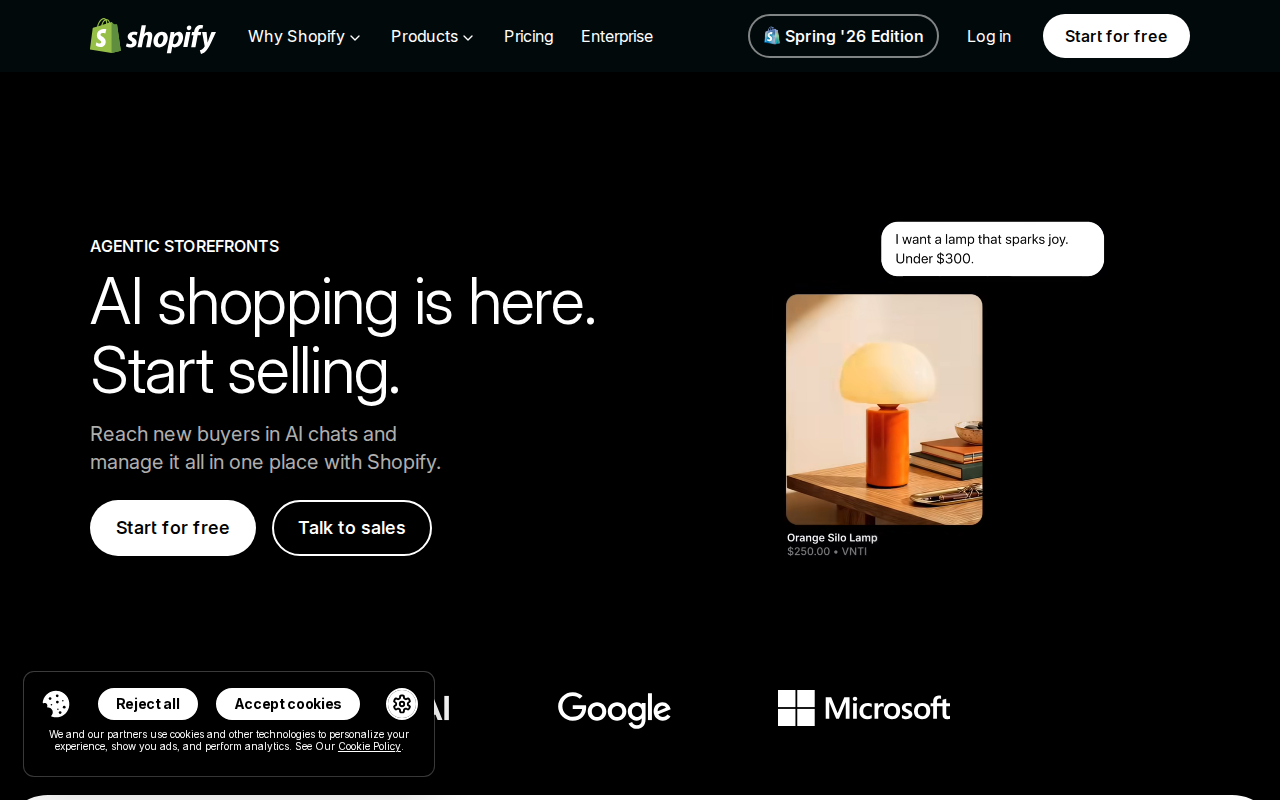
What Agentic Storefronts Actually Does
- Automatic catalog syndication — Your product titles, descriptions, pricing, images, and availability data sync to Shopify's global catalog and surface inside ChatGPT, Microsoft Copilot, Google AI Mode, and the Gemini app. No manual setup required.
- Conversational product discovery — When a ChatGPT user asks "What's a good waterproof hiking boot under $150?", your products compete alongside Amazon, Etsy, and other merchants. ChatGPT ranks by relevance, not ad spend.
- Redirected checkout — By default, customers who discover your products in ChatGPT click through to your store's checkout in a ChatGPT in-app browser or a new tab. The transaction still happens on your Shopify checkout, so you keep the customer data and order flow.
Opt-out is possible but not recommended. Shopify lets you disable Agentic Storefronts in Settings → Sales Channels, but doing so removes your store from a discovery channel that 200 million people use weekly. The cost is $0. There's no downside to being discoverable.
OpenAI Instant Checkout: Buy Directly Inside ChatGPT
Beyond product discovery, OpenAI launched Instant Checkout — a feature that lets customers complete purchases without ever leaving the ChatGPT conversation. Launched with Etsy in October 2025 and expanded to Shopify merchants through 2026, this turns ChatGPT from a research tool into an actual purchase channel.
How Instant Checkout Works
- A user asks ChatGPT for product recommendations ("best coffee grinder for pour-over")
- ChatGPT shows eligible products with a "Buy" button — the listings are unsponsored, ranked by relevance
- The user confirms shipping and payment details inside the chat interface
- ChatGPT passes the order to your store via the Agentic Commerce Protocol (ACP) — a Stripe-tokenized payment + shipping intent
- Your store accepts the order and handles fulfillment through your existing Shopify workflow
Instant Checkout Pricing and Limits
| Detail | Current State (July 2026) |
|---|---|
| Fee | 4% per completed transaction (vs. standard Shopify Payments at 2.9% + $0.30) |
| Availability | U.S. buyers only |
| Cart support | Single-item purchases only (multi-item carts coming later) |
| Payment | Stripe-tokenized via ACP protocol |
| Opt-in | You must sign up at shopify.com/chatgpt |
The 4% fee is higher than standard payment processing, but think about what you're paying for: zero-friction impulse purchases from customers who are already in a buying mindset. Adobe Analytics found that Black Friday 2025 shoppers coming through AI assistants converted at 38% higher rates than other channels. For impulse-buy products, the 4% might pay for itself in conversion lift.
The Native Shopify Connector for ChatGPT: Store Management From Chat
Separate from the shopping features, Shopify also offers a native ChatGPT Connector at chatgpt.com/apps/shopify. This turns ChatGPT into a store management interface — you can ask about orders, inventory, and products without logging into the Shopify admin.
What You Can Do With the Native Connector
- Query store performance — "What were yesterday's top-selling products?" or "Show me orders above $500 from this week"
- Check inventory — "Which products are below 5 units in stock?" or "When does Product X restock?"
- Update products — "Change the price of Product X to $49.99" or "Add 'vegan' to the tags on all products in Collection Y"
- Draft product descriptions — "Write a product description for a new organic cotton t-shirt" — ChatGPT uses your existing catalog style for consistency
The Risk: Changes Are Instant
Here's the gotcha that store owners learn the hard way: there is no draft mode or preview. When you ask ChatGPT to "set all winter coats to 50% off," it happens immediately through Shopify's Admin API. There's no confirmation screen, no rollback, and no "are you sure?" dialog.
Real example of what can go wrong: A merchant asked ChatGPT to "update all products with tag 'sample-sale' to price $0." ChatGPT executed it — 47 products went to $0. Orders started pouring in within minutes. The merchant had to manually cancel each order, and Shopify Support had to restore previous pricing from a backup.
Safety tips for the native connector:
- Always specify the exact products, not broad categories ("update SKU:BLK-TEE-L to $29.99," not "discount all t-shirts")
- Ask ChatGPT to show you the changes first before executing — "show me which orders from yesterday were above $500" before "email those customers"
- Set up Shopify's activity log alerts so you catch bulk changes quickly
- For bulk operations, still use the Shopify admin — the connector is best for quick checks and single-item updates
Rate Limits
Shopify's Admin API limits apply to the connector:
- Standard plans: ~2 requests/second
- Shopify Plus: ~20 requests/second with GraphQL (cost-based)
If you're running a busy store and asking ChatGPT for multiple analytics queries, you'll hit rate limits quickly. The connector works best as a complement to the Shopify admin, not a replacement.
Five Ways to Connect Shopify to ChatGPT (in Order of Practicality)
1. Agentic Storefronts (Easiest, Already On)
Your products appear in ChatGPT automatically. No setup. No cost. Just make sure your product data is clean — clear titles, natural-language descriptions, and accurate pricing. This is table stakes for every Shopify store in 2026.
2. Native Shopify Connector (Best for Store Management)
One-click auth at chatgpt.com/apps/shopify. Best for quick order lookups, inventory checks, and single-product updates. Don't use it for bulk operations.
3. OpenAI Instant Checkout (Best for Direct Sales)
Enable this if you sell to U.S. customers and your products benefit from impulse buys (apparel, gadgets, gifts, home goods). The 4% fee is worth testing — measure your conversion rate from ChatGPT vs. other channels before deciding.
4. Windsor.ai MCP (Best for Analytics)
Windsor.ai's MCP connector pulls your complete Shopify order history, customer data, product margins, and inventory into ChatGPT for conversational analysis. Ask questions like "Which customer segments have the highest 12-month LTV?" or "Generate a report of our top 10 products by profit margin." It's analytics-focused, not management-focused. Custom pricing based on data volume.
5. Zapier/Make + ChatGPT API (Best for Custom Workflows)
Build automated workflows: "When a new order comes in, send the details to ChatGPT, have it draft a personalized thank-you email, and save it as a draft in Gmail." Flexible but requires building and maintaining the Zaps yourself.
Real Shopify + ChatGPT Use Cases With Concrete Examples
1. AI-Powered Product Description Scaling
The problem: You're launching 200 SKUs for a new season. Writing unique, SEO-friendly descriptions for each one would take a week of copywriting time. Your existing descriptions follow a brand style guide, but you can't afford to write them all manually.
With ChatGPT via the native connector: Feed it 3-5 examples of your best product descriptions, your brand voice guide, and the new product specs. Ask ChatGPT to draft descriptions following the same pattern. You get 200 drafts in minutes. A human reviews for accuracy, adds any product-specific details, and pushes them live.
Prompt template:
Here are 3 examples of product descriptions that match our brand voice. Write a description for [PRODUCT NAME] following the same pattern: conversational but not cutesy, mention material and use case, include care instructions if relevant, end with a clear size/fit note. [PASTE 3 EXAMPLES]
2. Customer Order Intelligence Without Hunting Through Admin
The problem: A VIP customer emails your support team: "I placed 3 orders this month but one arrived damaged and I think I was charged twice for shipping." The support agent now has to search Orders, find 3 transactions across different dates, check tracking, compare shipping charges, and piece together a response. That's 15 minutes per inquiry.
With ChatGPT native connector: "Find all orders from [customer email] in June 2026. Show me order numbers, totals, shipping charges, and tracking status for each." ChatGPT returns a clean table. The agent can see instantly: 3 orders, shipping was charged correctly on 2, waived on 1 (replacement order), tracking shows 2 delivered and 1 in transit. Response time drops from 15 minutes to 2.
3. Inventory Risk Monitoring From Slack (via Cody)
The problem: You manage 500+ SKUs across multiple collections. By the time your weekly inventory report flags a stockout, the product has been sold out for 4 days and you've lost $2,000 in missed sales.
With Cody + Shopify: Cody watches your Shopify inventory in real time through its native Shopify integration. When any product drops below your threshold (say 5 units), Cody alerts the team in Slack with the product name, current stock, and restock ETA if available. No one has to remember to check.
4. Abandoned Cart Recovery With Context
The problem: Standard abandoned cart emails ("You left something behind!") have a ~3-5% recovery rate. Customers ignore them because they're generic — the email doesn't know why they abandoned the cart (shipping cost? found a better price? just browsing?).
With ChatGPT + Shopify (via Zapier): When a cart is abandoned, Zapier sends the cart contents and customer details to ChatGPT. ChatGPT drafts a contextual recovery email: "Noticed you were looking at the [product name] — we wanted to let you know shipping is free on orders over $50 (yours would qualify). Here's a quick size guide in case that was the question..." The email references the actual product and addresses a likely objection instead of just saying "come back."
Note: This requires Zapier/Make wiring. Cody handles this natively — it monitors Shopify and can send contextual follow-ups from Slack without building the Zap.
Common Pitfalls When Connecting Shopify to ChatGPT
1. "My Products Don't Show Up in ChatGPT"
Agentic Storefronts is automatic, but it's not magic. ChatGPT pulls from Shopify's global catalog, which indexes your product data. If your titles are "SKU-442-BLK-L" instead of "Men's Black Slim-Fit Chino Pants," ChatGPT won't surface them for "men's black pants." The ranking algorithm prioritizes products with complete, natural-language metadata.
Fix: Audit your product data. Every product should have a descriptive title (not a SKU), a natural-language description (not keyword-stuffed), accurate pricing, and clear images. Category and tag data is especially important — it's how ChatGPT knows your product is a "hiking boot" vs. a "fashion boot."
2. The "No Preview" Problem With the Native Connector
As covered above, changes through the native connector are instant and irreversible through ChatGPT. This is the #1 complaint from early adopters. The connector is designed for read-heavy workflows (checking orders, looking up inventory), not write-heavy bulk operations.
Fix: Use the connector primarily for queries. When you do need changes, use precise targeting and ask ChatGPT to verify before executing.
3. Instant Checkout Cannibalizes Your Direct Traffic
If customers can buy your products inside ChatGPT without ever visiting your store, you lose the opportunity to cross-sell, collect emails, build loyalty, or expose them to your brand experience. Every ChatGPT sale is a one-and-done transaction unless the customer proactively seeks out your brand.
Fix: Include a branded insert in your packaging that invites customers to shop directly on your site next time. Run promotions that are exclusive to your website (not available via ChatGPT). Use ChatGPT as an acquisition channel, not your primary sales channel.
4. Your Product Data Isn't "Conversational"
Traditional SEO product descriptions ("Buy men's running shoes | best running shoes 2026 | lightweight athletic footwear") work for Google but confuse ChatGPT. ChatGPT's ranking favors products described the way humans actually talk about them: "Lightweight running shoes with responsive cushioning — great for daily 5Ks and tempo runs."
Fix: Rewrite your top 20% of products (the ones that drive 80% of revenue) in natural, conversational language. Mention ideal use cases, who the product is for, and what problem it solves. This is where AI product description tools (including ChatGPT itself) can help you scale.
5. Thinking Agentic Storefronts Replaces SEO
Agentic Storefronts is a new discovery channel, not a replacement for Google organic traffic. As of mid-2026, Google still drives the majority of e-commerce discovery traffic. ChatGPT is growing fast — 200M weekly users — but it's additive, not a substitute.
Fix: Treat ChatGPT as a second front door, not a replacement. Your Google SEO strategy (product page optimization, collection page content, blog content, backlinks) still matters. The stores winning in 2026 are optimizing for both.
Which Path Should You Choose?
| Your Goal | Best Approach |
|---|---|
| Get my products discoverable in ChatGPT | Agentic Storefronts — already on, just improve your product data |
| Let customers buy directly in ChatGPT | Instant Checkout — opt in at shopify.com/chatgpt, 4% fee |
| Manage my store from chat | Native Shopify Connector — free, one-click auth, queries + updates |
| Analyze store data with AI | Windsor.ai MCP — full order history, LTV cohorts, margin analysis |
| Build custom ChatGPT workflows | Zapier/Make + ChatGPT API — most flexible, most setup |
| Give my team Shopify answers in Slack | Cody — native Shopify integration, no API wiring needed |
For most Shopify stores in mid-2026, the playbook is clear:
- Agentic Storefronts is a free given — make sure your product data is clean
- Test Instant Checkout on your top 10 products and measure conversion vs. direct traffic
- Use the native connector for quick order/inventory lookups
- Add Cody if your team lives in Slack and wants Shopify answers without context-switching
Related Shopify Pages on Cody
- Shopify AI Automation — AI-powered workflows for order tracking, inventory alerts, and customer insights
- Cody AI Assistant for Shopify — Cody's dedicated Shopify integration with Slack-native controls
- Connect Shopify to OpenClaw — Complete DIY integration guide with Admin API + proxy setup
What "Shopify with ChatGPT" Usually Means
In practice, teams tend to use ChatGPT with Shopify in one of four ways:
- Summarising activity, records, conversations, or changes from Shopify
- Classifying items such as tickets, leads, tasks, issues, or opportunities
- Drafting replies, updates, reports, documentation, or next steps
- Reasoning over context to suggest priorities, actions, or likely issues
The key is to avoid treating ChatGPT like magic. It needs the relevant Shopify context in the prompt - and it works best when you tell it exactly what good output looks like.
Good Use Cases for Shopify + ChatGPT
1. Turn raw Shopify context into a useful summary
Paste or pipe in the relevant records, notes, messages, or metrics from Shopify, then ask ChatGPT to extract only what matters: key changes, risks, blockers, patterns, or action items.
2. Standardise messy workflows
If your team handles similar decisions repeatedly inside Shopify, ChatGPT can apply the same rubric every time: classify, explain briefly, and return a structured next step.
3. Draft faster without starting from zero
Use ChatGPT to produce first drafts grounded in the Shopify context - support replies, internal updates, status summaries, sales follow-ups, or operating notes.
4. Create reusable prompt-driven operating procedures
Once you find a prompt that works well for Shopify, save it as a repeatable workflow so the whole team gets more consistent output.
A Simple Setup Pattern
A practical way to use ChatGPT with Shopify looks like this:
- Pull the right context from Shopify
- Give ChatGPT one clear task
- Ask for a structured response
- Have a human review anything customer-facing or high-risk
That last point matters. ChatGPT is useful for acceleration, but for anything sensitive - customer communication, financial interpretation, account changes, or production actions - keep a human in the loop.
Copy-Paste Prompts for Shopify
Summary prompt
You are helping me work inside Shopify. Summarise the context below into 5 bullets: what changed, what matters, what is blocked, and what needs action next. If anything is unclear, say what is missing.
Classification prompt
Review this Shopify item and classify it into the best category. Return JSON with: category, confidence, rationale, and next_action. Keep rationale under 50 words.
Drafting prompt
Use the Shopify context below to draft a concise response. Keep it specific, avoid made-up details, and list any assumptions separately.
Executive brief prompt
Turn this Shopify activity into a short update for leadership: what happened, why it matters, current risks, and recommended next steps.
Where This Breaks Down
Most Shopify + ChatGPT workflows fail for predictable reasons:
- Too little real context is provided
- The prompt asks for too many things at once
- The output format is vague
- The team expects ChatGPT to know live Shopify data it has not actually been given
- No review step exists for important actions
The fix is usually simple: give better source context, narrow the task, and require a schema or fixed structure in the response.
If You Want This Embedded in the Workflow
You can absolutely use ChatGPT manually with exported Shopify context. That works well for one-off tasks and prototyping.
But if you want the workflow to feel operational - available to the team, connected to live systems, repeatable, and embedded where work already happens - you usually want something more integrated.
Want Shopify-Style Workflows Without Manual Prompt Copy-Paste?
Cody gives your team a Shopify assistant in Slack, so people can check orders, customers, products, inventory, and store activity without wiring Admin API auth, handling version churn, or building ecommerce workflow glue.
Related ChatGPT Guides
- How to Use Stripe with ChatGPT
- How to Use Google Analytics with ChatGPT
- How to Use HubSpot with ChatGPT
Need a more automation-focused angle instead? See: Shopify AI Automation.
More Shopify + AI Resources
- Cody AI Assistant for Shopify — Cody's dedicated Shopify integration features
- Connect Shopify to OpenClaw — complete DIY integration guide