If you're trying to use SEMrush with ChatGPT, the real question usually isn't "can these two technically work together?" It's how to make ChatGPT useful inside a SEMrush workflow without getting vague, generic output back.
That's the useful framing.
ChatGPT is strongest when you give it the right context, a clear job, and a structured output format. SEMrush brings the operational context. When the two are used well together, you get faster triage, better summaries, cleaner drafts, and more consistent decisions.
SEMrush + ChatGPT: The Official Integration (December 2025)
As of late 2025, connecting SEMrush to ChatGPT isn't a third-party hack or a manual copy-paste workflow. SEMrush launched an official ChatGPT app on December 17, 2025 — built on their MCP (Model Context Protocol) infrastructure and available directly inside ChatGPT's app directory.
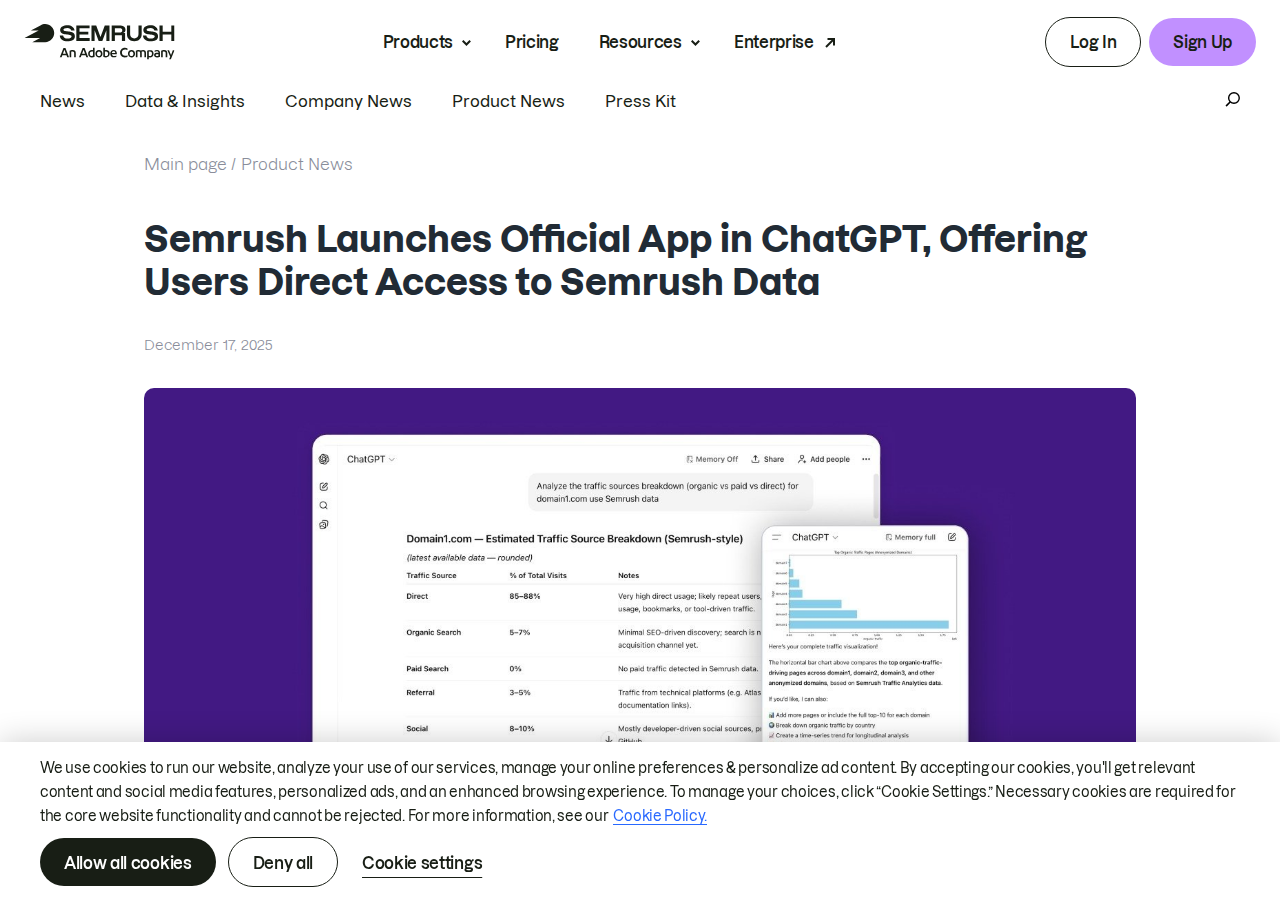
This is a first-party integration. You're not installing a plugin from the marketplace or wiring up a custom API proxy. You're connecting your SEMrush account to ChatGPT through an official, SEMrush-maintained connector that queries live data in real time.
Two Real Paths to Connect SEMrush to ChatGPT
There are now two legitimate ways to bring SEMrush data into ChatGPT:
| Path | What It Is | Best For |
|---|---|---|
| Official SEMrush ChatGPT App | First-party MCP connector, available in ChatGPT's app directory | Teams who want authenticated, one-click access to their SEMrush account inside ChatGPT |
| SEMrush MCP Server (manual config) | Direct MCP endpoint at https://mcp.semrush.com/v2/mcp |
Developers who want to wire SEMrush into Claude, Cursor, VS Code, or custom MCP clients |
| Third-party connectors (Composio, Windsor.ai) | Managed MCP wrappers that add auth + security layers | Teams already on Composio/Windsor who want SEMrush as one of many data sources |
Path 1: The Official SEMrush ChatGPT App (Recommended)
The SEMrush ChatGPT app is the simplest path for most teams. Here's how it works:
Setup (Takes Under 2 Minutes)
- Open ChatGPT and go to Apps in the left sidebar
- Search for "SEMrush" in the app directory
- Click Connect — you'll be redirected to SEMrush's OAuth consent screen
- Review and accept the permissions. SEMrush will request access to your account data
- Start using it — in any chat, type
@SEMrushbefore your prompt to pull live SEMrush data

Plan requirements: The SEMrush ChatGPT app is available to customers on Enterprise, EDU, Business, Pro, and Plus plans. You'll also need a ChatGPT Pro, Plus, Business, Enterprise, or Education account — MCP connectors aren't available on the free tier.
What You Get Access To
The official app exposes SEMrush data through MCP in a way that ChatGPT can query directly. The key data domains:
- SEO API — Keyword metrics (volume, CPC, competition, trend), domain organic positions, backlink data, domain vs domain comparisons, keyword gap analysis
- Trends API — Traffic analytics, market explorer, competitive benchmarking, traffic source breakdowns (direct, referral, organic, paid, social)
- Projects API (read-only) — Pull data from your existing SEMrush projects, including position tracking and site audit results
Each API request consumes SEMrush API units from your subscription allocation — there are no additional ChatGPT fees.
Path 2: Direct SEMrush MCP Server (For Developers)
If you want to connect SEMrush to multiple AI tools beyond ChatGPT, you can use the MCP server directly:
- Endpoint:
https://mcp.semrush.com/v2/mcp - Transport: Streamable HTTP (not stdio or SSE)
- Authentication: OAuth 2.1 (default) or API key fallback
Setup in Claude Code
claude mcp add semrush https://mcp.semrush.com/v2/mcp -t http
Setup in Cursor / VS Code
Add to your MCP config (~/.cursor/mcp.json or VS Code settings):
{
  "mcpServers": {
    "semrush": {
      "url": "https://mcp.semrush.com/v2/mcp",
      "headers": {
        "Authorization": "Apikey YOUR_SEMRUSH_API_KEY"
      }
    }
  }
}
SEMrush MCP also works in Claude, Perplexity (launched June 2026), and Antigravity. One connection covers all your AI tools.
Path 3: Third-Party Connectors
If your team is already using a platform like Composio or Windsor.ai for other data integrations, these can also bridge SEMrush to ChatGPT:
| Connector | Approach | Best For |
|---|---|---|
| Composio | Managed MCP toolkit, adds OAuth layer + security policies | Teams standardizing on Composio for all MCP integrations |
| Windsor.ai (SEMrush connector) | No-code MCP with auto-normalized data | Marketing teams who want SEMrush alongside ad platform data in ChatGPT |
These work but add a dependency. If Composio/Windsor goes down, your SEMrush-to-ChatGPT flow goes down too. For most teams, the official SEMrush app (Path 1) is more reliable because it's maintained directly by SEMrush.
Real SEMrush + ChatGPT Use Cases
1. Competitor Traffic Monitoring on Demand
Without ChatGPT: Log into SEMrush → Traffic Analytics → enter competitor domain → extract numbers → compare to previous period → build your own analysis.
With the SEMrush ChatGPT app:
You: "@SEMrush Compare organic traffic for nike.com vs adidas.com for Q2 2026. Which competitor is growing faster and what keywords are driving it?"
ChatGPT pulls live traffic data, identifies the growth leader, and lists the specific keywords behind the shift — all without you leaving the conversation.
2. Keyword Gap Analysis in Seconds
You: "@SEMrush Show me keywords that ahrefs.com ranks for in positions 1-10 that we don't rank for at all. Sort by volume descending."
This replaces the manual SEMrush Keyword Gap tool workflow: enter two domains, wait for the report, export, filter. Instead, you get a ranked list in natural language.
3. Content Briefs Anchored in Real Demand
You: "@SEMrush I'm writing a blog post about 'MCP servers for SEO.' Pull keyword volume, difficulty, and related questions for this topic. Then draft a content outline structured around the highest-opportunity terms."
ChatGPT pulls the SEMrush keyword data FIRST, then generates the outline. The result is a brief grounded in actual search demand, not guesswork.
4. Automated Weekly SEO Reports
You: "@SEMrush Generate a weekly SEO summary for our domain: top 5 ranking changes, new competitor entries, traffic anomalies, and one action item per section. Format as a Slack-ready update."
Because the MCP connection is persistent, you can run this same prompt every Monday and get a fresh report without rebuilding anything.
5. "Who's Winning Traffic in Our Industry?"
You: "@SEMrush List the top 10 domains by organic traffic in the 'project management software' space for June 2026. Highlight any newcomers that weren't in the top 10 last quarter."
This is the kind of question that would normally require multiple SEMrush reports and manual compilation. With the MCP connector, it's one prompt.
Common Pitfalls When Connecting SEMrush to ChatGPT
1. Assuming All SEMrush Data Is Available Through MCP
The SEMrush MCP server exposes SEO API, Trends API, and Projects API (read-only). It does not currently expose: Social Media Toolkit, Content Marketplace, PPC keyword data, or the full Site Audit write capabilities. Check the SEMrush MCP docs for the current coverage before building workflows around specific features.
2. Forgetting About API Unit Consumption
Every MCP query consumes SEMrush API units from your subscription. A complex query like "compare traffic for 10 competitors across 12 months" can burn through thousands of units in one prompt. Monitor your unit balance under SEMrush → Subscription → API Units. If you're on a 50,000-unit plan (Starter/Pro), be intentional about which queries you run through ChatGPT vs the SEMrush dashboard.
3. "List All Keywords" Syrup Queries
ChatGPT connected to SEMrush MCP will happily try to "list all keywords for our domain" — but a domain with 50,000+ ranking keywords will produce a response so long it gets truncated or times out. Always scope your queries: "top 20 keywords by traffic," "keywords in positions 1-3," "keywords with volume above 1,000," etc.
4. The "Freshness" Assumption
SEMrush data has inherent lag. Keyword volumes are monthly averages, not real-time. Traffic Analytics data typically reflects the previous month. If you ask ChatGPT "how much traffic did we get yesterday from Google," the MCP server won't have that data yet. Understand the data cadence: keyword metrics refresh monthly, traffic data lags by ~30 days, position tracking depends on your project update frequency.
5. OAuth Token Expiry in Long Sessions
The SEMrush ChatGPT app uses OAuth authentication. If you're mid-session and queries suddenly fail with authentication errors, your OAuth token likely expired. Re-authorize by going to Apps → SEMrush → Reconnect. This happens silently until it doesn't — there's no warning before the token expires.
6. Treating ChatGPT + SEMrush as a Replacement for SEO Expertise
ChatGPT can query SEMrush data. It can't interpret it with SEO judgment. When ChatGPT tells you "keyword X has low difficulty — target it," it's applying a generic heuristic, not your specific domain expertise. The data is live and accurate; the interpretation still needs a human who understands the competitive landscape, search intent, and your site's authority. Use the integration for data retrieval and first-draft analysis — not for final SEO decisions.
SEMrush ChatGPT App vs SEMrush Dashboard: When to Use What
| Scenario | SEMrush Dashboard | SEMrush in ChatGPT |
|---|---|---|
| Building a full keyword list with filtering, tagging, export | ✅ Better | ❌ Awkward |
| "Who are our top 3 competitors and what are they ranking for?" | ❌ Multiple reports | ✅ One prompt |
| Site Audit with detailed fix recommendations | ✅ Full feature set | ❌ Read-only, limited |
| "Generate a content brief based on keyword data" | ❌ Manual | ✅ Automatic, grounded in live data |
| Position tracking over time with charts | ✅ Visual dashboard | ❌ Text-only output |
| "Tell me what changed this week and what to do about it" | ❌ Requires analysis | ✅ Narrative summary |
| Bulk backlink analysis with filtering | ✅ Better UI | ❌ Limited to API coverage |
Which Path Should You Choose?
| Your Situation | Recommendation |
|---|---|
| You want SEMrush data inside ChatGPT now, with minimal setup | Official SEMrush ChatGPT App — 2-minute OAuth setup, no config files |
| You're a developer wanting SEMrush in Claude, Cursor, and VS Code too | Direct MCP Server — one claude mcp add command |
| Your team already uses Composio/Windsor for other MCP integrations | Third-party connector — consistent with existing stack |
| You want SEMrush + AI workflows in Slack, not ChatGPT | Cody — SEMrush AI assistant in Slack, no MCP wiring needed |
Already using Cody as your SEMrush AI assistant? See how to get keyword opportunities, domain visibility, and competitor SEO checks directly in Slack.
What "SEMrush with ChatGPT" Usually Means
In practice, teams tend to use ChatGPT with SEMrush in one of four ways:
- Summarising activity, records, conversations, or changes from SEMrush
- Classifying items such as tickets, leads, tasks, issues, or opportunities
- Drafting replies, updates, reports, documentation, or next steps
- Reasoning over context to suggest priorities, actions, or likely issues
The key is to avoid treating ChatGPT like magic. It needs the relevant SEMrush context in the prompt - and it works best when you tell it exactly what good output looks like.
Good Use Cases for SEMrush + ChatGPT
1. Turn raw SEMrush context into a useful summary
Paste or pipe in the relevant records, notes, messages, or metrics from SEMrush, then ask ChatGPT to extract only what matters: key changes, risks, blockers, patterns, or action items.
2. Standardise messy workflows
If your team handles similar decisions repeatedly inside SEMrush, ChatGPT can apply the same rubric every time: classify, explain briefly, and return a structured next step.
3. Draft faster without starting from zero
Use ChatGPT to produce first drafts grounded in the SEMrush context - support replies, internal updates, status summaries, sales follow-ups, or operating notes.
4. Create reusable prompt-driven operating procedures
Once you find a prompt that works well for SEMrush, save it as a repeatable workflow so the whole team gets more consistent output.
A Simple Setup Pattern
A practical way to use ChatGPT with SEMrush looks like this:
- Pull the right context from SEMrush
- Give ChatGPT one clear task
- Ask for a structured response
- Have a human review anything customer-facing or high-risk
That last point matters. ChatGPT is useful for acceleration, but for anything sensitive - customer communication, financial interpretation, account changes, or production actions - keep a human in the loop.
Copy-Paste Prompts for SEMrush
Summary prompt
You are helping me work inside SEMrush. Summarise the context below into 5 bullets: what changed, what matters, what is blocked, and what needs action next. If anything is unclear, say what is missing.
Classification prompt
Review this SEMrush item and classify it into the best category. Return JSON with: category, confidence, rationale, and next_action. Keep rationale under 50 words.
Drafting prompt
Use the SEMrush context below to draft a concise response. Keep it specific, avoid made-up details, and list any assumptions separately.
Executive brief prompt
Turn this SEMrush activity into a short update for leadership: what happened, why it matters, current risks, and recommended next steps.
Where This Breaks Down
Most SEMrush + ChatGPT workflows fail for predictable reasons:
- Too little real context is provided
- The prompt asks for too many things at once
- The output format is vague
- The team expects ChatGPT to know live SEMrush data it has not actually been given
- No review step exists for important actions
The fix is usually simple: give better source context, narrow the task, and require a schema or fixed structure in the response.
If You Want This Embedded in the Workflow
You can absolutely use ChatGPT manually with exported SEMrush context. That works well for one-off tasks and prototyping.
But if you want the workflow to feel operational - available to the team, connected to live systems, repeatable, and embedded where work already happens - you usually want something more integrated.
Want SEMrush-Style Workflows Without Manual Prompt Copy-Paste?
Cody gives your team a SEMrush AI assistant in Slack, so marketers can review keyword opportunities, compare competitors, monitor ranking changes, and share SEO updates without wiring SEMrush API clients or rebuilding report views by hand.
Related ChatGPT Guides
- How to Use Ahrefs with ChatGPT
- How to Use Google Analytics with ChatGPT
- How to Use Google Ads with ChatGPT
Need a more automation-focused angle instead? See: SEMrush AI Automation.
More SEMrush + AI Resources
- Cody AI Assistant for SEMrush — Cody's dedicated SEMrush integration features
- Connect SEMrush to OpenClaw — complete DIY integration guide