Stripe is where finance, ops, and growth teams go to answer questions about subscriptions, invoices, payments, refunds, customers, and revenue movement. A Stripe AI assistant is most useful when it helps the team spot failed payments, review churn or dunning risk, answer billing questions fast, and turn Stripe activity into clear Slack updates without living inside the dashboard. If you are running OpenClaw yourself, Stripe is still one of the cleaner billing integrations to build, but Cody is the faster path if you want the assistant experience instead of the API plumbing.
How OpenClaw Integrations Work
OpenClaw is a self-hosted AI assistant that runs on your own server — typically an EC2 instance — and connects to Slack. It uses Claude under the hood to process requests. Out of the box, OpenClaw doesn't ship with pre-built connections to third-party tools. Instead, integrations are built using the skills system: markdown files in ~/.openclaw/skills/ that give Claude instructions for a particular domain, combined with HTTP tool calls to any API you expose to it.
In practice, adding a real integration means: getting API credentials from the third-party service, building or configuring a small proxy/endpoint that OpenClaw can call, and writing a skill file that tells Claude how to use it. For some tools this is an afternoon of work. For others — like Stripe — it's considerably more involved.
Connecting OpenClaw with Stripe: Step by Step
Step 1: Create a Restricted API Key
In Stripe Dashboard → Developers → API Keys, create a restricted key rather than using your secret key. Grant it read access to the resources you need: Customers, Subscriptions, Charges, Invoices, Payment Intents. This limits blast radius if the key is ever compromised.
Step 2: Identify Your Key Queries
The most useful queries for an OpenClaw integration: list subscriptions by status, retrieve customer by email, list recent charges, retrieve invoice by ID. Stripe's API uses cursor-based pagination (starting_after) — your proxy needs to handle this for queries that return multiple objects.
Step 3: Build the Proxy and Skill File
Use the official Stripe Node.js or Python library in your proxy — they handle authentication, retries, and pagination cleanly. Write ~/.openclaw/skills/stripe.md documenting what financial data is queryable. Note: MRR is not a native Stripe metric — your proxy needs to calculate it from active subscriptions.
Challenges and Caveats
MRR Calculation Is Non-Trivial
Stripe doesn't expose an MRR endpoint — you have to calculate it from active subscription intervals, quantities, and prices. Handling annual plans (divided by 12), trial periods, and paused subscriptions correctly is easy to get wrong. Use a dedicated billing analytics tool or pre-calculate and cache MRR.
Test Mode vs Live Mode
Stripe has completely separate test and live API keys. Make absolutely sure your production integration uses your live key and that test key is only used in staging. It's embarrassingly easy to wire up production OpenClaw to the test key and get confused by missing data.
Stripe + OpenClaw: The Modern Way Is Not a Proxy — It's Stripe's Official MCP Server
The steps in the base template above describe the classic self-hosted approach: grab an API key, build a proxy, write a ~/.openclaw/skills/stripe.md file. That still works, but in 2026 there's a much cleaner path that most "how to connect Stripe to OpenClaw" guides are still too slow to catch up on: Stripe runs its own official remote MCP server at mcp.stripe.com, and a self-hosted OpenClaw can point straight at it — no proxy code, no Docker, no custom connector.
Stripe's MCP server is maintained by Stripe's own engineering team, is in public preview, and is documented right in Stripe's official docs (linked from docs.stripe.com/mcp). It exposes the Stripe API surface through MCP tools, so your OpenClaw agent can query customers, pull subscription details, check invoices, search charges, and even create refunds — all from a Slack prompt.
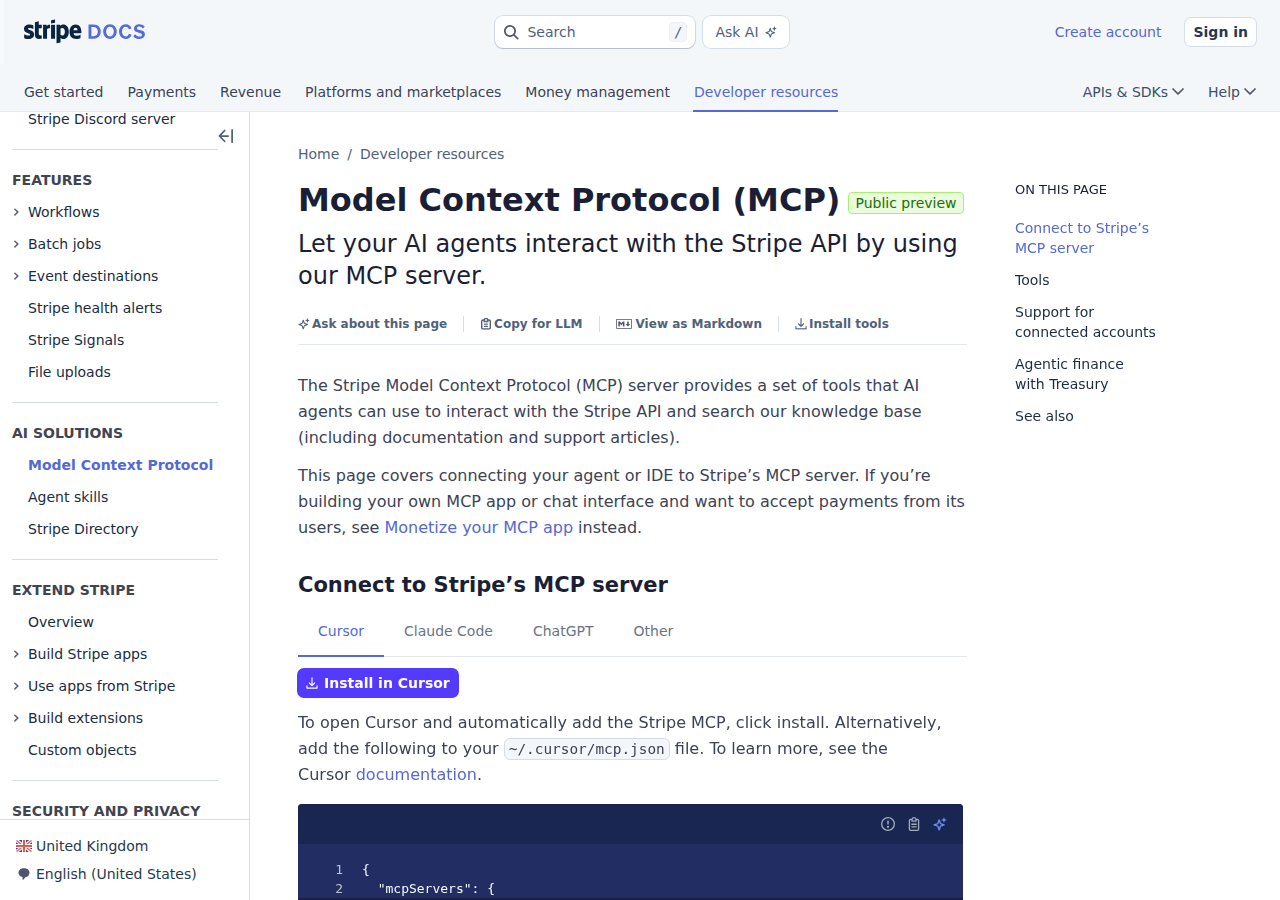
Why this matters for OpenClaw specifically: Stripe's docs show setup tabs for Cursor, Claude Code, and ChatGPT — the hosted/IDE clients. A self-hosted OpenClaw is in the same "any MCP-compatible client" category, so you can point it at the same
https://mcp.stripe.comendpoint and authenticate with a restricted key or OAuth, without waiting on any vendor certification. This is the same convenience pattern that makes Stripe one of the cleanest billing integrations to run yourself.
Path A: Official MCP Server at mcp.stripe.com (Recommended)
Endpoints and auth. Stripe's server is hosted at https://mcp.stripe.com as a Streamable HTTP MCP endpoint. You authenticate either with OAuth (interactive, a human approves once) or with a restricted API key as a Bearer token (autonomous/scheduled agents — no browser needed), which is ideal for OpenClaw running headless on a server.
Wire it into OpenClaw (self-hosted ~/.openclaw/settings.json), example for the headless/restricted-key case:
{
  mcpServers: {
    stripe: {
      url: "https://mcp.stripe.com",
      transport: "streamable-http",
      headers: {
        Authorization: "Bearer rk_live_51..."
      }
    }
  }
}
For the interactive path you'd instead run openclaw mcp login stripe and let OAuth handle it. Either way, once connected, the Stripe tools appear alongside your other OpenClaw tools.
A real prerequisite nobody warns you about: an administrator has to enable MCP access in the Stripe Dashboard at Settings → MCP (separate switches for live and sandbox mode). If this isn't turned on, the server won't respond for you even with valid credentials — this trips people up constantly, so check it first.
Full set of MCP tools. The MCP server exposes a composable tool set (rather than one tool per endpoint, which would bloat the context window). The ones to know:
| MCP Tool | What It Does | Example OpenClaw Prompt |
|---|---|---|
stripe_api_search |
Search Stripe API methods by keyword | "Which endpoint returns a customer by email?" |
stripe_api_details |
Get required/optional params + types for any method | "What fields does create_refund need?" |
stripe_api_read |
Execute any GET — covers 60+ endpoints | "List active subscriptions" |
stripe_api_write |
Execute POST/PATCH/PUT/DELETE — create, update, refund | "Finalize invoice #in_abc" |
create_refund |
Dedicated, safest write operation | "Refund charge ch_xyz" |
get_balance_summary |
Interactive balance overview | "Give me today's balance summary" |
search_stripe_resources |
Stripe search API across customers, charges, invoices... | "Search customers matching 'acme'" |
search_stripe_documentation |
Search Stripe's docs/knowledge base | "How do I handle SEPA failed payments?" |
stripe_implementation_planner |
Guides product choices (payments, billing, marketplace) | "What API should I use to build a marketplace?" |
stripe_api_read + stripe_api_write together cover ~133 API methods, which is why the tool list stays small but the capability is huge.
What the MCP server does NOT cover (as of mid-2026): Stripe Connect platform-level operations (connected-account management, transfers, platform fees — the OAuth flow is per-user, not per-connected-account), Stripe Sigma scheduled queries, and webhook event processing (the server is request-response only, not event-driven). If you need any of those, fall back to the REST proxy path the base template describes.
Path B: Stripe Restricted Key + Skill File (For Fully Autonomous Agents)
The OAuth flow needs a human to approve once, which is fine for interactive Slack use. But scheduled jobs — the nightly revenue briefing, the churn watch, the dispute scan — run headless with no browser. For those, create a restricted API key in Stripe Dashboard → Developers → API Keys and grant it the minimum read permissions your agent needs (Customers, Subscriptions, Charges, Invoices, PaymentIntents, Balance — read only if it doesn't need to write).
Never hand an agent your account's secret key. A restricted key limits blast radius: if an agent prompt ever gets hijacked, the worst it can do is read data, not move money or issue refunds. This single habit is the difference between a scary integration and a boring, safe one.
Then write ~/.openclaw/skills/stripe.md documenting your account's specifics — default currency, your plans and prices, refund policy, and the query patterns your team actually uses (MRR snapshot, failed payments in last 24h, customer lookup by email, churn watch, dispute alert). That skill file is what turns a raw API connection into a useful assistant that knows your business, not just Stripe's.
Path C: Plain REST API Proxy + Skill File (Maximum Control)
This is exactly what the base template's steps describe — a thin proxy in front of api.stripe.com that handles auth, cursor pagination, and rate limits, plus a skill file. Use it when you're air-gapped, need custom caching, need Stripe Connect Stripe-Account header switching, or want to pre-calculate derived metrics (MRR, LTV, churn rate) that Stripe doesn't expose natively.
Real Use Cases: What a Stripe + OpenClaw Agent Actually Does
These are concrete workflows, not generic "automate your billing" filler.
1. Morning revenue briefing, posted to #finance automatically
Every morning at 9 AM, OpenClaw queries Stripe and posts a summary. The MRR figure is calculated in the agent's reasoning layer (Stripe doesn't expose MRR natively — see Pitfall 1):
📊 Revenue Briefing Yesterday's revenue: €4,820 from 38 charges · MRR €142,500 (↑3.2% MoM) New subscriptions: 12 (€3,720) · Cancellations: 4 (€1,180) Failed payments: 7 (€890) — 3 retryable, 4 need follow-up · Disputes: 1
2. Customer 360 — billing context on demand
A support agent pastes a customer email in #support and OpenClaw returns, in one thread: customer since date, active subscriptions and plans, last 5 charges with amounts, open invoices, disputes, payment method. No dashboard logins needed, no tab-switching.
3. Failed payment triage
Every 4 hours, scan for PaymentIntents with status=requires_payment_method in the last 24h and group them: retryable (Stripe will auto-retry), action-needed (expired cards), and ready-to-email. OpenClaw can even draft the outreach for the expired-card group.
4. Churn early-warning
Weekly, analyze subscription cancellations and surface patterns: "3 of 5 who churned had a failed payment the week before, and nobody followed up." That single insight changes how you do renewals outreach.
5. Cross-tool financial intelligence
Because OpenClaw can consume multiple MCP servers at once, a monthly review can mix Stripe (revenue/MRR/churn/refund rate) with HubSpot (pipeline, deal size, sales cycle) and your analytics (trial → paid conversion). One Slack thread with a real business review, not five dashboards.
Stripe-Specific Pitfalls (What Generic Guides Miss)
These are the gotchas that actually bite teams — the kind a surface-level "connect an API" tutorial won't warn you about.
-
MRR is not a native Stripe metric — and agents calculate it wrong silently. There is no
GET /v1/mrrendpoint. You have to derive it from active subscriptions:unit_amount × quantity / interval, annual divided by 12, exclude trialing/paused/incomplete, and remembercancel_at_period_end=truesubs still count until the period ends. Get any of that wrong and your "MRR" is off by 20-40% with no error message telling you. Fix: pre-calculate MRR in a nightly job and have the agent read the cached value, not the raw subscription list. -
Test mode vs live mode is a silent data gap. Test and live API keys are completely separate, and nothing in the API response tells you which mode you're in — the data simply isn't there. Wire OpenClaw to a test key by accident and it returns empty results for real customers, and it looks like Stripe is broken rather than misconfigured. Fix: add a smoke test — query
get_stripe_account_infoand verify the account ID matches production before trusting any output. -
Stripe uses cursor pagination, not page numbers. Every list endpoint paginates with
starting_after+has_more, notpage=2. LLMs default to offset-style thinking and will return an incomplete list without noticing. Fix: document the pagination loop (limit=100, followhas_morewithstarting_after) in your skill file so the agent completes the full traversal. -
Idempotency is not automatic for AI agents. Stripe supports idempotency keys so a retried
POSTdoesn't duplicate — but an agent doesn't generate them unless told to. A timed-outcreate_customerfollowed by a retry creates a duplicate. Fix: make it standard operating procedure to attach a UUID idempotency key to every write, and include the date in scheduled job keys (so "Wednesday's briefing" re-run doesn't double-post). -
Restricted keys can't touch Stripe Connect. If you run a Connect platform (marketplace, SaaS billing for connected accounts), restricted keys and the MCP server's per-user OAuth both hit a wall — Connect needs a platform-level key and the
Stripe-Accountheader. This is the one scenario where the proxy (Path C) genuinely wins. -
Rate limits are per-key, and every agent shares them. Live-mode limits are ~100 read ops/sec / 25 write ops/sec per API key, not per account. Multiple OpenClaw agents on one restricted key compete for the same budget; test mode is even lower. Fix: stagger scheduled workflows (don't run briefing, churn check, and dispute scan in the same minute), or use per-user OAuth (Path A) which gives each teammate their own session and budget.
-
The MCP server has no webhook integration. Stripe fires real-time events (
charge.succeeded,invoice.payment_failed) via webhooks, but the MCP server is request-response only. If you want OpenClaw to react instantly to a big charge or a new dispute, you need a separate webhook → OpenClaw bridge (~50 lines of Express), not the MCP server. -
MCP access must be enabled in the dashboard first. Settings → MCP, separately for live and sandbox, and it can take a few minutes to propagate. Everyone writes config and gets a confusing error before realizing the switch was off. Check this before debugging anything else.
Also read
- Connecting OpenClaw with HubSpot: A Practical Guide — CRM + billing paired with Stripe for cross-tool financial intelligence
- Connecting OpenClaw with QuickBooks: A Practical Guide — the accounting counterpart, for receivables and cash-flow view
- How to Connect Stripe to OpenClaw: Setup, Models, and Workflow Guide — the setup-focused cross-reference with full MCP tool reference and decision matrix
- How to Connect Stripe to ChatGPT — the ChatGPT-side Stripe integration
- Stripe AI Automation — AI automation workflows for Stripe teams
Skip All of This — Use Cody Instead
Cody has Stripe integration built in. Ask about subscriptions, failed payments, refunds, invoices, and billing health from Slack without wiring up the API yourself.
Related Guides
- Connecting OpenClaw with Shopify: A Practical Guide
- Connecting OpenClaw with Quickbooks: A Practical Guide
- Connecting OpenClaw with Hubspot: A Practical Guide
Need the model-flexible version? See: How to Connect Stripe to OpenClaw: Setup, Models, and Workflow Guide.