If you're trying to use Notion with ChatGPT, the real question usually isn't "can these two technically work together?" It's how to make ChatGPT useful inside a Notion workflow without getting vague, generic output back.
That's the useful framing.
ChatGPT is strongest when you give it the right context, a clear job, and a structured output format. Notion brings the operational context. When the two are used well together, you get faster triage, better summaries, cleaner drafts, and more consistent decisions.
Notion MCP: The Official Way to Connect Notion to ChatGPT
In April 2026, Notion launched Notion MCP (Model Context Protocol) — an official integration layer that lets AI apps like ChatGPT, Claude, and Cursor read from and write to your Notion workspace in real time. This is the closest thing to a native Notion-ChatGPT connector available today.
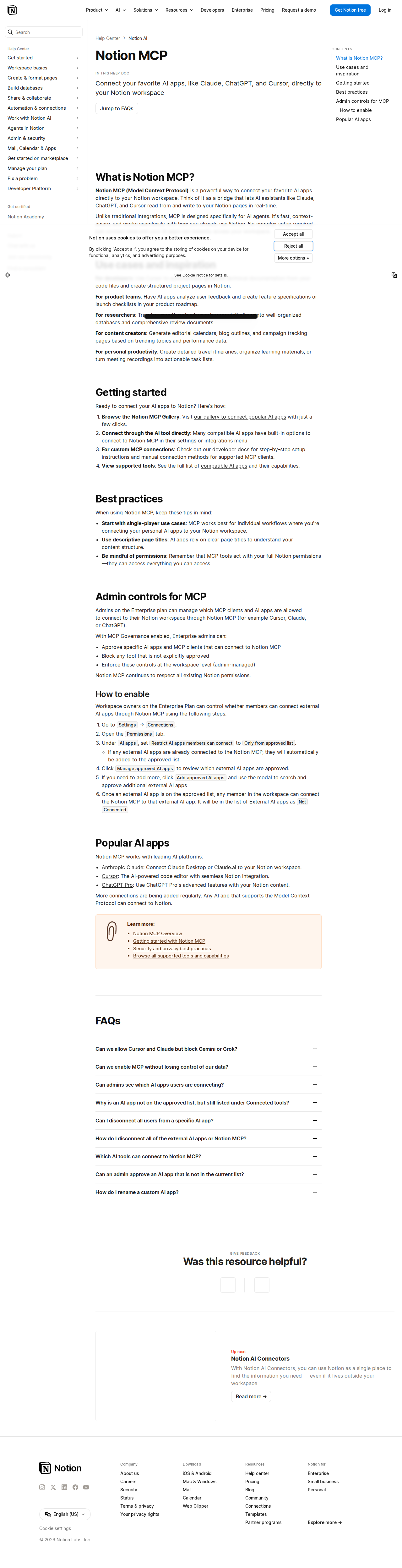
What Notion MCP Lets You Do Inside ChatGPT
Once connected, ChatGPT can interact with your Notion workspace the same way you do:
- Search across pages and databases — Ask ChatGPT "Find my Q2 planning doc" and it pulls the relevant page
- Read page content — ChatGPT can digest meeting notes, project specs, wikis, and research docs
- Create new pages — Draft a page from conversation, like "Turn this brainstorm into a structured Notion page"
- Update databases — Add rows, update properties, create database entries from ChatGPT output
- Query databases with filters — "Show me all tasks assigned to me that are overdue"
It's a real-time, two-way connection. ChatGPT doesn't just talk about your Notion content — it reads and writes it.
How to Set Up Notion MCP with ChatGPT
Setting it up takes under two minutes:
- Make sure you're on a paid ChatGPT plan — Notion MCP works with ChatGPT Plus ($20/mo) and Pro ($200/mo). It was initially Pro-only but expanded to Plus in mid-2025.
- Go to ChatGPT Settings → Connectors — Navigate to chatgpt.com/#settings/Connectors
- Click "Add Connector" and paste the Notion MCP URL:
https://mcp.notion.com/mcp - Complete the OAuth flow — Choose which workspace to connect, review the permissions, and authorize
- Grant page-level access — Notion requires you to explicitly share pages/databases with the integration. Go to any page, click
...→ Connections → add the MCP connection

What the Connection Actually Looks Like in Practice
Once connected, you don't need to copy-paste Notion content into ChatGPT anymore. You just ask:
You: "What's on my agenda for this week? Check my Notion tasks database and summarize the top 5 priorities."
ChatGPT queries your tasks database, filters by this week, and returns a ranked summary — all without you opening Notion.
You: "Create a new page in my Meeting Notes database for the design review tomorrow. Title: 'Design Review — June 26'. Add a template section for attendees, agenda, and action items."
ChatGPT creates the page in the right database, formatted and ready to go.
You: "Search my Notion workspace for anything about the rebranding project and give me a status update."
ChatGPT searches across pages and databases, compiles the findings, and presents a coherent status.
How Notion MCP Compares to Other Integration Methods
Notion MCP isn't the only way to connect Notion and ChatGPT. Here's how it stacks up against the alternatives:
| Method | Best For | Read Notion | Write to Notion | Setup Time | Cost |
|---|---|---|---|---|---|
| Notion MCP + ChatGPT | Individual productivity, real-time read/write | ✅ Yes | ✅ Yes | ~2 min | ChatGPT plan ($20-$200/mo) |
| Zapier | Automated content workflows | ✅ Yes | ✅ Yes | ~15 min | Free plan + API tokens |
| Make (Integromat) | Complex multi-step automations | ✅ Yes | ✅ Yes | ~20 min | Free plan + API tokens |
| Notion API + OpenAI API | Fully custom integrations | ✅ Yes | ✅ Yes | Hours | API usage costs |
| Windsor.ai MCP connector | No-code MCP alternative | ✅ Yes | Limited | ~5 min | Paid |
Zapier: Best for Scheduled Automation
If you need ChatGPT to process Notion content on a schedule — like "every Monday morning, summarize last week's meeting notes" — Zapier is a better fit than MCP. The Notion MCP connection is conversational (you ask, it does), while Zapier is trigger-based (time or event → action).
Common Zapier + Notion + ChatGPT workflow:
- Trigger: New database item in Notion
- Action: Send content to ChatGPT for classification or summarization
- Action: Update the Notion item with ChatGPT's output
Notion API + OpenAI: Most Control, Most Work
For developers who need complete control, calling the Notion API directly from an OpenAI-powered script gives you unlimited flexibility. But you'll be writing OAuth flows, handling rate limits, parsing Notion's block-based JSON structure, and managing your own error handling. The Notion MCP server abstracts all of that away.
Real Use Cases for Notion + ChatGPT
1. Meeting Notes → Action Items (Automated)
Pain point: You take great notes in Notion, but turning them into actionable tasks means copy-pasting into a task tracker or manually creating database entries.
With MCP + ChatGPT:
"Take my meeting notes from the June 25th product review page and create separate task entries in my Action Items database for each decision made, with due dates and assignees."
ChatGPT reads the page, identifies decisions, and creates properly formatted database entries — no manual transcription.
2. Research Synthesis Across Workspaces
Pain point: Your team has knowledge spread across dozens of Notion pages, databases, and wikis. Finding the right information for a specific question means searching manually.
With MCP + ChatGPT:
"Search all my Notion pages for mentions of 'pricing strategy' and 'competitor analysis' from the last 3 months. Give me a bulleted summary of what we know and what gaps exist."
ChatGPT cross-references multiple pages and delivers a synthesized response — way faster than clicking through search results.
3. Content Calendar Management
Pain point: You plan content in a Notion database but drafting happens elsewhere. Every piece requires manual context-switching.
With MCP + ChatGPT:
"Pull the next 5 content ideas from my Blog Content database that are in 'draft' status. For each one, write a 3-bullet outline and update the status to 'outline ready'."
ChatGPT reads the database, generates drafts, and writes updates back — all in one conversation.
4. Onboarding Documentation on Demand
Pain point: New team members ask the same questions. You have the answers in Notion, but finding them takes effort.
With MCP + ChatGPT:
"A new engineer is joining the platform team tomorrow. Search our Notion onboarding docs and create a personalized 30-60-90 day checklist for a backend engineer."
ChatGPT reads your onboarding docs and generates a role-specific plan — something a static Notion page can't do.
Common Pitfalls When Connecting Notion to ChatGPT
1. The "Share Every Page" Problem
Notion MCP doesn't automatically grant ChatGPT access to your entire workspace. You have to explicitly share individual pages and databases with the integration. This is a security feature, not a bug — but it means that if you forget to share a page, ChatGPT will tell you "I couldn't find that" even if it exists in your workspace.
Fix: Create a "shared with AI" section in your workspace and proactively add new pages there, or share entire database views rather than individual pages.
2. Rich Block Types Get Lost in Translation
Notion's API returns content as structured JSON — tables, toggles, callouts, synced blocks, embedded databases. ChatGPT can read plain text blocks just fine, but complex layouts (nested toggles, multi-column databases, inline math) may not translate well. The AI might summarize a table incorrectly or miss content inside collapsed sections.
Fix: For critical content, keep it in simple text blocks and bullet lists. Save complex layouts for human consumption only.
3. ChatGPT Acts With Your Full Permissions
When you connect Notion MCP, ChatGPT operates with your Notion permissions — it can access, modify, or delete anything you can. If you're a workspace admin who can delete the company wiki, ChatGPT technically can too.
Fix: If you're concerned, create a separate Notion integration with limited capabilities (read-only, or scoped to specific databases) instead of using the full MCP connector. Or use a dedicated "AI workspace" for experimentation.
4. Rate Limits on API Calls
Notion's API enforces rate limits (typically 3 requests per second for the MCP server). If you ask ChatGPT to "update all 500 items in my database," it will hit the rate limit and some operations will fail silently.
Fix: Batch your requests. Instead of "update everything," ask for "update the top 10 priority items." ChatGPT MCP handles batching automatically for reasonable workloads, but be mindful of volume.
5. ChatGPT Pro Was Required — Now It's Not (Sort Of)
Notion MCP originally required a ChatGPT Pro subscription ($200/month). This changed in mid-2025 — ChatGPT Plus ($20/month) now supports MCP connectors. However, some Notion-specific features (like write-back to databases with complex filters) may still require Pro depending on OpenAI's feature gating.
Fix: If you're on Plus and the connector doesn't appear, check OpenAI's latest documentation. The MCP connector rollout has been staged.
Which Path Should You Choose?
| Scenario | Recommendation |
|---|---|
| You want real-time Notion access inside ChatGPT | Notion MCP — native, free (with ChatGPT sub), 2-minute setup |
| You need scheduled automations | Zapier — trigger-based, works while you sleep |
| You want your whole team using Notion in Slack | Cody — dedicated Notion assistant embedded where your team already works |
| You're a developer building a custom integration | Notion API + OpenAI API — full control, unlimited flexibility |
For most individual users, Notion MCP + ChatGPT is the cleanest path. It's official, it's fast to set up, and it handles both reading and writing without any third-party middleware.
For teams, the equation changes — you want the Notion knowledge accessible in Slack, not just in one person's ChatGPT session. That's where a dedicated Notion AI assistant makes more sense.
What "Notion with ChatGPT" Usually Means
In practice, teams tend to use ChatGPT with Notion in one of four ways:
- Summarising activity, records, conversations, or changes from Notion
- Classifying items such as tickets, leads, tasks, issues, or opportunities
- Drafting replies, updates, reports, documentation, or next steps
- Reasoning over context to suggest priorities, actions, or likely issues
The key is to avoid treating ChatGPT like magic. It needs the relevant Notion context in the prompt - and it works best when you tell it exactly what good output looks like.
Good Use Cases for Notion + ChatGPT
1. Turn raw Notion context into a useful summary
Paste or pipe in the relevant records, notes, messages, or metrics from Notion, then ask ChatGPT to extract only what matters: key changes, risks, blockers, patterns, or action items.
2. Standardise messy workflows
If your team handles similar decisions repeatedly inside Notion, ChatGPT can apply the same rubric every time: classify, explain briefly, and return a structured next step.
3. Draft faster without starting from zero
Use ChatGPT to produce first drafts grounded in the Notion context - support replies, internal updates, status summaries, sales follow-ups, or operating notes.
4. Create reusable prompt-driven operating procedures
Once you find a prompt that works well for Notion, save it as a repeatable workflow so the whole team gets more consistent output.
A Simple Setup Pattern
A practical way to use ChatGPT with Notion looks like this:
- Pull the right context from Notion
- Give ChatGPT one clear task
- Ask for a structured response
- Have a human review anything customer-facing or high-risk
That last point matters. ChatGPT is useful for acceleration, but for anything sensitive - customer communication, financial interpretation, account changes, or production actions - keep a human in the loop.
Copy-Paste Prompts for Notion
Summary prompt
You are helping me work inside Notion. Summarise the context below into 5 bullets: what changed, what matters, what is blocked, and what needs action next. If anything is unclear, say what is missing.
Classification prompt
Review this Notion item and classify it into the best category. Return JSON with: category, confidence, rationale, and next_action. Keep rationale under 50 words.
Drafting prompt
Use the Notion context below to draft a concise response. Keep it specific, avoid made-up details, and list any assumptions separately.
Executive brief prompt
Turn this Notion activity into a short update for leadership: what happened, why it matters, current risks, and recommended next steps.
Where This Breaks Down
Most Notion + ChatGPT workflows fail for predictable reasons:
- Too little real context is provided
- The prompt asks for too many things at once
- The output format is vague
- The team expects ChatGPT to know live Notion data it has not actually been given
- No review step exists for important actions
The fix is usually simple: give better source context, narrow the task, and require a schema or fixed structure in the response.
If You Want This Embedded in the Workflow
You can absolutely use ChatGPT manually with exported Notion context. That works well for one-off tasks and prototyping.
But if you want the workflow to feel operational - available to the team, connected to live systems, repeatable, and embedded where work already happens - you usually want something more integrated.
Want Notion-Style Workflows Without Manual Prompt Copy-Paste?
Cody gives your team a Notion AI assistant in Slack, so people can search docs, summarise meeting notes, review database context, and turn workspace knowledge into clear answers and updates without hunting through Notion.
Related ChatGPT Guides
- How to Use Confluence with ChatGPT
- How to Use Jira with ChatGPT
- How to Use Google Workspace with ChatGPT
Need a more automation-focused angle instead? See: Notion AI Automation.
More Notion + AI Resources
- Cody AI Assistant for Notion — Cody's dedicated Notion integration features
- Connect Notion to OpenClaw — complete DIY integration guide