If you're trying to use Intercom with ChatGPT, the real question usually isn't "can these two technically work together?" It's how to make ChatGPT useful inside a Intercom workflow without getting vague, generic output back.
That's the useful framing.
ChatGPT is strongest when you give it the right context, a clear job, and a structured output format. Intercom brings the operational context. When the two are used well together, you get faster triage, better summaries, cleaner drafts, and more consistent decisions.
The Intercom Synced Connector: Native ChatGPT Integration
In October 2025, OpenAI launched the Intercom synced connector — the official, first-party way to bring your Intercom data directly into ChatGPT. This isn't a third-party workaround or a hacky API integration. It's a read-only connector that syncs your conversations, tickets, and help center content into ChatGPT, where you can query it in plain language.
What the Connector Does Inside ChatGPT
The connector eliminates the "context hop" — that moment where you know a customer detail lives somewhere in Intercom, but you have to stop what you're doing in ChatGPT, switch tabs, search, scroll, and copy-paste the right snippet back into your conversation.
With the Intercom connector enabled, you can ask things like:
- Pre-meeting prep: "Help me prepare for a meeting with customer X by updating me on outstanding issues raised in the last four weeks."
- Feature validation: "Find positive Intercom conversations mentioning our new feature Y, and add customer quotes to my campaign brief in Drive."
- Product research: "Build a list of the most common feature requests based on customer inquiries."
- Volume awareness: "Summarize all open conversations from the past 24 hours in Intercom."
Setup Is Minimal
Setting up the connector takes about 30 seconds:
- In ChatGPT, open Settings → Connectors
- Search for "Intercom" and select it
- Sign in with your Intercom account to approve the secure connection
That's it. No API tokens to copy. No webhook URLs to configure. It's an authenticated OAuth flow that respects your existing Intercom permissions — users only see conversations and data they already have access to in Intercom.
Availability: The Intercom connector works with ChatGPT Business, Enterprise, and Edu plans. It's not available on free or Plus plans. The connector is read-only — ChatGPT can read your Intercom data but cannot create, update, or delete conversations, tickets, or help center articles.
Real Example: From Intercom Search to Executive Brief in 2 Minutes
Here's a real workflow pattern teams run with the connector:
- Pull context: "Find all Intercom conversations tagged 'enterprise-bug' from the last 7 days and summarize the pattern."
- Sharpen the answer: "Now narrow to conversations where the customer mentioned 'timeout' or 'slow', and tell me which accounts are affected, ranked by MRR."
- Produce the output: "Turn that into a 1-paragraph executive update for our VP of Engineering. Include: impact summary, affected accounts, recommended next step."
Before the connector, this would require: logging into Intercom → applying filters → reading each conversation individually → opening a separate tool to format the update → manually cross-referencing account data. Now it's a single, flowing conversation.
Alternative Path: Intercom MCP Server (Official)
If you need programmatic API access (not just synced indexing) or you're building AI agents that need to interact with Intercom, the official Intercom MCP server is a better fit than the ChatGPT connector.
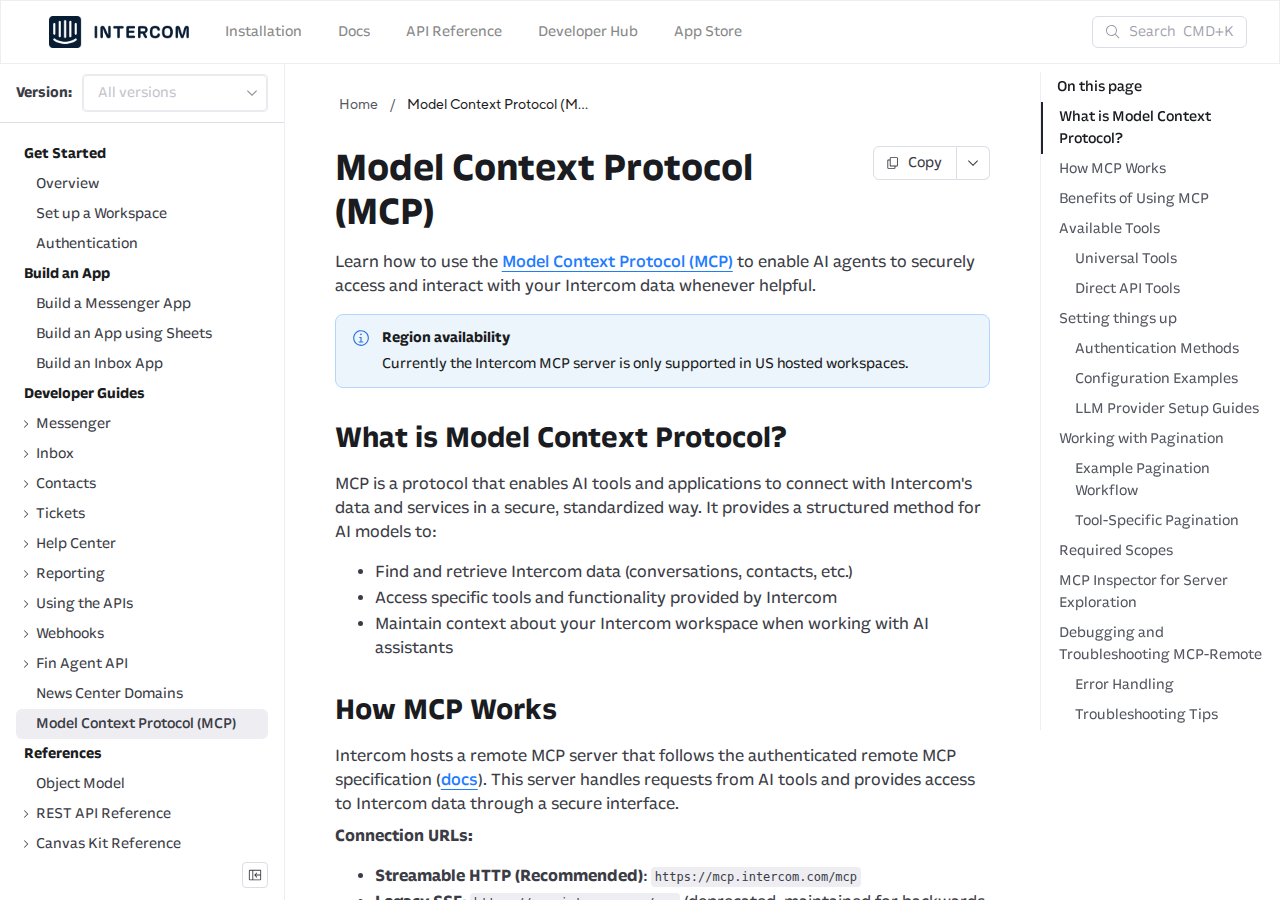
Intercom hosts a remote MCP server at `mcp.intercom.com` that follows the authenticated remote MCP specification. It exposes 13 tools across universal search + direct API operations:
| Tool | What It Does |
|---|---|
| `search` | Universal search across conversations and contacts using query DSL |
| `fetch` | Retrieve full details for specific resources by ID |
| `search_conversations` | Advanced conversation search with filters (state, assignee, tags) |
| `get_conversation` | Full conversation details including all parts and metadata |
| `search_contacts` | Contact search by name, email, phone, custom attributes |
| `get_contact` | Complete contact info including custom attributes and activity |
Plus 7 more tools for tickets, companies, help center articles, and data export — giving you programmatic access to nearly every Intercom resource.
MCP Server Configuration
For OAuth authentication (recommended):
```json { "mcpServers": { "intercom": { "command": "npx", "args": ["mcp-remote", "https://mcp.intercom.com/mcp"] } } } ```
For Bearer token authentication (CI/CD or automated workflows):
```json { "mcpServers": { "intercom": { "command": "npx", "args": ["mcp-remote", "https://mcp.intercom.com/mcp", "--header", "Authorization:${AUTH_HEADER}"], "env": { "AUTH_HEADER": "Bearer YOUR_INTERCOM_API_TOKEN" } } } } ```
Region limitation: The Intercom MCP server is currently only supported in US-hosted workspaces. EU-hosted workspaces will need to use the ChatGPT connector or manual API workflows.
Query DSL Patterns You'll Actually Use
The Intercom MCP search tool uses a query DSL. Here are the patterns that come up most often in real usage:
``` // Find all open email conversations object_type:conversations state:open source_type:email
// Conversations containing "refund" — shows real customer friction object_type:conversations source_body:contains:"refund" limit:20
// Contacts from a specific company domain object_type:contacts email_domain:"acme.com"
// Conversations assigned to a specific team object_type:conversations team_assignee_id:15 ```
Pagination tip: Results default to 5 per page (max 150 with `limit:`). When more results exist, the response includes a `_note` with the cursor. Add `starting_after:cursor_value` to fetch the next page.
Path 3: Intercom's Built-In AI (Fin) vs. ChatGPT
Intercom has its own AI agent called Fin, powered by a mix of models including OpenAI's GPT-4 plus Intercom's proprietary AI technologies. Fin is purpose-built for customer-facing support automation — answering customer questions from your help center, drafting replies for agents, and triaging conversations.
The distinction matters:
| Use Case | Best Tool |
|---|---|
| Answer customer questions automatically | Fin — native, purpose-built, respects macros and SLAs |
| Analyze support trends for product decisions | ChatGPT connector — ask arbitrary analytical questions |
| Build an AI agent that reads AND writes to Intercom | MCP server — programmatic read/write API access |
| Draft internal executive briefings from support data | ChatGPT connector — natural language querying, no API knowledge needed |
| Automate support workflows from Slack | Cody — AI assistant with Intercom integration, no connector setup |
Fin and ChatGPT are complementary, not competing. Fin handles the customer-facing automation inside Intercom. ChatGPT with the connector handles the cross-functional, analytical work that other teams (product, marketing, leadership) need from support data.
Real Intercom + ChatGPT Use Cases
1. Customer Health Check Before QBRs
Before: Manually search for recent conversations, read through tickets, cross-reference with CRM, build a summary doc.
With the connector:
You: "Pull all conversations and tickets from Acme Corp in the last 90 days. Summarize: what issues came up, how quickly they were resolved, and any recurring themes I should address in the QBR."
ChatGPT reads tagged Acme Corp conversations, identifies pattern: "3 billing-related tickets in Q2, all resolved within 4 hours, but a 5th about SSO that took 8 days." That's the signal you need going into the call.
2. Product Feedback Mining
You: "Search Intercom conversations from the last 30 days that mention 'export', 'reporting', or 'dashboard.' Categorize the requests and rank by frequency."
Instead of combing through support tags (which are only as good as your team's tagging discipline), ChatGPT searches the raw conversation text — catching feature requests that might not have been tagged properly.
3. Onboarding Friction Detection
You: "Find conversations from new customers (created in last 60 days) that mention confusion about setup, getting started, or onboarding. What are the top 3 friction points?"
This surfaces the onboarding gaps your product team needs to fix — directly from customer language, not from internal assumptions.
4. Support Quality Audits
You: "Pull 10 random closed conversations from last week. For each, tell me: was the customer's question fully answered? Was the tone appropriate? Would you recommend any follow-up?"
A lightweight QA loop that doesn't require a dedicated QA tool or manual sampling.
Common Pitfalls When Connecting Intercom to ChatGPT
1. The Connector Is Read-Only (No Write-Back)
This is the #1 source of confusion. The ChatGPT connector can read your Intercom data but cannot create, update, or delete anything. If you're planning to draft replies in ChatGPT and post them to Intercom, you'll need the MCP server path — or you'll be copy-pasting. Set expectations with your team: the connector is for analysis and context, not for actions.
2. Initial Sync Time Is Non-Trivial
When you first connect, the connector needs to sync your Intercom data. For large workspaces with thousands of conversations, this can take minutes to hours. The connector won't surface recent data until the initial sync completes. Connect it during off-peak hours and let it sync overnight.
3. Permission Changes Lag
If you change a team member's Intercom permissions (e.g., restricting which inboxes they can see), those changes may not take effect in ChatGPT until the next sync cycle. Don't rely on the connector for real-time permission enforcement — it's a data access layer, not a security boundary.
4. Free-Text Search ≠ Structured Filtering
The Intercom MCP's search DSL works well when you know your field names (`source_body`, `team_assignee_id`, `email_domain`). But the ChatGPT connector relies more on natural language understanding. Complex queries like "show me conversations from Enterprise-tier customers who mentioned 'security' AND 'API'" may return broader results than you intended. Start specific, then narrow down.
5. "Fin Does Some of This Already" Blind Spot
Teams with Fin enabled sometimes skip the ChatGPT connector entirely, thinking Fin covers everything. Fin is excellent at customer-facing automation, but it won't produce a cross-functional trend report for your product team or an executive briefing for your VP. The connector fills the gap Fin doesn't cover: making support data usable for the rest of the company.
Which Path Should You Choose?
| Scenario | Recommendation |
|---|---|
| You need to query support data in plain English for analysis | ChatGPT connector — zero-setup, natural language |
| You're building an AI agent that reads/writes Intercom data | MCP server — 13 tools, full API surface |
| You want customer-facing AI that answers questions automatically | Intercom Fin — purpose-built for support automation |
| You want the team using this daily in Slack without connector overhead | Cody — Intercom assistant in Slack, built-in |
For most teams, the fastest win is enabling the ChatGPT connector for cross-functional access to support data, while keeping Fin for customer-facing automation. The MCP server path is the right choice when you need programmatic read/write access — for example, auto-creating tickets from monitoring alerts or building a custom triage agent.
For the full MCP setup guide with Intercom, see: Intercom MCP Connection Guide
What "Intercom with ChatGPT" Usually Means
In practice, teams tend to use ChatGPT with Intercom in one of four ways:
- Summarising activity, records, conversations, or changes from Intercom
- Classifying items such as tickets, leads, tasks, issues, or opportunities
- Drafting replies, updates, reports, documentation, or next steps
- Reasoning over context to suggest priorities, actions, or likely issues
The key is to avoid treating ChatGPT like magic. It needs the relevant Intercom context in the prompt - and it works best when you tell it exactly what good output looks like.
Good Use Cases for Intercom + ChatGPT
1. Turn raw Intercom context into a useful summary
Paste or pipe in the relevant records, notes, messages, or metrics from Intercom, then ask ChatGPT to extract only what matters: key changes, risks, blockers, patterns, or action items.
2. Standardise messy workflows
If your team handles similar decisions repeatedly inside Intercom, ChatGPT can apply the same rubric every time: classify, explain briefly, and return a structured next step.
3. Draft faster without starting from zero
Use ChatGPT to produce first drafts grounded in the Intercom context - support replies, internal updates, status summaries, sales follow-ups, or operating notes.
4. Create reusable prompt-driven operating procedures
Once you find a prompt that works well for Intercom, save it as a repeatable workflow so the whole team gets more consistent output.
A Simple Setup Pattern
A practical way to use ChatGPT with Intercom looks like this:
- Pull the right context from Intercom
- Give ChatGPT one clear task
- Ask for a structured response
- Have a human review anything customer-facing or high-risk
That last point matters. ChatGPT is useful for acceleration, but for anything sensitive - customer communication, financial interpretation, account changes, or production actions - keep a human in the loop.
Copy-Paste Prompts for Intercom
Summary prompt
You are helping me work inside Intercom. Summarise the context below into 5 bullets: what changed, what matters, what is blocked, and what needs action next. If anything is unclear, say what is missing.
Classification prompt
Review this Intercom item and classify it into the best category. Return JSON with: category, confidence, rationale, and next_action. Keep rationale under 50 words.
Drafting prompt
Use the Intercom context below to draft a concise response. Keep it specific, avoid made-up details, and list any assumptions separately.
Executive brief prompt
Turn this Intercom activity into a short update for leadership: what happened, why it matters, current risks, and recommended next steps.
Where This Breaks Down
Most Intercom + ChatGPT workflows fail for predictable reasons:
- Too little real context is provided
- The prompt asks for too many things at once
- The output format is vague
- The team expects ChatGPT to know live Intercom data it has not actually been given
- No review step exists for important actions
The fix is usually simple: give better source context, narrow the task, and require a schema or fixed structure in the response.
If You Want This Embedded in the Workflow
You can absolutely use ChatGPT manually with exported Intercom context. That works well for one-off tasks and prototyping.
But if you want the workflow to feel operational - available to the team, connected to live systems, repeatable, and embedded where work already happens - you usually want something more integrated.
Want Intercom-Style Workflows Without Manual Prompt Copy-Paste?
Cody gives your team an Intercom AI assistant in Slack, so people can review inbox health, summarise conversation history, draft replies, and surface recurring customer pain without managing access tokens or building the inbox workflow glue themselves.
Related ChatGPT Guides
Need a more automation-focused angle instead? See: Intercom AI Automation.
More Intercom + AI Resources
- Cody AI Assistant for Intercom — Cody's dedicated Intercom integration features
- Connect Intercom to OpenClaw — complete DIY integration guide