If you're searching for "how to connect Freshdesk to OpenClaw", the real question is usually not just whether the connection is possible. It's how to make Freshdesk usable inside an OpenClaw workflow with the right model, the right context, and the right level of control.
That's the practical framing.
OpenClaw gives you the orchestration layer: connectors, skills, tools, prompts, approvals, and the ability to run workflows where your team already works. Freshdesk provides the domain context. The integration becomes valuable when those two pieces are connected cleanly.
Freshdesk + OpenClaw: What's Actually Happening Here
When someone searches for "how to connect Freshdesk to OpenClaw," they're asking one of two things. Either they run OpenClaw on their own infrastructure and need a reliable path into their support queue, or they use Cody (managed OpenClaw) and want to understand the plumbing underneath.
Freshdesk is where tickets, contacts, companies, groups, and solution articles live for thousands of support teams. Connecting it to OpenClaw means your agent can triage the queue every morning, spot overdue or at-risk tickets, summarise a customer's history in one Slack message, draft replies in your brand voice, and surface recurring product pain — without living inside the Freshdesk UI all day.
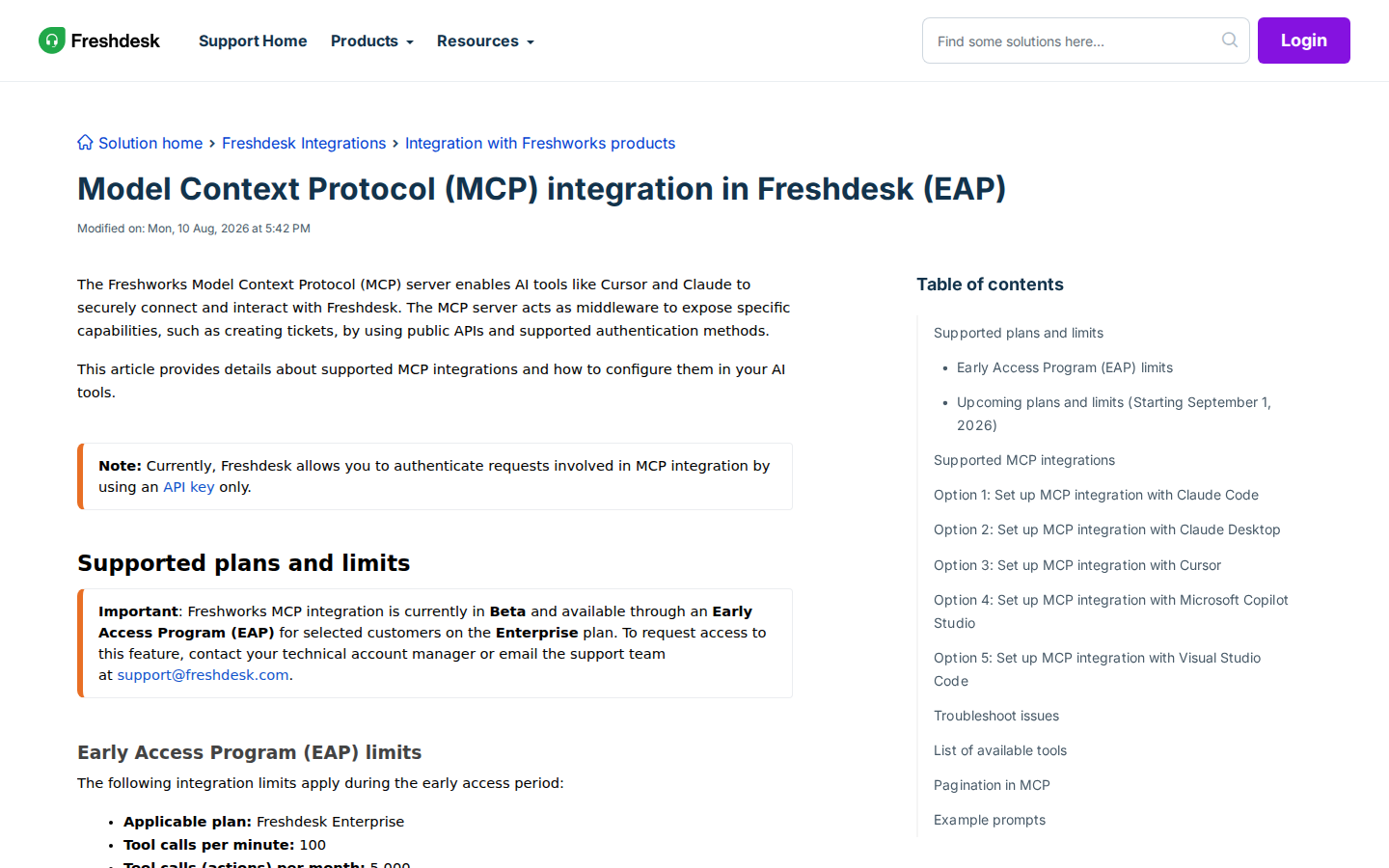
The landscape here changed meaningfully in 2026. Freshworks now ships an official MCP server for Freshdesk, but it comes with two sharp caveats most listicles gloss over: it's Beta/EAP and Enterprise-only, and it authenticates with an API key only — there is no OAuth flow. That second point is the single most important thing to understand before you start, and it's why the honest answer usually still lands on a direct API proxy for production headless use.
Let's walk through what actually works as of late 2026.
Path A: Freshdesk's Official MCP Server (Beta / EAP, Enterprise Only)
Freshworks hosts an official MCP server that exposes Freshdesk capabilities (create tickets, fetch conversations, manage contacts and companies, search solution articles) via public APIs. It's a "remote" MCP endpoint hosted at your own Freshdesk domain:
https://<your-freshdesk-domain>/mcp
The Freshdesk docs frame this around Claude Code, Claude Desktop, Cursor, Microsoft Copilot Studio, and VS Code — but the MCP server follows the standard Model Context Protocol, so any MCP-compatible client can point at the same endpoint, including self-hosted OpenClaw. You aren't waiting on Freshworks to "certify" OpenClaw the way some hosted AI products work.
How this connects to OpenClaw: OpenClaw can consume remote MCP servers as tools. In your OpenClaw Gateway config, you'd register the Freshdesk MCP server over HTTP/Streamable transport with the API key in the authorization header:
{
  mcp: {
    servers: {
      freshdesk: {
        url: "https://yourdomain.freshdesk.com/mcp",
        transport: "streamable-http",
        headers: {
          Authorization: "YOUR_FRESHDESK_API_KEY"
        }
      }
    }
  }
}
Run openclaw mcp doctor freshdesk --probe to confirm the connection, then your agent can use the Freshdesk tools the authenticated API key is allowed to touch.
The Two Big Caveats (Read These First)
⚠️ Caveat #1 — Beta / EAP / Enterprise only. The Freshdesk MCP integration is in Beta and available through an Early Access Program for selected Enterprise-plan customers. You have to contact your technical account manager (or email support@freshdesk.com) to request access. If you're on Growth, Pro, or the free/Sprout plan, the MCP server simply isn't available to you yet — Path B is your route.
⚠️ Caveat #2 — API key auth only, no OAuth. Freshdesk currently authenticates MCP requests with an API key only. That single key becomes a shared credential: every tool call reaches Freshdesk as one identity, with full read/write scope for whatever that key (and its user's role) is allowed to do. There's no per-agent OAuth token, no scope-limiting, no "this agent can only read tickets" granularity. This matters for security and it matters for attribution — see the pitfalls section below.
EAP Rate Limits and the September 1, 2026 Change
During the Early Access period, the limits are tight:
| Limit | EAP Value |
|---|---|
| Applicable plan | Freshdesk Enterprise |
| Tool calls per minute | 100 |
| Tool calls (actions) per month | 5,000 |
| Tool permissions | Full tool access |
An "action" is one successful tool invocation — e.g. "fetch the conversation for ticket #1001" or "update company #11's name to Apple" each count as one. A single morning triage that lists 40 open tickets and pulls each one's detail could burn through a meaningful chunk of that 5,000 monthly budget fast. Starting September 1, 2026, Freshworks moves this onto tiered plans/add-ons (Freshdesk and Freshdesk Omni 2026) with per-plan rate limits and included action counts — so the exact numbers are in flux right now. Check the live doc before you commit to a monthly volume.
Path B: Freshdesk REST API Proxy + OpenClaw Skill File (Works Today, Any Plan)
For the majority of teams — anything below Enterprise, or anyone who wants full control and headless/cron reliability — the direct Freshdesk REST API v2 proxy remains the right answer, and it's the path the base OpenClaw template already assumes.
Step 1: Get Your Freshdesk API Key
Log into Freshdesk, click your profile picture → Profile Settings, and locate "View API Key" (you'll complete a captcha verification). Freshdesk uses the key as the username in HTTP Basic authentication; the password field is ignored (the convention is to pass "X" or anything non-empty). Your base URL is https://{your-domain}.freshdesk.com/api/v2.
Step 2: Understand the Key Endpoints
Freshdesk's REST API v2 is well-documented and predictable. The core surfaces your agent will touch:
| Resource | Method | Endpoint | Notes |
|---|---|---|---|
| List tickets | GET | /tickets |
Page-based; supports filter= presets (open, pending, resolved, overdue, etc.) |
| Filter tickets | GET | /tickets/filter |
Accepts predefined filters or query= custom filter queries |
| Get ticket | GET | /tickets/{id} |
Full detail including conversation history |
| Get ticket conversations | GET | /tickets/{id}/conversations |
Threaded replies, notes, and replies |
| Create ticket | POST | /tickets |
Requires requester email or ID |
| List contacts | GET | /contacts |
Filter by email=, state=, etc. |
| Get contact | GET | /contacts/{id} |
Requester profile + custom fields |
| List companies | GET | /companies |
Account-level context |
| List groups | GET | /groups |
Support group roster |
| List agents | GET | /agents |
Agent roster (IDs needed for assignment) |
| List/Get solution articles | GET | /solutions/categories … /solutions/articles/{id} |
Knowledge base lookup |
Step 3: Build the Proxy and Skill File
Build a thin proxy that accepts simple HTTP calls from OpenClaw and translates them into Freshdesk API calls, resolving agent IDs back to names, and write a ~/.openclaw/skills/freshdesk.md with your SLA targets, group IDs, and assignment logic:
# Freshdesk Skill

## Groups
- Support: group_id 21000012345
- Billing: group_id 21000067890

## SLA Targets
- First response: under 4 business hours
- Resolution: under 24h for normal priority, 8h for urgent

## Common Queries
- Open queue: GET /tickets/filter?filter=open
- Overdue watch: GET /tickets/filter?filter=overdue, check due_by vs now
- Customer history: GET /contacts?email={email} → GET /tickets?requester_id={id}

## Important
- Freshdesk returns agent IDs, not names — resolve before showing the model
- due_by is the SLA breach timestamp; compare against now, not created_at
Real Use Cases for a Freshdesk + OpenClaw Agent
Here's what support and success teams actually build once the connection works — specific to Freshdesk's data model and workflows.
1. Morning Queue Triage
Every morning the agent checks the Freshdesk queue and posts to #support:
📥 Freshdesk Status — Mon 17 Aug, 09:00 Open tickets: 64 (down from 71 Friday) Overdue / at SLA risk: 9 — 3 are urgent priority Unassigned: 11 — need triage Waiting on customer > 48h: 18 — ping scheduled ⚠️ Ticket #4821: Enterprise account "Acme Corp", 31h without agent reply, urgent, tagged "billing-dispute"
The agent pulls the open filter, checks due_by against the current time for SLA risk, cross-references requester company and priority, and formats the summary. The lead sees what needs attention in 30 seconds instead of clicking through Freshdesk views.
2. Customer 360° from One Query
An agent types a customer's email in Slack. OpenClaw pulls from Freshdesk:
- Contact profile (name, company, role, plan, custom fields)
- All past tickets (open and resolved) with one-line summaries
- Company-level context (how many other tickets is that account filing?)
- Relevant solution articles they might benefit from
- Group assignment history
All in a single thread. What used to be five Freshdesk views and manual piecing-together is now one query.
3. Weekly Support Health Report
Every Friday the agent generates a report for the leads:
📊 Support Health — Week 33 Tickets opened: 412 (↑6% WoW) Median first response: 3.1h (↓ from 3.9h) Median resolution: 21.4h (↑ from 18h — trending worse) SLA breaches: 14 (↑ from 6) Top issue tags: "login issues" (31%), "billing" (24%), "integration" (18%) Top accounts by volume: Acme Corp (11), Beta Inc (7), Gamma Ltd (6)
The agent aggregates by status, priority, and tag keyword, comparing week-over-week to surface drift before it becomes a problem.
4. Overdue-Ticket Early Warning
The agent polls the overdue filter and escalates:
🚨 Overdue Alert Ticket #4917: Urgent · "API rate limit blocking sync" · Acme Corp (Enterprise, $28K ARR) Opened: 52h ago · SLA breached: 16h ago Assigned: unassigned (was in Billing group) Recommended: Escalate to team lead, reach out to CSM, flag to product
This is the highest-value Freshdesk workflow because it catches breaches humans miss while clicking through the UI.
5. Recurring-Issue Mining for Product
Product managers don't live in Freshdesk, but they need the signal. Once a month:
📋 Product Feedback Digest — Aug 2026 Top issue themes (by ticket count):
- Bulk contact actions — 27 tickets, 5 from enterprise accounts
- Custom report builder — 21 tickets
- Slack notification granularity — 16 tickets Rising: "Bulk actions" went from 6 to 27 mentions this month Recurring tickets detected: 9 near-duplicate "login MFA" tickets — surface a fix
The agent clusters by tag and keyword across resolved tickets, turning unstructured support volume into a structured product signal.
Freshdesk-Specific Pitfalls (What Most Guides Miss)
These are the real-world gotchas from teams running Freshdesk integrations in production.
1. The API Key Is a Single Shared Identity — No Scoping
Freshdesk MCP (and the REST API v2) authenticate everything with one API key that acts as a single shared user. There's no OAuth, no per-agent tokens, no read-only vs read-write fine-grained scoping. Every tool call reaches Freshdesk as that one identity, with full access the key's role allows. If you give the key to three agents, you can't tell who did what, and a buggy prompt can create or delete tickets just as easily as read them. Fix: Use a dedicated service-account user for the agent key, restrict that user's role/permissions in Freshdesk to the minimum (e.g. no destructive admin rights), and route writes through human-review steps in OpenClaw where possible.
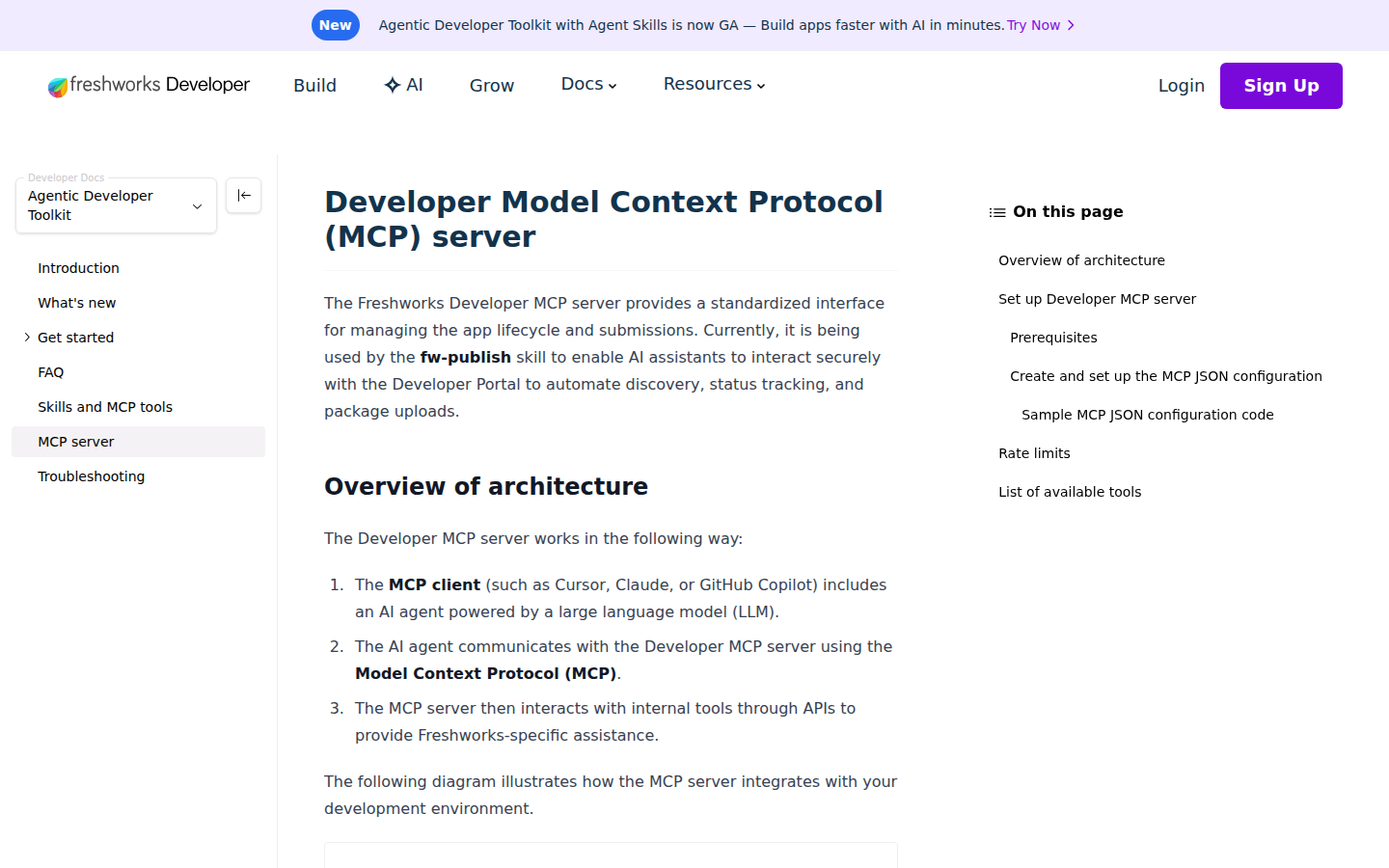
2. There Are TWO Official Freshworks MCP Servers — Don't Confuse Them
Freshworks actually ships two different MCP servers, and this is the #1 confusion vector:
- Freshdesk MCP server —
https://<your-freshdesk-domain>/mcp— the support data server (tickets, contacts, companies, articles). API-key auth, Beta/EAP, Enterprise-only. This is the one you want for a support assistant. - Freshworks Developer MCP server —
https://mcp.freshworks.dev/mcp— the app lifecycle server used by thefw-publishskill to manage Custom App submissions (list_custom_apps, submit_custom_app, add_app_version, get_app_status). Bearer-token auth via the Application Management Portal, 60 req/min. This one is for Freshworks app developers, not for reading your support queue.
Guides that say "point at mcp.freshworks.dev to get your tickets" are flat wrong. Verify which server you're actually configuring.
3. Filter API Is Not Arbitrary Search
The Freshdesk /tickets/filter endpoint accepts a fixed set of predefined filters or a custom filter query DSL — not free-form search across every field. For complex queue views (e.g. "all urgent tickets from enterprise accounts created in the last 7 days"), you often can't express that in a single filter — you'll fetch a broader set and filter client-side in your proxy. Fix: Understand the filter query syntax up front, and expect to do client-side refinement. Don't assume "the API will just search it."
4. Agent IDs, Not Names
Freshdesk returns agent IDs, not human-readable names, across tickets, assignments, and conversations. If your agent shows "assigned to agent #21000168800" to your team, that's useless. Fix: Resolve agent IDs to names in your proxy/skill file — cache the /agents roster and map IDs back before presenting anything to the model or to Slack.
5. Outbound Ticket Fields Are Immutable
Once a ticket is created, certain fields are effectively locked (Freshdesk restricts editing many ticket properties after creation, and outbound emails behave differently from replies). If your agent tries to "fix" a priority or requester and the change silently no-ops, this is usually why. Fix: Get the ticket shape right at creation time, and treat update operations as strictly additive (replies, notes, status, tags) rather than full field rewrites.
6. Conversations vs Threads Semantics
Freshdesk models the thread as a series of conversations (reply, note, or forward types) under a ticket. A "reply" goes to the customer; a "note" is internal-only. If your agent drafts something and doesn't know which type it's emitting, you can leak an internal note to a customer. Fix: Make the reply-vs-note distinction explicit in your skill file, and default to drafts that require human approval before sending customer-facing replies.
Decision Matrix: Which Path Should You Take?
| Scenario | Best Path | Why |
|---|---|---|
| Enterprise plan, got EAP access, interactive use | Official MCP — Path A | Zero infrastructure, hosted endpoint, Freshworks-maintained |
| Growth/Pro/Sprout plan | Proxy — Path B | MCP is Enterprise-only |
| Headless/cron agent (nightly triage) | Proxy — Path B | API key is stable for background use; MCP EAP limits are tight |
| Need full control + custom fields + scoping | Proxy — Path B | REST API v2 is more complete than the MCP tool surface |
| Small team, want Freshdesk agent in Slack today | Cody | Zero setup, Freshdesk connected in minutes, no API glue |
| Building Freshworks marketplace apps | Developer MCP — mcp.freshworks.dev | App lifecycle, not support data |
Related Pages
- Cody AI Assistant for Freshdesk — Cody's managed Freshdesk integration
- Connecting OpenClaw with Freshdesk — the integrations-collection guide to the same tool
- How to Connect Zendesk to OpenClaw — the competing support platform
- How to Connect Intercom to OpenClaw — another support tool in the same category
What “Connect Freshdesk to OpenClaw” Actually Means
In practice, connecting Freshdesk to OpenClaw usually involves four layers:
- Authentication so OpenClaw can securely access Freshdesk
- Tooling or proxy endpoints that expose the right Freshdesk actions and data
- Skills/instructions that tell OpenClaw how to reason over Freshdesk context
- Model selection so the assistant uses the right LLM for the job
That last piece matters more than most people expect.
Which Models Can You Use?
OpenClaw is model-flexible, so a Freshdesk integration does not need to be tied to a single provider. Depending on your setup, teams commonly want to use:
- OpenAI models for broad reasoning, structured extraction, and tool use
- Anthropic models for writing, analysis, and long-context work
- Google models for multimodal and large-context workflows
- Other model backends if your OpenClaw environment exposes them
Model names and availability change frequently, so check your OpenClaw model catalogue rather than copying a version from a guide. The practical point is that you can connect Freshdesk once, then choose a supported model for each workflow.
For example:
- Use Claude for nuanced summarisation or drafting
- Use OpenAI for structured extraction, tool-heavy workflows, or general-purpose copiloting
- Use Gemini when multimodal or very large context windows matter
A Good Integration Pattern for Freshdesk
A strong Freshdesk + OpenClaw setup usually looks like this:
- OpenClaw receives a request in chat or from an automation
- It calls the right Freshdesk endpoint or proxy
- The selected model reasons over the returned context
- OpenClaw returns an answer, draft, classification, or action
- High-risk actions stay behind approvals or structured guardrails
That is what makes the setup operational rather than just experimental.
Step-by-Step: Connect Freshdesk to OpenClaw
Step 1: Get Your Freshdesk API Key
Log into Freshdesk, click your profile picture → Profile Settings, and scroll to 'Your API Key'. Use this as the username in HTTP Basic authentication (the password can be anything — Freshdesk ignores it). Your base URL is https://{your-domain}.freshdesk.com/api/v2.
Step 2: Use the Filter Tickets Endpoint
The /tickets/filter endpoint accepts predefined filters (open, unresolved, overdue, etc.) or custom filter queries. For SLA breach risk, look at the due_by field on tickets compared to the current time. The /tickets/{id} endpoint gives full ticket details including conversation history.
Step 3: Build the Proxy and Skill File
Build your proxy around ticket listing, filtering, and detail endpoints. Write ~/.openclaw/skills/freshdesk.md with your SLA targets and agent names — Freshdesk returns agent IDs, so your proxy should resolve these to human-readable names.
Model-Specific Workflow Ideas
Freshdesk + OpenAI
Use this when you want a strong general-purpose setup for extraction, classification, action planning, and tool-driven workflows around Freshdesk.
Freshdesk + Claude
Use this when you want better writing quality, clearer summaries, stronger nuance, and reliable long-context reasoning over Freshdesk data.
Freshdesk + Gemini
Use this when the workflow benefits from large context windows, multimodal inputs, or Google-native ecosystem alignment.
Common Mistakes
Most teams do not fail because the model is bad. They fail because:
- the Freshdesk connection is too thin
- the model lacks the right live context
- prompts are vague
- no structured outputs are enforced
- permissions and approvals are skipped
- one model is forced to do every job, even when another would be a better fit
The best setup is usually one integration layer, multiple model options, and clear guardrails.
Challenges and Caveats
Filter Complexity Is Limited
Freshdesk's ticket filter API supports a fixed set of conditions — not fully arbitrary queries. For complex queue views, you may need to fetch more data than needed and filter client-side in your proxy.
Webhook Support Varies by Plan
Freshdesk automations and webhooks (for real-time notifications) are available on Growth plan and above. On the free/Sprout plan, you're polling-only.
Want Freshdesk Connected to OpenClaw Without Building the Whole Stack Yourself?
Cody gives your team a Freshdesk AI assistant in Slack, so people can review queues, spot overdue or at-risk tickets, summarise ticket context, draft replies, and surface recurring customer pain without managing API keys or building the support workflow glue themselves.
Related OpenClaw Guides
- How to Connect Zendesk to OpenClaw
- How to Connect Intercom to OpenClaw
- How to Connect HubSpot to OpenClaw
Looking for a more workflow-first angle? See: Freshdesk AI Automation and Freshdesk AI Assistant.
More Freshdesk Resources
- Cody AI Assistant for Freshdesk — Cody's dedicated Freshdesk integration features and benefits