YouTube is where video teams track uploads, views, watch time, subscriber growth, comments, and channel momentum, but the useful story still gets buried across YouTube Studio tabs and per-video views. A YouTube AI assistant is most useful when it helps teams review channel performance, compare recent videos, spot weak click-through or retention, triage comment threads, and turn publishing movement into clear Slack updates without living inside YouTube Studio all day. If you are running OpenClaw yourself, YouTube is still a workable Google integration to wire up, but Cody is the faster path if you want the assistant experience instead of the API glue.
How OpenClaw Integrations Work
OpenClaw is a self-hosted AI assistant that runs on your own server — typically an EC2 instance — and connects to Slack. It uses Claude under the hood to process requests. Out of the box, OpenClaw doesn't ship with pre-built connections to third-party tools. Instead, integrations are built using the skills system: markdown files in ~/.openclaw/skills/ that give Claude instructions for a particular domain, combined with HTTP tool calls to any API you expose to it.
In practice, adding a real integration means: getting API credentials from the third-party service, building or configuring a small proxy/endpoint that OpenClaw can call, and writing a skill file that tells Claude how to use it. For some tools this is an afternoon of work. For others — like YouTube — it's considerably more involved.
Connecting OpenClaw with YouTube: Step by Step
Step 1: Enable the YouTube Data API and YouTube Analytics API
In Google Cloud Console, enable both the YouTube Data API v3 and the YouTube Analytics API. For your own channel data, use OAuth 2.0 with the channel owner's Google account — Service Accounts do not work for normal YouTube Studio access. Start with read-only scopes so your integration can inspect channel and video performance safely before you think about any write actions.
Step 2: Expose Channel, Video, and Comment Workflows Through a Proxy
The useful endpoints are spread across APIs: channel and video metadata from the Data API, deeper performance metrics like watch time and retention from the Analytics API, and comment threads from the Data API. Build a small proxy that wraps the specific workflows your team will actually ask about, like channel growth, recent-video comparison, weak CTR or retention checks, and comment review, instead of exposing raw Google API details directly to OpenClaw.
Step 3: Write the Skill File Around Real Channel and Publishing Questions
Write ~/.openclaw/skills/youtube.md with your channel IDs, the metrics available from each API, the comment and moderation workflows you want exposed, and the questions the team actually asks, like "which videos drove subscriber growth this week?", "which uploads have weak retention?", or "which comments need a reply first?". The assistant gets much better when the skill file is built around real editorial and channel-review work instead of raw API endpoints.
Challenges and Caveats
The Most Useful Metrics Are Split Across Two APIs
The YouTube Data API gives you surface-level stats like views, likes, comment count, and metadata, while the YouTube Analytics API gives you deeper metrics like watch time, retention, traffic source, and subscriber movement. If you only wire up the Data API, the assistant will miss some of the performance questions content teams care about most.
Quota and Caching Matter More Than Teams Expect
YouTube API quotas are easy to burn when you keep re-querying search, comment, or analytics endpoints across multiple videos. If several people start asking the assistant about channel performance every day, cache recent results and focus the proxy on the handful of workflows that actually matter so the integration stays reliable.
Comments Are Operationally Useful but Can Get Noisy Fast
Comment threads can create real audience signal, support load, and creator follow-up work, but they also become noisy quickly on active channels. The useful assistant behavior is to triage and summarise comments, not dump raw threads back into Slack.
There Is No Official YouTube MCP Server — Here's the Honest Map
The steps in the base template above describe the classic self-hosted path: enable the Data API and Analytics API in Google Cloud, build a thin proxy around the channel/video/comment workflows you actually care about, and write a ~/.openclaw/skills/youtube.md file. That still works — and for a self-hosted OpenClaw running scheduled, headless channel reviews it's genuinely the best path (more on why below). But the first thing to know is a fact most "YouTube + AI" guides skip past: as of mid-2026, Google has not shipped an official YouTube MCP server.
Google has rolled out 50+ Google-managed remote MCP servers for its own products — Drive, Gmail, Calendar, Maps, Google Ads, BigQuery, and more. YouTube is conspicuously not on that list. There is no mcp.youtube.com endpoint, no one-click "Connect to ChatGPT/Claude" button from Google for YouTube, and nothing you can wire into OpenClaw with a Google-maintained URL.
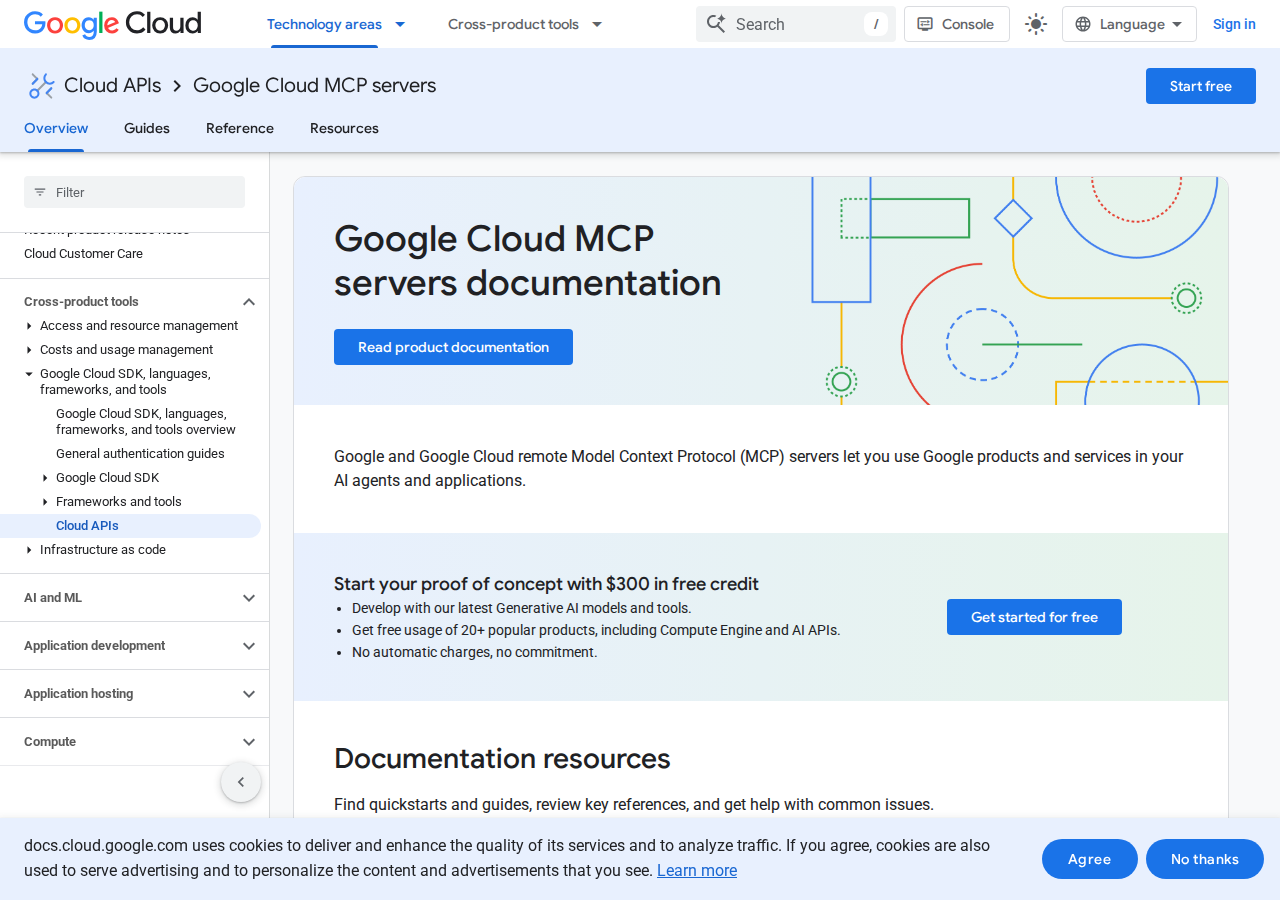
The Google Cloud MCP docs (August 2026) list dozens of Google-managed MCP servers for Drive, Gmail, Calendar, Maps, Google Ads and more — YouTube is not among them.
What exists instead are community-built MCP servers that wrap the public YouTube Data API v3, plus a handful of managed MCP connectors from third parties. All of them reach the same real YouTube data — they're just not Google's code. That's the decision that actually matters for a self-hosted OpenClaw, and the three paths below map it out.
Path A: Community MCP Servers (Transcript- or channel-focused, you run them)
Community servers fall into two camps, and they solve very different problems:
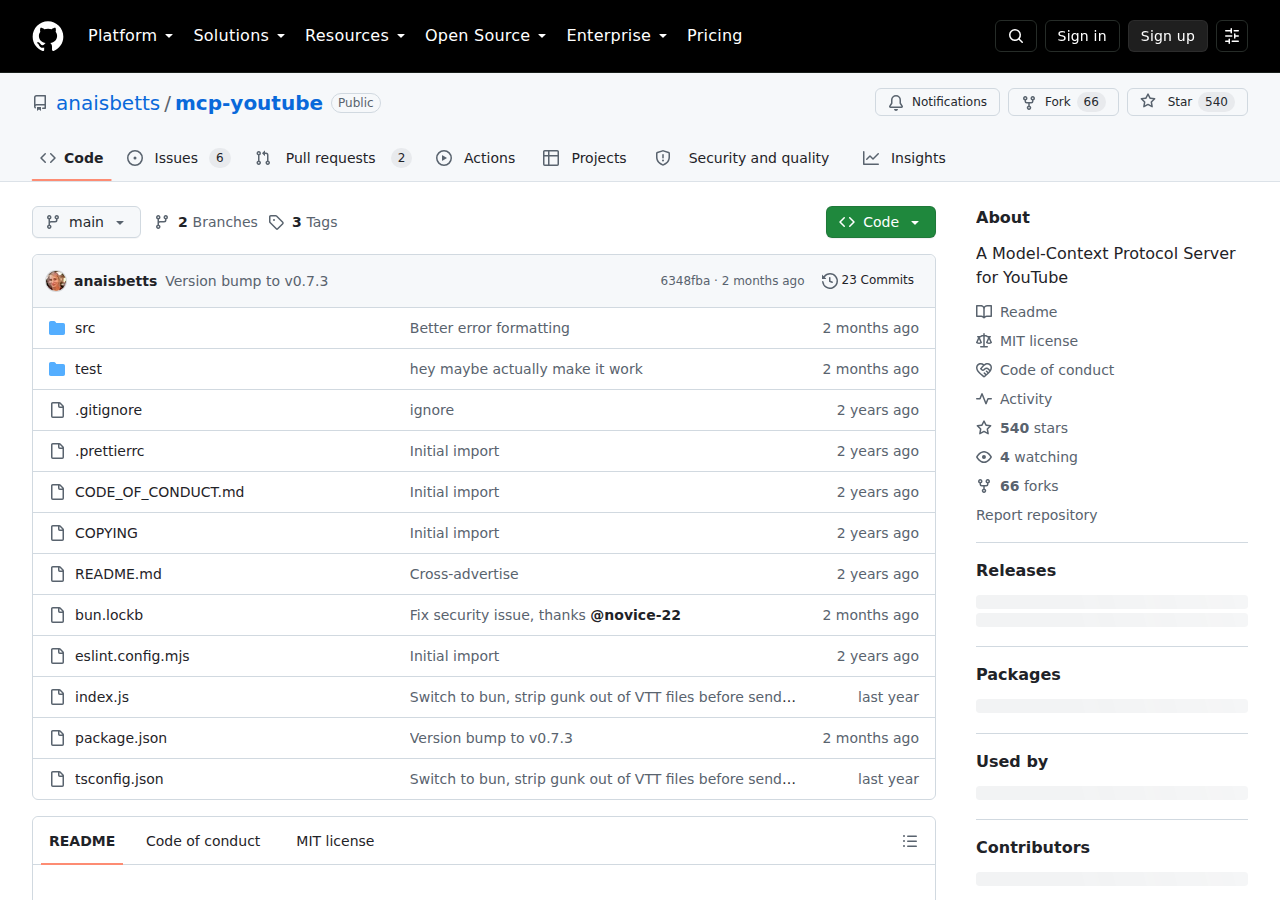
Transcript / content servers (yt-dlp based, no API key). The most popular is anaisbetts/mcp-youtube (~540 stars on GitHub), which uses yt-dlp to pull subtitles from any public video and expose them to the AI client. No Google API key, no quota — but it only does transcripts. Great for "summarise this video / this creator's catalogue," useless for your channel's private analytics.
Channel / analytics servers (Data API v3 + Analytics API via OAuth2). Servers like hakanoz203/youtube-channel-mcp and ZubeidHendricks/youtube-mcp-server connect via OAuth2 to the YouTube Data API v3 and the YouTube Analytics API, so they can read your private channel data — subscriber movement, watch time, retention, traffic sources, demographics — and some can even update titles/tags/descriptions. These map directly onto the "channel analytics assistant" angle this page's base template is built around.
Wire a community server into a self-hosted OpenClaw (local stdio, same as any MCP client):
{
  mcpServers: {
    "youtube-analytics": {
      command: "npx",
      args: ["-y", "youtube-studio-mcp"]
    }
  }
}
The trade-off: you're running and trusting third-party code with your OAuth credentials. Every guide — including this one — will tell you to read the repo before you hand it your channel's OAuth token. For transcript-only work that risk is near-zero (no auth at all). For channel analytics, it's real, because the server needs write-adjacent scopes to be useful.
Path B: Managed MCP Connectors (No self-hosting, but a subscription + data-flow setup)
If you'd rather not run community code, a few managed platforms ship a hosted YouTube MCP endpoint. Coupler.io's YouTube MCP is the clearest example: you set up a YouTube data flow in Coupler.io (Professional plan), then point your MCP client at Coupler's MCP server, and ask natural-language questions about audience retention, traffic sources, playback locations, device types, and geography. ytmcp.com offers a similar "connect your AI to YouTube" hosted endpoint.
The win over Path A is obvious — no code to audit, no OAuth plumbing, Coupler's token handles auth. The cost is a subscription plus (in Coupler's case) a pre-existing data-flow setup, and you're now dependent on a third party's uptime and data-freshness cadence rather than querying YouTube live.
Path C: Data API + Analytics API Proxy + Skill File (The headless / OpenClaw-native path)
Here's the honest catch that makes the base template's proxy approach not obsolete for OpenClaw, even though community MCP servers exist: none of the paths above give you scheduled, headless channel work. MCP is request-response — the AI client asks, the server answers, inside a conversation a human starts. Close the chat and nothing happens. For a self-hosted OpenClaw whose whole point is running on your EC2 box without a human in the loop, the value is the 8 AM channel digest, the "which uploads have weak retention?" sweep, and the comment-triage job that runs overnight.
That's the Data API + Analytics API proxy from the base template. Concretely:
- Enable both APIs in Google Cloud Console — YouTube Data API v3 (surface stats, metadata, comments) and the YouTube Analytics API (watch time, retention, traffic source, subscriber movement). The base template's biggest caveat is that the metrics you actually ask about live in the Analytics API, not the Data API.
- Authenticate with OAuth 2.0 as the channel owner — and note this is a headless-hostile step. Service accounts don't work for normal YouTube Studio access; you need an OAuth token for the channel owner's Google account, and that token expires. Store a refresh token and automate the refresh, or your 8 AM digest silently dies after a few weeks.
- Build a caching proxy around the handful of workflows your team asks about (channel growth, recent-video comparison, weak CTR/retention, comment triage), and pin your channel IDs + the metric definitions in the skill file.
For interactive Slack Q&A, Path A (a channel-analytics community server) is faster to stand up. For the scheduled headless review that a self-hosted OpenClaw exists to do, Path C is the pragmatic choice. Most teams end up with both.
Real Use Cases: What a YouTube + OpenClaw Agent Actually Does
Concrete channel-ops workflows — mapped to the base template's "channel analytics, video-performance review, comment triage" brief, not generic "automate your channel" filler.
1. Weekly channel review as a Slack digest (scheduled, headless → Path C)
Every Monday morning, a scheduled job pulls the last week's videos and their Analytics API metrics, compares them against the channel's rolling average, and posts a digest: which uploads beat the baseline on retention, which sank, and one suggested next action per underperformer. Because it's headless, it runs through the proxy + skill file — the clearest demonstration of why you keep Path C alive.
2. "Which uploads have weak retention?" — ask instead of digging through Studio
A producer asks in Slack rather than opening YouTube Studio:
"Which of our last 10 uploads had the steepest drop-off in the first 30 seconds?"
OpenClaw pulls retention curves from the Analytics API, ranks them by early drop-off, and returns the list with the timestamp where each video lost viewers. This is the single highest-value question for a content team, and it's precisely the metric that only lives in the Analytics API.
3. Comment triage without dumping raw threads into Slack
The base template's third caveat is right to warn about noise. The useful behavior is triage: overnight, the agent pulls new comment threads, buckets them into questions-needing-answers / bugs / praise / spam, and posts only the "needs a reply" shortlist with a suggested reply drafted. On an active channel this is the difference between "audience signal" and "another noisy feed."
4. Traffic-source shift early warning
A scheduled check watches where views are coming from — YouTube Search, Suggested, Browse, External — and flags a material shift. When "Suggested" collapses and "Search" spikes, that usually means the algorithm changed how it surfaces your content, and you want to know this week, not in the monthly review.
5. Cross-tool publishing intelligence
Because OpenClaw can consume several MCP servers or proxies at once, a single Slack thread can mix YouTube (a new video's first-48h performance) with Google Analytics (did it drive site traffic?), a social source (Instagram/Twitter-X how the promo posts did), and your CRM or support tool (any churn or inbound signal). One review thread instead of four dashboards.
YouTube-Specific Pitfalls (What Generic Guides Miss)
The gotchas that actually bite a creator/ops team, not the surface-level "APIs need auth" warnings.
-
The metrics you want live in a different API than the one you'll think to enable. The Data API gives views, likes, comment counts and metadata; watch time, retention, traffic sources and subscriber movement live in the Analytics API, which is a separate enable + separate scope. Everyone wires the Data API first and then wonders why the assistant "can't answer retention questions." Enable both from day one.
-
OAuth tokens expire — and a self-hosted headless agent won't tell you when. This is the #1 silent-killer of an OpenClaw + YouTube integration. Service accounts don't work for channel data, so you're on a channel-owner OAuth token with a limited lifetime. If your refresh-token automation isn't set up (and tested), the Monday digest just stops one day with no error in Slack. Set a credential-expiry check into the same cron that runs the digest.
-
YouTube API quota is easy to burn and the expensive operations are the tempting ones. The default Data API allocation is 10,000 units/day, and a single search call costs 100 units while a list call costs 1. If several teammates start asking the agent to "find videos about X" every hour, you'll hit the cap before noon. Cache aggressively, prefer list-by-ID over search, and route the assistant to already-fetched results where possible.
-
There's no official server — so you're choosing between unaudited community code and unaudited analytics accuracy. Path A's community OAuth servers are the real risk vector (third-party code holding your channel's OAuth token). Path C's managed connectors are safer on code but you inherit their data-freshness and any mismatch between their "retention" metric and YouTube Studio's. As of mid-2026 Google hasn't given you a first-party option, so "verify against Studio before you ship a decision on it" is the working rule.
-
Naming collisions across the ecosystem will waste an afternoon. "YouTube MCP" points at at least three different things — transcript servers (yt-dlp, no auth), channel/analytics servers (Data API + OAuth), and hosted connectors (Coupler/ytmcp). When you follow a tutorial, check which one it's wiring up. The config blocks look interchangeable; the capabilities absolutely aren't.
-
Comment scope vs. spam: write access is where the noise becomes risk. Read-only comment triage is safe and high-value. The moment you grant comment write (posting replies, deleting), you're letting an LLM speak publicly as your channel. Most teams are better served by triage + a drafted reply a human approves than by letting the agent post directly.
Also read
- Connecting OpenClaw with Google Analytics: A Practical Guide — the sibling Google-property integration, and how its OAuth/headless story parallels YouTube's
- How to Connect Facebook Ads to OpenClaw — another marketing-side integration with a native MCP server (the sharp contrast to YouTube's "no official server")
- Connecting OpenClaw with Instagram: A Practical Guide — the other social channel in the same "Social & Content" category, for cross-channel publishing intelligence
Skip All of This — Use Cody Instead
Cody gives your team a YouTube AI assistant in Slack, so people can review channel growth, compare video performance, triage comments, and share content updates without wiring Google APIs or living inside YouTube Studio all day.
Related Guides
- Connecting OpenClaw with Instagram: A Practical Guide
- Connecting OpenClaw with Twitter X: A Practical Guide
- Connecting OpenClaw with Google Analytics: A Practical Guide
Need the model-flexible version? See: How to Connect YouTube to OpenClaw: Setup, Models, and Workflow Guide.