If you're searching for "how to connect Facebook Ads to OpenClaw", the real question is usually not just whether the connection is possible. It's how to make Facebook Ads usable inside an OpenClaw workflow with the right model, the right context, and the right level of control.
That's the practical framing.
OpenClaw gives you the orchestration layer: connectors, skills, tools, prompts, approvals, and the ability to run workflows where your team already works. Facebook Ads provides the domain context. The integration becomes valuable when those two pieces are connected cleanly.
Facebook Ads + OpenClaw: The Official MCP Server Changes Everything
Most "connect Facebook Ads to OpenClaw" guides are actually stale. They tell you to create a Meta Developer App, wait through App Review, hand-write a proxy around the Marketing API, and manage 60-day access tokens on your own. That workflow was real for years — and it's exactly what the template data for this page still describes.
What changed: on April 29, 2026, Meta shipped Meta Ads AI Connectors, and on July 16, 2026 they extended it so you can connect any AI application to Meta Ads through your own developer app. That second update is the one that matters for OpenClaw.
Meta Ads AI Connectors is an umbrella for two interfaces onto the Marketing API:
- The Ads MCP Server, hosted at
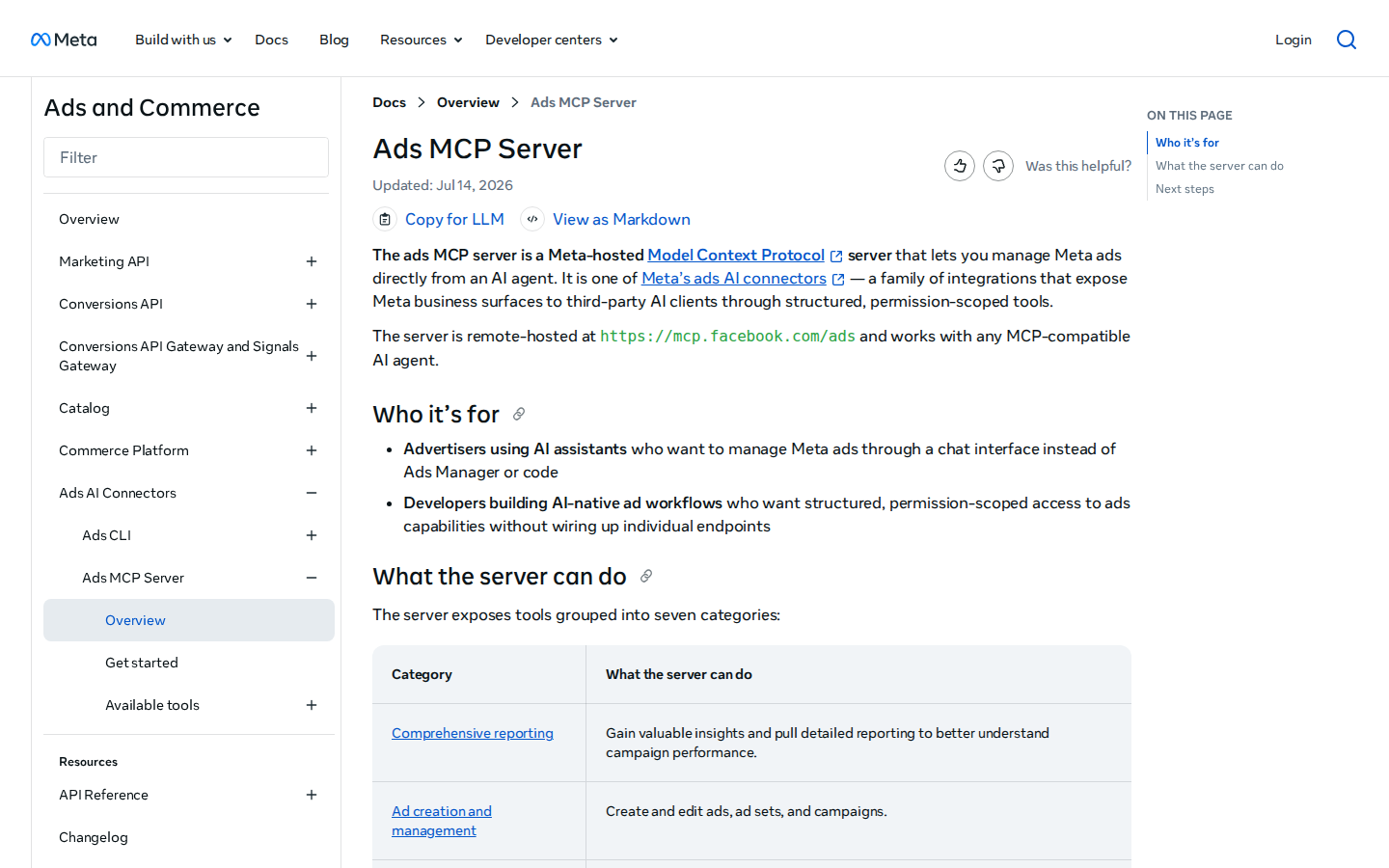
https://mcp.facebook.com/ads— a Model Context Protocol endpoint that exposes 29 tools across seven capability areas - The Ads CLI, installed via npm (
meta auth login), for scripted and bulk workflows
Both authenticate through Meta Business OAuth rather than the old Developer-App + App-Review gauntlet. That means the setup that used to take 25+ minutes — and could stretch across days waiting on permission approvals — now takes 5 to 15 minutes.
Here's the honest nuance for OpenClaw teams: ChatGPT and Claude are on Meta's one-click connector list, but a self-hosted OpenClaw is a "bring your own dev app" client. You don't get the zero-config path — but you do get the July 16 "connect any AI app" path, which means OpenClaw can point straight at mcp.facebook.com/ads using your own developer app + a User Access Token or OAuth redirect. That's the angle this guide covers in full.
Path A: Official Meta Ads MCP Server (Recommended)
The cleanest path in mid-2026 is Meta's own hosted server. It's maintained by Meta, authenticates through Business OAuth, and — critically — you approve the specific ad accounts it can reach.
What the 29 tools expose (across seven capability areas, per Meta's docs):
| Category | What It Does |
|---|---|
| Comprehensive reporting | spend, CPA, ROAS, reach, and conversion data across campaigns, ad sets, and ads — pulled from live account data |
| Ad creation and management | create, pause, and edit campaigns, ad sets, budgets, and targeting without opening Ads Manager |
| Catalog creation and management | inspect and update the product catalog behind shopping and dynamic ads (the heaviest cluster — 10 of the 29 tools) |
| Account diagnostics | check account health, permissions, and API limits |
| Dataset operations | verify your pixel, Conversions API, and event data are actually landing |
How it connects to OpenClaw: OpenClaw consumes remote MCP servers as tools. In your OpenClaw Gateway config:
{
  mcp: {
    servers: {
      metaAds: {
        url: "https://mcp.facebook.com/ads",
        transport: "streamable-http",
        auth: "oauth"
      }
    }
  }
}
Run openclaw mcp login metaAds to complete the Meta Business OAuth flow, select which ad accounts to grant, and verify with openclaw mcp doctor metaAds --probe.
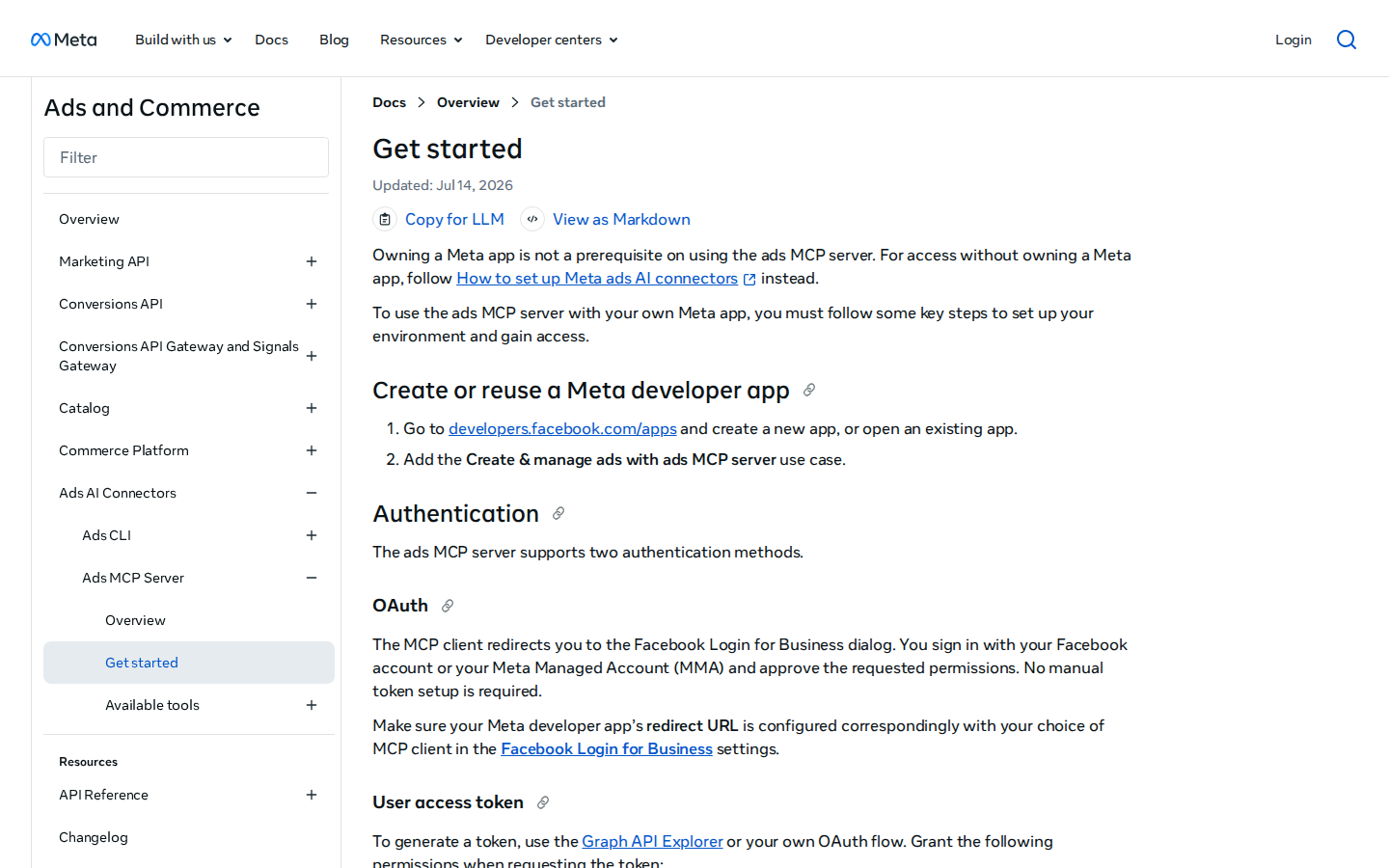
⚠️ The two auth realities: Meta's docs list two supported authentication methods. OAuth (a redirect through the Facebook Login for Business dialog — you must configure your dev app's redirect URL to match your MCP client) or a User Access Token (generated via Graph API Explorer or a custom OAuth flow). For a headless OpenClaw gateway doing scheduled work, the User Access Token route is the practical choice — but note it's still a user token, so it inherits that user's ad-account permissions and expiry.
Path B: The Ads CLI (For Scripted and Bulk Work)
If you'd rather drive Meta Ads from a terminal or a coding agent than a chat window, Meta ships the Ads CLI. Install it via npm, then authenticate:
npm install -g @meta/ads-cli
meta auth login
It requires Python 3.12+, and it's deterministic — it produces spec files and exit codes rather than conversational responses. That makes it the right tool for bulk operations and repeatable scripts, and it sidesteps the token overhead that an MCP server imposes on your context window.
The recommended split: MCP for analysis and ad-hoc reporting, CLI for deterministic execution and bulk changes.
Path C: Marketing API Proxy + Skill File (Maximum Control / Headless)
The official MCP server covers the vast majority of paid-social work, but some scenarios still push past it:
- No triggers. The MCP protocol is request-response. An MCP server cannot alert you that a campaign blew past its CPA target or a creative's CTR dropped — there's no event mechanism. If you want "react to performance changes automatically," you need a scheduled poller.
- No access to Meta's optimization layer (Advantage+, bidding algorithms, audience expansion), lead-form management, or local files.
- Organic posting (Instagram comments, DMs, page posts) is a separate surface — the paid-side MCP server doesn't touch it.
For these, a thin proxy around the Marketing API (/v22.0/{ad_account_id}/insights) plus a skill file gives you full control:
# Facebook Ads Skill

## Account Context
- Ad account IDs: act_123456789 (US), act_987654321 (UK)
- Currency: USD | Default attribution: 7-day click / 1-day view
- Pixel: 1234567890123456 on the shop + main site

## Common Queries
- **Morning spend check:** total spend + CPA + ROAS vs yesterday (all active campaigns)
- **Creative fatigue:** ads with CTR dropping across 3+ consecutive days
- **Budget drift:** ad sets spending >110% of daily budget
- **Conversion gap:** campaigns with high clicks but zero pinned conversions

## Important
- Everything created through a connector lands PAUSED — always confirm activation
- System User tokens don't expire like user tokens; prefer them for scheduled work
- Meta rate limits are score-based, not a simple requests/hour cap
Real Use Cases for a Facebook Ads + OpenClaw Agent
These are workflows a paid-social team actually runs once the connection works — specific to Meta's data model, not generic "ask about your ads."
1. Morning Performance Briefing
Every morning at 9 AM, OpenClaw queries insights and posts to #growth:
📊 Paid Social — Aug 13 Yesterday spend: $4,820 (↑ 6% DoD) Blended ROAS: 2.4x (target 2.8x — below) CPA: $18.20 (target $15.00) ⚠️ Creative fatigue: 3 prospecting ads with CTR dropping 4 days straight Budget drift: Ad set "Retargeting-Lookalike-1" spent 122% of daily cap
2. Creative Fatigue Early Warning
Scheduled every 6 hours, the agent scans ads whose CTR has fallen for 3+ consecutive days and flags them before they burn budget:
🔴 Creative fatigue — action suggested Ad "Prospecting-DTC-03": CTR 1.8% → 1.2% → 0.9% over 3 days; frequency 3.4 Recommendation: pause + swap in the next creative variant. Want me to draft the edit?
3. Cross-Account Agency Rollup
For agencies managing clients, the agent summarizes spend, ROAS, and CPA across every account into one Slack digest — no Ads Manager tab-hopping.
4. Budget Drift Guard
The agent flags any ad set spending over 110% of its daily cap (Meta's 25% over-delivery allowance is the baseline) so the team catches runaway spend before it compounds.
5. Catalog / Dynamic Ads Sync
Because 10 of the 29 MCP tools are catalog operations, the agent can flag products missing from a dynamic-ads feed or outdated prices — a genuinely useful, under-covered workflow.
Facebook Ads-Specific Pitfalls (What Most Guides Miss)
1. Everything the Connector Creates Lands PAUSED
This is deliberate — Meta's strongest safety mechanism. Every campaign, ad set, and ad created through the MCP server or CLI arrives paused, and no flag overrides it. You must manually activate anything the connector creates. If your agent "created" a campaign but you don't see spend, this is why. Fix: build an explicit "review-and-activate" step into your workflow, and never assume creation = live.
2. OpenClaw Is a "Bring Your Own Dev App" Client
ChatGPT and Claude are on Meta's one-click connector list; a self-hosted OpenClaw is not. The July 16, 2026 update added the "connect any AI app via your own developer app" path — but that path requires a Meta Developer App with the "Create & manage ads with ads MCP server" use case added, plus a User Access Token or a properly configured OAuth redirect URL. You're not exempt from App Review entirely on the deeper-integration path. Fix: set up the dev app once, keep the redirect URL documented, and treat the User Access Token's expiry as a first-class operational concern.
3. No Triggers — MCP Is Request-Response Only
There is no such thing as an MCP trigger. The protocol's own working group states clients discover server-side changes by polling. If you want your agent to react to "campaign blew past CPA" or "a lead-gen form just filled," you must schedule a poller — the MCP server won't push anything. Fix: pair the MCP connection with a cron-style poller (OpenClaw's scheduler can drive this) for anything that needs to be proactive.
4. Scope Is Still On You
OAuth is a real improvement over pasting a System User token into a third-party repo, but you still decide which ad accounts an AI client can spend against — and 29 tools includes full write access. Budget changes and campaign edits happen without a confirmation screen. That's a big deal for a multi-user OpenClaw harness where several people may trigger the agent. Fix: grant the minimum ad accounts, and gate write operations behind OpenClaw's approval system.
5. It's Paid-Side Only — No Organic
The Meta Ads MCP server covers the paid surface only. Instagram organic posting, comments, and DMs are a separate Instagram/Graph API surface. Don't expect the ads connector to touch your organic presence. Fix: treat paid and organic as two separate integrations, even under the same Meta brand.
6. Token Context Overhead
MCP sessions preload tool descriptions into the AI client's context window — and 29 tools (with Meta's verbose schemas) add up. If you're running Meta's connector alongside other MCP servers, the token cost climbs. The CLI avoids this entirely. Fix: use MCP for interactive Q&A, but lean on the CLI or a proxy for heavy, repetitive pulls.
Decision Matrix: Which Path Should You Take?
| Scenario | Best Path | Why |
|---|---|---|
| Team wants Meta Ads data in Slack today, interactive queries | Official MCP — Path A | Meta-hosted, no proxy code, OAuth, maintained by Meta |
| Small team that wants the assistant without building any of it | Cody | Full OpenClaw + Meta Ads, ready in minutes |
| Bulk edits, scripted exports, deterministic workflows | Ads CLI — Path B | Exit codes + spec files, no context-window overhead |
| Proactive alerts (CPA breach, creative fatigue, budget drift) | Proxy + scheduler — Path C | MCP has no triggers; you need a poller |
| Deep custom integration / non-ChatGPT client via your own app | Official MCP + dev app — Path A | July 16 "any AI app" path, User Access Token |
| Organic Instagram / page management | Separate Graph API integration | Ads MCP is paid-side only |
Related Pages
- Cody AI Assistant for Facebook Ads — Cody's dedicated Facebook Ads integration features and benefits
- How to Connect Google Analytics to OpenClaw — the measurement layer that usually sits beside paid social
- How to Connect HubSpot to OpenClaw — CRM integration with a similar multi-path architecture
What “Connect Facebook Ads to OpenClaw” Actually Means
In practice, connecting Facebook Ads to OpenClaw usually involves four layers:
- Authentication so OpenClaw can securely access Facebook Ads
- Tooling or proxy endpoints that expose the right Facebook Ads actions and data
- Skills/instructions that tell OpenClaw how to reason over Facebook Ads context
- Model selection so the assistant uses the right LLM for the job
That last piece matters more than most people expect.
Which Models Can You Use?
OpenClaw is model-flexible, so a Facebook Ads integration does not need to be tied to a single provider. Depending on your setup, teams commonly want to use:
- OpenAI models for broad reasoning, structured extraction, and tool use
- Anthropic models for writing, analysis, and long-context work
- Google models for multimodal and large-context workflows
- Other model backends if your OpenClaw environment exposes them
Model names and availability change frequently, so check your OpenClaw model catalogue rather than copying a version from a guide. The practical point is that you can connect Facebook Ads once, then choose a supported model for each workflow.
For example:
- Use Claude for nuanced summarisation or drafting
- Use OpenAI for structured extraction, tool-heavy workflows, or general-purpose copiloting
- Use Gemini when multimodal or very large context windows matter
A Good Integration Pattern for Facebook Ads
A strong Facebook Ads + OpenClaw setup usually looks like this:
- OpenClaw receives a request in chat or from an automation
- It calls the right Facebook Ads endpoint or proxy
- The selected model reasons over the returned context
- OpenClaw returns an answer, draft, classification, or action
- High-risk actions stay behind approvals or structured guardrails
That is what makes the setup operational rather than just experimental.
Step-by-Step: Connect Facebook Ads to OpenClaw
Step 1: Create a Meta Developer App and Get Business Verification
Go to developers.facebook.com, create an app, and select 'Business' as the app type. To access the Marketing API in production, your business must be verified through Meta Business Manager — this involves submitting business documentation and typically takes 1–5 business days.
Step 2: Request the Marketing API Permissions
In App Review, request the ads_read permission (to read ad account data) and ads_management if you need to make changes. Meta reviews these requests. Standard permissions like ads_read are usually granted without a lengthy review, but advanced permissions require a detailed use case description and screencast.
Step 3: Implement OAuth and Build the Proxy
Meta uses OAuth 2.0 with long-lived access tokens (valid for 60 days). System User tokens (available through Meta Business Manager) are better for server-to-server integrations — they don't expire like user tokens. Build your proxy around the Marketing API endpoints (/v19.0/{ad_account_id}/insights is your key endpoint for performance data) and write the skill file.
Model-Specific Workflow Ideas
Facebook Ads + OpenAI
Use this when you want a strong general-purpose setup for extraction, classification, action planning, and tool-driven workflows around Facebook Ads.
Facebook Ads + Claude
Use this when you want better writing quality, clearer summaries, stronger nuance, and reliable long-context reasoning over Facebook Ads data.
Facebook Ads + Gemini
Use this when the workflow benefits from large context windows, multimodal inputs, or Google-native ecosystem alignment.
Common Mistakes
Most teams do not fail because the model is bad. They fail because:
- the Facebook Ads connection is too thin
- the model lacks the right live context
- prompts are vague
- no structured outputs are enforced
- permissions and approvals are skipped
- one model is forced to do every job, even when another would be a better fit
The best setup is usually one integration layer, multiple model options, and clear guardrails.
Challenges and Caveats
App Review Can Be Slow and Unpredictable
Meta's app review process has a reputation for inconsistency. Reviews can take days or weeks, and requests can be rejected for reasons that aren't always clearly communicated. Build extra time into your project plan.
Token Management Is Non-Trivial
User tokens expire. System User tokens are more stable but require specific Business Manager setup. Whichever you use, build token refresh and expiry handling into your proxy from day one.
Rate Limits Are Usage-Dependent
Meta's API uses a score-based rate limiting system that depends on your app's recent usage patterns. It's not a simple requests/hour limit — it can be hard to predict when you'll hit a limit.
Want Facebook Ads Connected to OpenClaw Without Building the Whole Stack Yourself?
Cody gives your team a Facebook Ads assistant in Slack, so people can review campaign and ad-set performance, spot ROAS or CPA drift, catch creative fatigue, and get paid-social updates without living inside Meta Ads Manager.
Related OpenClaw Guides
- How to Connect Google Ads to OpenClaw
- How to Connect Google Analytics to OpenClaw
- How to Connect HubSpot to OpenClaw
Looking for a more workflow-first angle? See: Facebook Ads AI Automation and Facebook Ads AI Assistant.
More Facebook Ads Resources
- Cody AI Assistant for Facebook Ads — Cody's dedicated Facebook Ads integration features and benefits