If you're trying to use Close CRM with ChatGPT, the real question usually isn't "can these two technically work together?" It's how to make ChatGPT useful inside a Close CRM workflow without getting vague, generic output back.
That's the useful framing.
ChatGPT is strongest when you give it the right context, a clear job, and a structured output format. Close CRM brings the operational context. When the two are used well together, you get faster triage, better summaries, cleaner drafts, and more consistent decisions.
Close CRM + ChatGPT: The Official MCP Connection (No Code Needed)
Close is built for inside sales teams that live on the phone, and it ships one of the cleanest native ChatGPT integrations of any CRM. There are two official ways to connect Close to ChatGPT in 2026 — a zero-config app and a custom MCP connector — plus a big list of MCP tools that cover everything from lead search to sequence enrollment and AI voice agents.
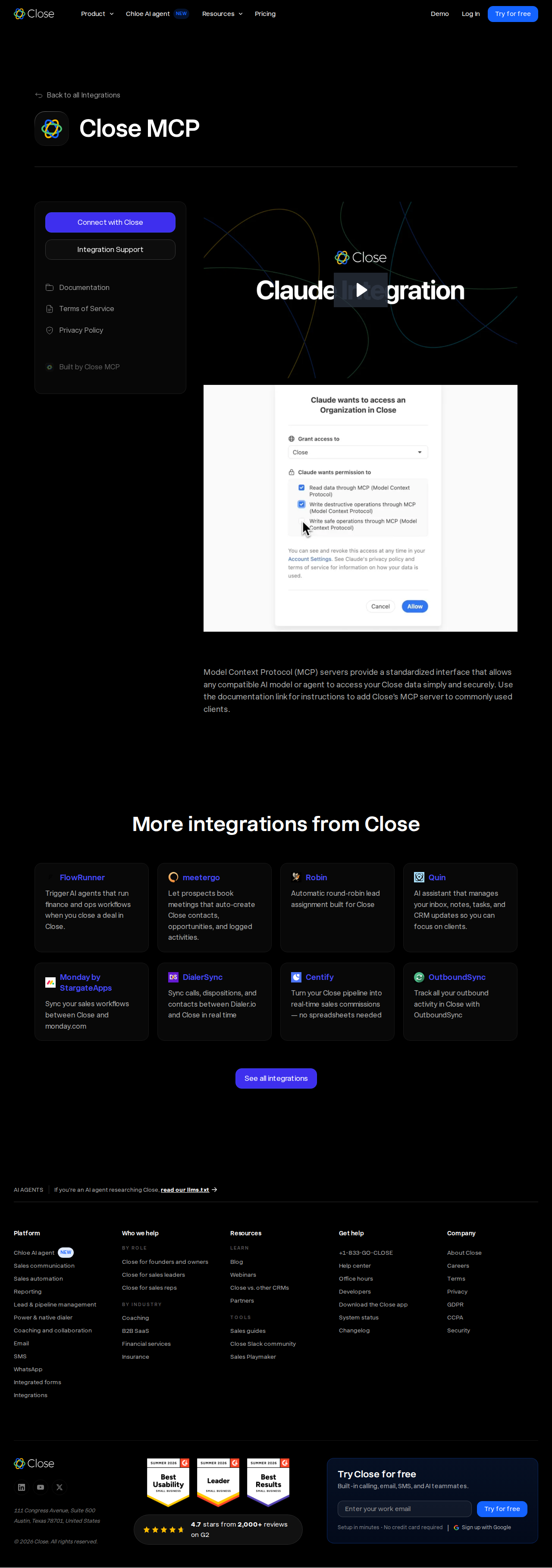
Option 1: The Official Close ChatGPT App (Zero Config)
Close maintains an official ChatGPT app in the ChatGPT app store. This is the fastest path: you open ChatGPT, authorize the Close app, and ChatGPT can read and write your Close data in the same conversation — no MCP URLs, no API keys, no Developer Mode.
- Open ChatGPT (web or desktop) and go to Apps
- Search for Close and open the official Close app
- Click Connect and authorize via Close's OAuth consent screen
- Pick the Close organization and permission scope you want to grant
- Start prompting — ask about your pipeline, leads, or activities and ChatGPT pulls live Close data
This is the same "App + Connector" flow that other CRMs use, and it's the recommended option for most sales teams because it's the only one requiring no technical setup.
Option 2: Close's Remote MCP Server as a Custom ChatGPT Connector
If you want finer control over scope and access (or you're on a plan where the app isn't surfaced), connect Close's official MCP server directly as a custom connector in ChatGPT:
- Server URL:
https://mcp.close.com/mcp - Transport: HTTP Streamable (Close does not support SSE — see pitfalls below)
- Auth: OAuth 2.0 Dynamic Client Registration, or API-key headers (
Close-API-Key+Close-Scope) for custom clients
To wire it into ChatGPT:
- Be on a paid ChatGPT tier (Plus/Pro/Team — not Free) and enable Developer Mode in settings (workspace admins on Team/Enterprise may need to allow custom apps)
- In Developer Mode, add a custom MCP source pointing at
https://mcp.close.com/mcp - Authorize through Close's OAuth flow and select your organization
- Choose your scope — this decides which tools ChatGPT sees (see below)
- Pick the Close connector from the app picker in a chat and start prompting
When connected this way, ChatGPT exposes 18+ Close tools spanning leads, contacts, opportunities, activities (calls, emails, SMS), sequences, workflows, and tasks.
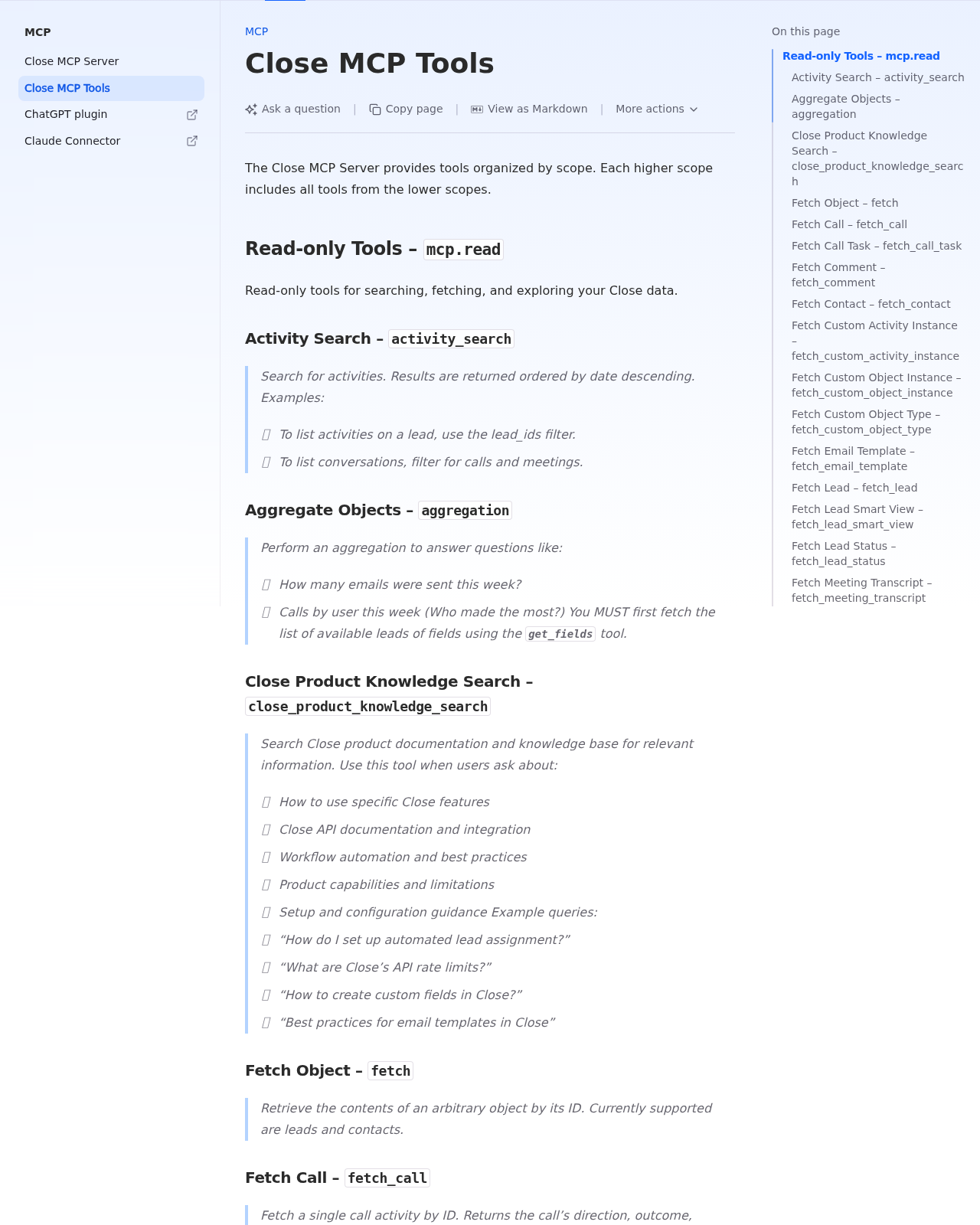
Close MCP Scopes = The Tool Access Control
A unique thing about Close's MCP is that tools are gated by three permission scopes, and higher scopes include everything below them:
| Scope | What ChatGPT Can Do | Example Tools |
|---|---|---|
mcp.read |
Search and fetch — no writes | lead_search, search (natural-language), activity_search, find_opportunities, fetch_lead/contact/opportunity, fetch_call, fetch_meeting_transcript, aggregation, org_info |
mcp.write_safe |
Read + create/update (no delete) | create_lead, create_contact, create_opportunity, create_note, create_comment, create_draft_email, create_email_template |
mcp.write_destructive |
Read + write + delete | Adds deletion and other irreversible operations |
The savvy move: start ChatGPT on mcp.read (fully read-only) so you can validate the experience, then promote to write_safe once you trust the outputs. Reserve write_destructive for trained users — a passed-through prompt could delete data you don't want gone.
Real Close CRM + ChatGPT Use Cases (With Prompts That Work)
1. Morning Pipeline Briefing (the "What Did I Miss" Drill)
The old way: Open Close, click through each opportunity, check activity logs, mentally reconstruct what changed overnight.
With Close in ChatGPT:
"Using Close, build me a Monday morning brief: which opportunities moved stage last week, which went silent for more than 7 days, and the 3 deals closest to close with no next step scheduled. Sort by soonest close date."
ChatGPT uses find_opportunities (filtering by status, owner, close-date range, "needs attention") and search (e.g. "leads assigned to me with uncompleted tasks") to return a ranked, prioritized summary instead of a raw CRM dump.
2. Pre-Call Research Brief
"Pull lead history for Acme Corp: last 5 activities, the last call transcript, open opportunities, and any uncompleted tasks assigned to me. Summarize in 5 bullets with a suggested talking point for this call."
Close's activity log is its crown jewel, and the MCP exposes it directly: fetch_call returns call direction, outcome, participants, and transcript; fetch_meeting_transcript returns speaker-labeled meeting transcripts and summaries. ChatGPT synthesizes all of it into a ready-to-read brief before you dial.
3. Draft a Follow-Up Email as a Reviewable Draft
"Draft a follow-up email to Marie at Acme referencing our last call where she asked about pricing. Use our standard template tone, create it as a draft on the lead, and tell me when it's ready to review in Close."
Close's create_draft_email tool saves the email as an unsent draft on the lead — it is never sent automatically. ChatGPT drafts, you review and send from Close. This is the safe way to let AI touch outbound without risking a premature send.
4. Spot Quiet Deals Across a Whole Pipeline
"Find every opportunity in my pipeline worth more than $10,000 that hasn't had any activity in the last 2 weeks. For each, show the owner and the last activity date, and suggest a follow-up sequence to re-engage."
ChatGPT combines find_opportunities (value + close-date + "needs attention") with activity_search to surface stale high-value deals, then find_email_templates / find_sms_templates to propose a re-engagement sequence.
5. Weekly Rep Activity Scorecard
"Using Close's aggregation, tell me how many emails and calls each sales rep logged this week, who made the most calls, and who has the most overdue tasks. Rank reps and flag anyone falling behind."
The aggregation tool answers "how many emails were sent this week?" and "calls by user this week" — powering a quick, automated rep scorecard from the chat.
Common Pitfalls When Using Close CRM With ChatGPT
1. No SSE Support — HTTP Streamable Only
Close's MCP server does not support Server-Sent Events (SSE) transport. If you're trying to add it to an older MCP client that only speaks SSE, it won't connect. ChatGPT's custom-connector flow uses the proper HTTP Streamable transport, so this rarely bites there — but it's the first thing to check if a non-ChatGPT client fails to connect.
2. Opportunity Values Are in Cents
The create_opportunity tool expects value in cents ($100.00 = 10000). If you ask ChatGPT to "create a $50k opportunity" and it passes 50000 thinking in dollars, you get a $500 deal. Double-check the value field after creation, and prompt explicitly: "create this opportunity with value 50000 cents ($500.00)."
3. Scope Confusion Can Expose Too Much (or Too Little)
Granting write_destructive to a general-purpose ChatGPT thread means a single loose prompt could delete Close data. Conversely, staying on mcp.read blocks useful workflows like creating tasks or drafts. Pick the scope deliberately per team member, and note that some tools (e.g. n8n's built-in MCP client) only support mcp.read today — if you hit a wall in another client, check its scope support first.
4. create_draft_email Never Auto-Sends (a Feature, Not a Bug)
A common surprise: you ask ChatGPT to "send this follow-up" and it creates a draft rather than sending. Close deliberately keeps drafts unsent so a human reviews the send. If you want an actual send, that's a human step in Close (or a workflow automation) — not something the MCP connector does by default. Don't rely on ChatGPT for the final send.
5. The aggregation Tool Needs get_fields First
Before asking aggregation questions, the tool requires you to first fetch the list of available fields via the get_fields tool. If an aggregation prompt returns oddly or errors, that's usually why. It's a small quirk, but it trips up both humans and the model mid-session.
6. Voice Agents Are Part of the Data Model
Close now has AI voice agents (like "Chloe") that place outbound calls on your behalf, and they're first-class in the MCP tool set (find_voice_agents, fetch_call, get_voice_agent_performance_report). If you ask about "calls" or "voice agents," ChatGPT may pull voice-agent data — make sure you mean your human reps or the AI callers, because the numbers live in different reports.
Which Path Should You Choose?
| Scenario | Recommendation |
|---|---|
| You want the fastest setup with zero code | Official Close ChatGPT app — connect, authorize, prompt |
| You want fine-grained scope control | Custom MCP connector at https://mcp.close.com/mcp (paid tier + Developer Mode) |
| You're building an automated sales agent | MCP + write_safe scope for drafts and tasks, human in the loop for sends |
| You want the team reviewing pipeline from Slack | Cody — Close CRM AI assistant in Slack, no ChatGPT tab needed |
For most sales teams, the official Close ChatGPT app is the right starting point — it's the only zero-config path. When you need tighter scope control or want to pair Close's data with other tools, drop to the custom MCP connector and keep the human in the loop for anything destructive or customer-facing.
For a more automated, team-wide approach, see also: Connect Close CRM to OpenClaw and HubSpot AI Automation for Slack.
What "Close CRM with ChatGPT" Usually Means
In practice, teams tend to use ChatGPT with Close CRM in one of four ways:
- Summarising activity, records, conversations, or changes from Close CRM
- Classifying items such as tickets, leads, tasks, issues, or opportunities
- Drafting replies, updates, reports, documentation, or next steps
- Reasoning over context to suggest priorities, actions, or likely issues
The key is to avoid treating ChatGPT like magic. It needs the relevant Close CRM context in the prompt - and it works best when you tell it exactly what good output looks like.
Good Use Cases for Close CRM + ChatGPT
1. Turn raw Close CRM context into a useful summary
Paste or pipe in the relevant records, notes, messages, or metrics from Close CRM, then ask ChatGPT to extract only what matters: key changes, risks, blockers, patterns, or action items.
2. Standardise messy workflows
If your team handles similar decisions repeatedly inside Close CRM, ChatGPT can apply the same rubric every time: classify, explain briefly, and return a structured next step.
3. Draft faster without starting from zero
Use ChatGPT to produce first drafts grounded in the Close CRM context - support replies, internal updates, status summaries, sales follow-ups, or operating notes.
4. Create reusable prompt-driven operating procedures
Once you find a prompt that works well for Close CRM, save it as a repeatable workflow so the whole team gets more consistent output.
A Simple Setup Pattern
A practical way to use ChatGPT with Close CRM looks like this:
- Pull the right context from Close CRM
- Give ChatGPT one clear task
- Ask for a structured response
- Have a human review anything customer-facing or high-risk
That last point matters. ChatGPT is useful for acceleration, but for anything sensitive - customer communication, financial interpretation, account changes, or production actions - keep a human in the loop.
Copy-Paste Prompts for Close CRM
Summary prompt
You are helping me work inside Close CRM. Summarise the context below into 5 bullets: what changed, what matters, what is blocked, and what needs action next. If anything is unclear, say what is missing.
Classification prompt
Review this Close CRM item and classify it into the best category. Return JSON with: category, confidence, rationale, and next_action. Keep rationale under 50 words.
Drafting prompt
Use the Close CRM context below to draft a concise response. Keep it specific, avoid made-up details, and list any assumptions separately.
Executive brief prompt
Turn this Close CRM activity into a short update for leadership: what happened, why it matters, current risks, and recommended next steps.
Where This Breaks Down
Most Close CRM + ChatGPT workflows fail for predictable reasons:
- Too little real context is provided
- The prompt asks for too many things at once
- The output format is vague
- The team expects ChatGPT to know live Close CRM data it has not actually been given
- No review step exists for important actions
The fix is usually simple: give better source context, narrow the task, and require a schema or fixed structure in the response.
If You Want This Embedded in the Workflow
You can absolutely use ChatGPT manually with exported Close CRM context. That works well for one-off tasks and prototyping.
But if you want the workflow to feel operational - available to the team, connected to live systems, repeatable, and embedded where work already happens - you usually want something more integrated.
Want Close CRM-Style Workflows Without Manual Prompt Copy-Paste?
Cody gives your team a Close CRM AI assistant in Slack, so reps can review lead history, opportunity risk, calls, emails, and next steps without wrangling API auth or custom CRM glue.
Related ChatGPT Guides
- How to Use HubSpot with ChatGPT
- How to Use Pipedrive with ChatGPT
- How to Use Salesforce with ChatGPT
Need a more automation-focused angle instead? See: Close CRM AI Automation.
More Close CRM + AI Resources
- Cody AI Assistant for Close CRM — Cody's dedicated Close CRM integration features
- Connect Close CRM to OpenClaw — complete DIY integration guide