If you're searching for "Twitter / X MCP", you're asking one of two things: does Twitter / X have an MCP server? or how do I connect Twitter / X to an AI assistant via the Model Context Protocol?
✅ Twitter / X has an official MCP server. Details in the setup section below.
What Is MCP?
Model Context Protocol (MCP) is an open standard developed by Anthropic that lets AI assistants — like Claude — connect to external tools, APIs, and data sources in a standardised way.
Before MCP, every AI integration required bespoke tooling: custom prompts, custom API wrappers, and custom glue code to pass context back and forth. MCP replaces that with a common interface: the AI asks the MCP server for data or actions, the server returns structured results, and the AI uses them to answer your question or complete a task.
In plain terms: MCP is how you give an AI assistant live access to Twitter / X — not just knowledge about it, but real, up-to-date data from your account.
What a Twitter / X MCP Integration Does
Once Twitter / X is connected via MCP, your AI assistant can:
- Read live data — pull records, metrics, activity, and status directly from Twitter / X
- Take actions — create, update, or log records based on your instructions
- Cross-reference context — combine Twitter / X data with other connected tools mid-conversation
The key difference from a standard chatbot: the assistant is not working from training data or memory. It is reading your actual Twitter / X instance, in real time.
Practical Twitter / X MCP Use Cases
Performance lookups mid-workflow
Ask the assistant to fetch recent post performance from Twitter / X while you're planning the next content calendar — no dashboard-switching required.
Content repurposing with live data
Pull your top-performing content from Twitter / X via MCP and have the assistant generate repurposed formats (threads, summaries, email snippets) in one step.
Scheduling and publish via conversation
Draft and schedule a post to Twitter / X by describing it in chat — the assistant handles formatting and API calls.
Twitter / X MCP: Real Configuration & Setup
The Twitter/X MCP story changed completely in mid-2026. X now runs an official, first-party hosted MCP server at https://api.x.com/mcp (launched June 30, 2026) — so you are no longer stuck stitching together a community server and praying the API doesn't change under you. Here is exactly how it works.
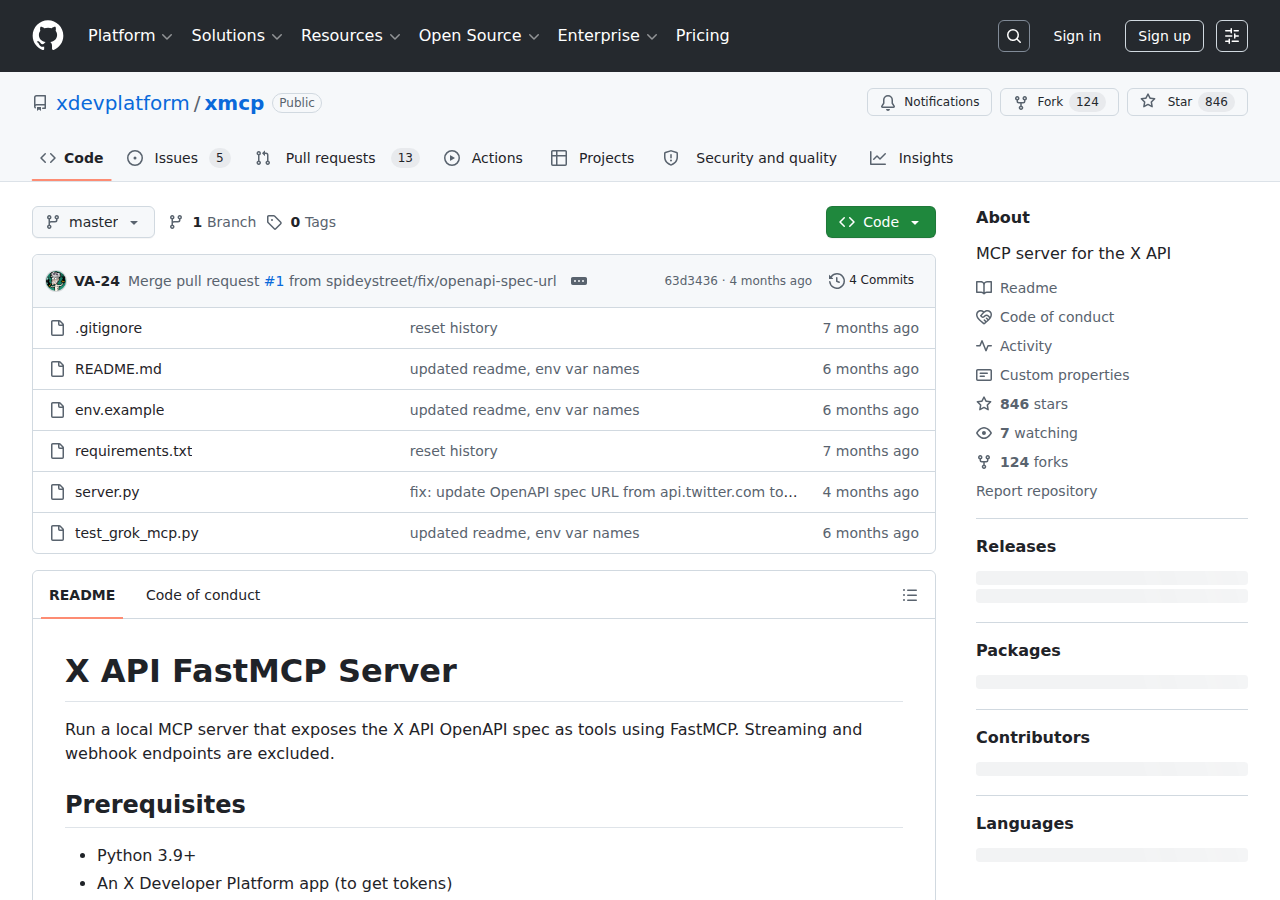
1. Know the two things both called "X MCP"
Search "X MCP" and you hit two first-party artifacts with nearly the same name. They are not interchangeable:
| Hosted X MCP | xdevplatform/xMCP (open source) | |
|---|---|---|
| What it is | X-operated remote server | Local server you run yourself (FastMCP) |
| Endpoint | https://api.x.com/mcp |
http://127.0.0.1:8000/mcp (tunnel for remote) |
| Transport | Streamable HTTP | HTTP, your machine |
| Auth | OAuth 2.0 via xurl bridge, or app-only Bearer | Bearer token, OAuth1, OAuth2 user tokens |
| Surface | The X API across six tool groups | 175 endpoints wrapped as tools |
| Maintenance | None — X runs it | You update and host it |
The June 30 launch was the hosted server. The xdevplatform/xMCP repo is the self-host option — fine if you need to inspect the tool surface or run inside your own network, but most people want the hosted one.
2. The fastest read-only test (no browser, no OAuth)
If you only need reads — searching posts, looking up users, reading trends — you can point any MCP client at the hosted URL with an app-only Bearer token. No OAuth dance, no local bridge:
{
  "url": "https://api.x.com/mcp",
  "headers": { "Authorization": "Bearer YOUR_APP_ONLY_BEARER_TOKEN" }
}
That gets you reads with no user context. That is genuinely one header.
3. Full access: OAuth 2.0 through the xurl bridge
For writes (post, bookmark, publish an Article) and user-scoped reads you need OAuth 2.0 with PKCE. The local xurl CLI is the glue — it "bridges a stdio MCP client to a remote Streamable HTTP MCP server, injecting Authorization: Bearer <token>" and refreshing it automatically. From your client's point of view the remote server looks like a local stdio server.
stdio JSON-RPC       HTTPS + Authorization: Bearer
client <──────────> xurl mcp <──────────────────────> api.x.com/mcp
(Cursor,/Claude,     (local bridge,                   (hosted,
 Grok)                OAuth + token refresh)           X-operated)
Install and wire it up:
# macOS (Homebrew)
brew install --cask xdevplatform/tap/xurl
# or cross-platform
npm install -g @xdevplatform/xurl

# smoke-test the bridge
npx -y @xdevplatform/xurl mcp https://api.x.com/mcp
Then add it to Claude Desktop / Cursor (claude_desktop_config.json / mcp.json):
{
  "mcpServers": {
    "xapi": {
      "command": "npx",
      "args": ["-y", "@xdevplatform/xurl", "mcp", "https://api.x.com/mcp"],
      "env": {
        "CLIENT_ID": "YOUR_X_APP_CLIENT_ID",
        "CLIENT_SECRET": "YOUR_X_APP_CLIENT_SECRET"
      }
    }
  }
}
Prerequisites: Node.js (for npx), an X developer app with OAuth 2.0 enabled, and the redirect URI
http://localhost:8080/callbackregistered on that app. On a headless box, authenticate first withxurl auth oauth2 --headlessbefore wiring up the bridge. On first launch a browser tab opens for OAuth; approve it once and tokens cache to~/.xurl.
4. What the six tool groups can do
The hosted server groups the X API surface into six capability groups — the same design choice every large API MCP is converging on, instead of one tool per endpoint:
- Posts — fetch posts; list accounts that liked, reposted, or quoted a post; get recent counts for a query
- Search — full-archive post search, user search, and news search. The full-archive search is the headline tool: it reaches back across X's history, not just a recent window
- Users — resolve the current authenticated user, look up users by ID or handle, read timelines and mentions
- Bookmarks — list, add, remove bookmarks, and manage bookmark folders (these are writes)
- Trends & News — trends by location using a WOEID (Where-On-Earth ID), plus news stories
- Articles — create draft Articles and publish them (long-form publishing straight from an agent, gated behind OAuth)
5. Real workflow: live-conversation research
This is the use case that justifies the official server — X-proprietary data a generic web-search MCP can't reach cleanly:
You: "Search X for posts from the last 24 hours about the MCP spec update,
      summarize the main complaints, and list the five accounts driving the
      conversation."

AI:  Uses search + the likers/reposters tools to rank voices, returns a
     summary with the top five accounts and their repeated criticisms.
6. Trend triage by location
You: "Get trends for WOEID 23424977 (United States) and flag anything
      relevant to AI tooling."
The trends-by-WOEID tool is the cleanest way to give an agent geographic awareness of what is spiking right now — something no competitor connector matches.
Related: if you're evaluating which tool connectors matter for your team, see Connecting OpenClaw with Google Analytics — Real-Time Data for another live-data integration path, and SEMrush MCP for keyword research you can pair with X trend signals.
How to Connect Twitter / X via MCP
There are two main paths:
Option A: Use Twitter / X's official MCP server
Twitter / X maintains an official Twitter / X MCP server. This is the recommended starting point — it's built and maintained by the Twitter / X team, so it stays up to date with API changes.
What the server exposes:
- posts
- full-archive search
- users and timelines
- bookmarks
- trends and news by WOEID
- articles (draft + publish)
- OAuth 2.0 via xurl bridge
What you'll need:
- An MCP-compatible client (Claude Desktop, OpenClaw, or another host)
- Twitter / X credentials configured per the server's setup guide
This path gives you the most control but requires you to handle client configuration and credential management yourself.
Option B: Use Cody (OpenClaw-based, managed)
Cody is built on OpenClaw and supports MCP-compatible integrations out of the box. You connect Twitter / X once from the Cody dashboard — no server to run, no code to write — and Cody handles authentication, context passing, and write-back actions with appropriate guardrails.
Cody works where your team already operates: Slack, Telegram, or the web chat. The Twitter / X connection is available to your entire team without each person setting up their own MCP client.
Want Twitter / X Connected to AI Without Running Your Own MCP Server?
Cody includes Twitter / X integration out of the box. Connect it once, then ask about mentions, replies, keyword conversations, post engagement, and audience signals directly from Slack, without managing API tiers or building your own proxy service.
MCP vs Other AI Integration Patterns
| Approach | What it is | Tradeoff |
|---|---|---|
| MCP | Standardised protocol for live tool access | Requires an MCP server; most powerful when set up correctly |
| RAG (retrieval) | Pre-index Twitter / X content and retrieve it | Good for static docs; not suitable for live/transactional data |
| Manual copy-paste | Paste Twitter / X output into ChatGPT/Claude | Fast to start; breaks for anything recurring or at scale |
| Custom API wrappers | Bespoke integration code per tool | Full control; high maintenance overhead |
MCP wins when you need live data from Twitter / X and want to avoid rebuilding integrations as APIs change.
Common Mistakes
- Using training data when live data is needed — if the AI doesn't have an MCP connection, it will answer from memory, which is often outdated or wrong for account-specific questions
- No write-back guardrails — MCP can write to Twitter / X, so it's worth adding an approval step for any action that modifies records
- Too many tools exposed at once — give the AI access to the Twitter / X actions it actually needs; a scoped connection is easier to reason about and audit
- Skipping structured outputs — ask the AI to return structured JSON or clear fields when writing back to Twitter / X; free-form output is harder to validate
Here are the X-specific gotchas that trip up everyone on day one:
- "Hosted" ≠ paste-the-URL-and-go. The remote-URL + Bearer path works only for read-only app-only tokens. For OAuth user context you must launch the local
xurl mcpbridge — the config usescommand: npx, not a bare URL. Once that clicks, every snippet makes sense. - "Without any setup" means free of infrastructure, not free of cost. Every tool call bills against your X API plan or pay-per-use credits. The MCP layer itself has no subscription, but it inherits the X API's pricing. One developer's first-day reaction: "lol just spent like an hour connecting to the X MCP only to realize you have to pay every time you call it." Wire it read-only first.
- Writes cost real money and are rate-limited harder. Posting is billed around $0.015 per post and $0.20 for a post containing a link — pricing X says is meant to curb spam. Writes (bookmarks, article_publish) hit stricter rate limits than reads; expect occasional 429s and build retry-with-backoff into any write-heavy agent. An agent in a loop is a billing and rate-limit event waiting to happen.
- An app-only token can't write. Posting, bookmarking, and publishing Articles need user context via the OAuth 2.0 path. If writes fail with a Bearer-token config, that is why.
- Guard
~/.xurllike a password. It holds live tokens. The xurl maintainers warn in plain terms: "Never read or send this file to LLM context." On a multi-user or agent box that file is a credential leak waiting to happen. - First-run login times out by default. The client's startup timeout is shorter than the browser OAuth round-trip. Set
startup_timeout_sec = 300(or your client's equivalent) and make sure the redirect URI on your X app is exactlyhttp://localhost:8080/callback— a trailing slash orhttpsbreaks the handshake. - Draft, don't auto-publish. The community's hard-won rule for write access: separate drafting from publishing. Tell the agent to create a draft, do not publish — publishing should be a separate, explicit, human-approved command. Especially if you plan to try How to Connect Twitter/X to OpenClaw with autonomous workflows.
The MCP replaces brittle scrapers with a first-party path — but only if you respect the cost model and keep writes human-gated.
Related MCP Guides
Want the full workflow picture? See: Twitter / X AI Automation and How to Connect Twitter / X to OpenClaw.